Learn from the best! Meet the four finalists headed to the FINALS of the Power BI Dataviz World Championships! Register now
Ok.. So I have this project that involves 3 tables. Employees, Licenses, Cost
Employees contain
| ID | Name | Company | Country |
| 1 | Eric | Test1 Inc | Norway |
| 2 | Peter | Test2 Corp | Sweden |
| 3 | John | Test3 AS | Denmark |
License contain
| ID | License Type |
| 1 | Helpdesk |
| 2 | Helpdesk |
| 3 | Workorder |
| 1 | Reception |
| 2 | Workorder |
| 3 | Reception |
And Cost contain
| Category | License Type | Quantity Type | Price |
| Service | Helpdesk | Total | 425 |
| Service | Reception | pr license | 47 |
| Facility | Workorder | pr license | 47 |
I've created a custom column on Employee based on company to create Country.
The goal here is to be to click on a map, and get the amount of licenses for each country and show the cost pr license type monthly in .f.ex a table form like this.
| Category | License Type | Quantity Type | Price | Count | Monthly |
| Service | Helpdesk | Total | 425 | 2 | 425 |
| Facility | Workorder | pr license | 47 | 2 | 94 |
The count is a calculated column which goes to Licenses table to fetch distinct values
Solved! Go to Solution.
i have created a PBIX file that may be what you want
you dont not want to use a distinct count of the id becuase the id in itself is not unique. just use a count
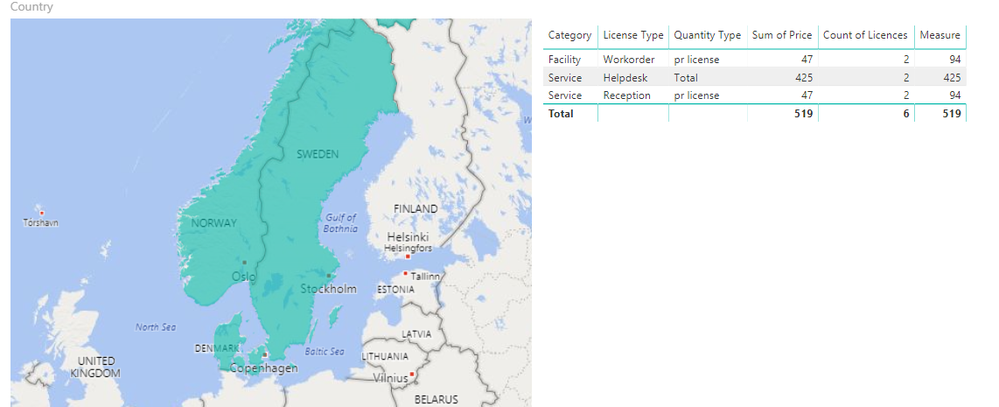
this file has a sheet that alows you to do what you asked click on one of the countrys and the table to the right will show the brakedown of the number of licences by type with a count and a sum of the price based on the quantity type
Proud to be a Super User!
Modify with AnthonyTilley's pbix, create measures instead of calculated columns (columns are static while measures are dynamic)
Count = CALCULATE(DISTINCTCOUNT(Licenses[License Type]),ALLSELECTED(Licenses)) Measure = Var ty = max(Cost[Quantity Type]) var co = count(Licenses[ID]) Var sw = SWITCH(ty,"TOTAL",sum(Cost[Price]),Sum(Cost[Price])*[Count]) Var bl = if(co = blank(),BLANK(),sw) return bl
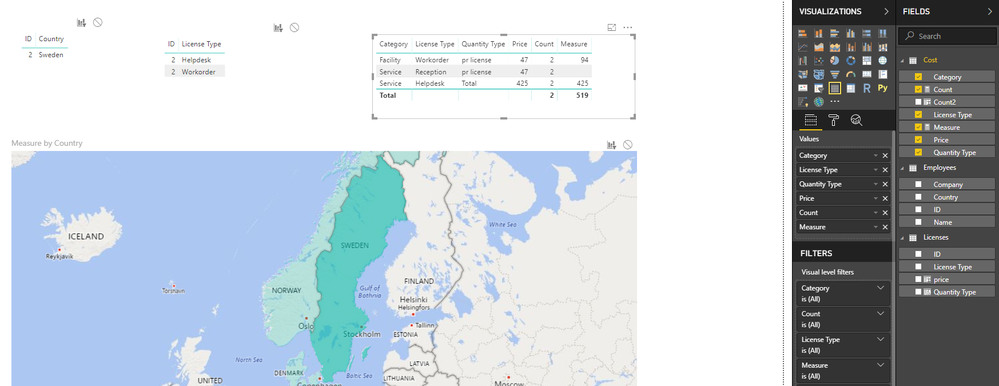
You can add [measure] is not blank in the visual level filter for the table visual, so final result can be
Best Regards
Maggie
Community Support Team _ Maggie Li
If this post helps, then please consider Accept it as the solution to help the other members find it more quickly.
i have created a PBIX file that may be what you want
you dont not want to use a distinct count of the id becuase the id in itself is not unique. just use a count
this file has a sheet that alows you to do what you asked click on one of the countrys and the table to the right will show the brakedown of the number of licences by type with a count and a sum of the price based on the quantity type
Proud to be a Super User!
A new Power BI DataViz World Championship is coming this June! Don't miss out on submitting your entry.
Share feedback directly with Fabric product managers, participate in targeted research studies and influence the Fabric roadmap.
| User | Count |
|---|---|
| 45 | |
| 34 | |
| 27 | |
| 15 | |
| 15 |
| User | Count |
|---|---|
| 58 | |
| 55 | |
| 38 | |
| 21 | |
| 20 |