cancel
Showing results for 
Search instead for 
Did you mean: 

The Power BI Data Visualization World Championships is back! Get ahead of the game and start preparing now! Learn more

Reply
Kirsten22
Regular Visitor

Calculate instalment amounts by each instalment date

Hi,


I am looking to create a measure that would calculate the installment amount each week by account. Below is an example of the data. I need to be able to see when each instalment occurs and the value of the instalment for each account. So account A would have a $5k instalment on 10/08, 10/09, 10/10, and 10/11.


I would like to put the results in a graph that would show the week commencing date on the x-axis and the sum of the total instalments across all accounts for that week as the value.


Does anyone know of a good solution for this?


AccountNumber of InstalmentsInstalment AmountFirst Instalment Date
A4 $                          5,00010/08/2022
B4 $                          2,5004/08/2022
C5 $                          3,00031/07/2022
D3 $                          4,00028/07/2022
E4 $                          5,0001/08/2022
F4 $                          2,5004/08/2022
1 ACCEPTED SOLUTION
Anonymous
Not applicable

Hi @Kirsten22 ,

Eyelyn9_1-1657254286752.png


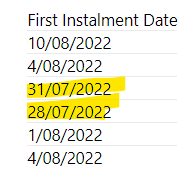
Based on this, the format of date column seems to be dd/mm/yyyy, so for Account A,First Instalment Date=August 10, not October 8 , right?


Please transform the table in Power Query:

let
    Source = Table.FromRows(Json.Document(Binary.Decompress(Binary.FromText("i45WclTSUTIBYgUVBZzAVMfAwACoxtBA38BC38jAyEgpVidayYkIrUY6pmCtJig6nYEipgR0GkMtNTbUNzBHaHUBCRHQagLVamSBotWVFK+iuNeNPJ/GAgA=", BinaryEncoding.Base64), Compression.Deflate)), let _t = ((type nullable text) meta [Serialized.Text = true]) in type table [Account = _t, #"Number of Instalments" = _t, #"Instalment Amount" = _t, #"First Instalment Date" = _t]),
    #"Changed Type" = Table.TransformColumnTypes(Source,{{"Account", type text}, {"Number of Instalments", Int64.Type}, {"Instalment Amount", Currency.Type}, {"First Instalment Date", type text}}),
    #"Changed Type with Locale" = Table.TransformColumnTypes(#"Changed Type", {{"First Instalment Date", type date}}, "en-GB"),
    #"Added Custom" = Table.AddColumn(#"Changed Type with Locale", "Instalment Date", each [
end=Date.AddDays([First Instalment Date],[Number of Instalments]-1),
l={Number.From([First Instalment Date])..Number.From(end)}
][l]),
    #"Expanded Instalment Date" = Table.ExpandListColumn(#"Added Custom", "Instalment Date"),
    #"Changed Type1" = Table.TransformColumnTypes(#"Expanded Instalment Date",{{"Instalment Date", type date}})
in
    #"Changed Type1"

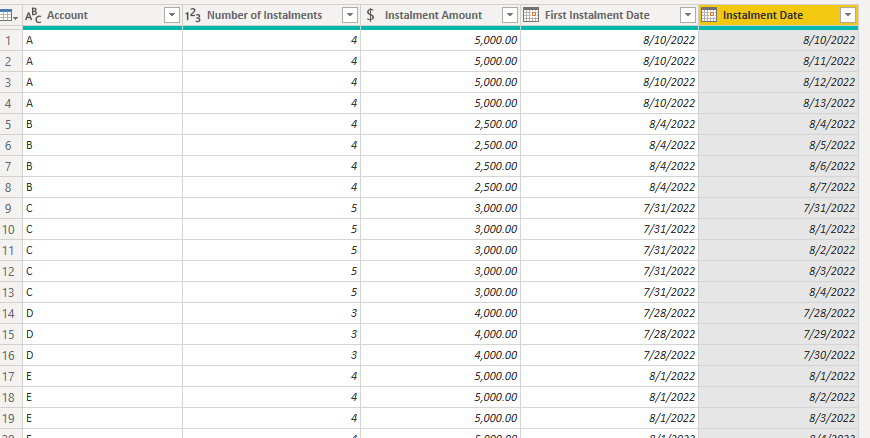
Output:
Eyelyn9_0-1657254070591.png

Best Regards,
Eyelyn Qin
If this post helps, then please consider Accept it as the solution to help the other members find it more quickly.

View solution in original post

2 REPLIES 2
Anonymous
Not applicable

Hi @Kirsten22 ,

Eyelyn9_1-1657254286752.png


Based on this, the format of date column seems to be dd/mm/yyyy, so for Account A,First Instalment Date=August 10, not October 8 , right?


Please transform the table in Power Query:

let
    Source = Table.FromRows(Json.Document(Binary.Decompress(Binary.FromText("i45WclTSUTIBYgUVBZzAVMfAwACoxtBA38BC38jAyEgpVidayYkIrUY6pmCtJig6nYEipgR0GkMtNTbUNzBHaHUBCRHQagLVamSBotWVFK+iuNeNPJ/GAgA=", BinaryEncoding.Base64), Compression.Deflate)), let _t = ((type nullable text) meta [Serialized.Text = true]) in type table [Account = _t, #"Number of Instalments" = _t, #"Instalment Amount" = _t, #"First Instalment Date" = _t]),
    #"Changed Type" = Table.TransformColumnTypes(Source,{{"Account", type text}, {"Number of Instalments", Int64.Type}, {"Instalment Amount", Currency.Type}, {"First Instalment Date", type text}}),
    #"Changed Type with Locale" = Table.TransformColumnTypes(#"Changed Type", {{"First Instalment Date", type date}}, "en-GB"),
    #"Added Custom" = Table.AddColumn(#"Changed Type with Locale", "Instalment Date", each [
end=Date.AddDays([First Instalment Date],[Number of Instalments]-1),
l={Number.From([First Instalment Date])..Number.From(end)}
][l]),
    #"Expanded Instalment Date" = Table.ExpandListColumn(#"Added Custom", "Instalment Date"),
    #"Changed Type1" = Table.TransformColumnTypes(#"Expanded Instalment Date",{{"Instalment Date", type date}})
in
    #"Changed Type1"

Output:

Eyelyn9_0-1657254070591.png

Best Regards,
Eyelyn Qin
If this post helps, then please consider Accept it as the solution to help the other members find it more quickly.

amitchandak
Super User
Super User

@Kirsten22 , In case this is a month , then generate end date

end date = date(year([First Instalment Date]), month([First Instalment Date]) +[Number of Instalments], Day([First Instalment Date]) )


Then you use the attached file or blog - https://community.powerbi.com/t5/Community-Blog/How-to-divide-distribute-values-between-start-date-o...


Not if they days 7, week. Then use the power query solution in blog - Duration -7 Days and not need of date diff you already have a number of installment

example : List.Dates([First Instalment Date], [Number of Instalments] ,#duration(7,0,0,0) ) 

https://medium.com/@amitchandak/power-query-get-all-dates-between-the-start-and-end-date-9ad6a84cf5f...


Share with Power BI Enthusiasts: Full Power BI Video (20 Hours) YouTube
Microsoft Fabric Series 60+ Videos YouTube
Microsoft Fabric Hindi End to End YouTube

Helpful resources

Announcements
Power BI DataViz World Championships

Power BI Dataviz World Championships

The Power BI Data Visualization World Championships is back! Get ahead of the game and start preparing now!

December 2025 Power BI Update Carousel

Power BI Monthly Update - December 2025

Check out the December 2025 Power BI Holiday Recap!

FabCon Atlanta 2026 carousel

FabCon Atlanta 2026

Join us at FabCon Atlanta, March 16-20, for the ultimate Fabric, Power BI, AI and SQL community-led event. Save $200 with code FABCOMM.