This is best Fabric, Power BI, SQL and AI community event. How do we know? The last event sold out! Save €200 with code FABCMTY200.
Register nowA new Data Days event is coming soon! This time we’re going bigger than ever. Fabric, Power BI, SQL, AI and more. Don't miss out.
Hi everyone,
Can you please help me to check why this Calculate function went wrong:
Week Amount = CALCULATE(sum(Merge[TotalAmount]),filter('Merge',Merge[YearWeeknum of PurchaseDay]))
Type = if([Week Amount]>9000,"high",if([Week Amount]>3000,"medium",if([Week Amount]>10,"low")))
Low = CALCULATE(counta(Merge[ID]),filter('Merge',[Type]="low"))
There are only 4 "low" in the measure "Type" but when in card visual, it shows there are 241 "low".
Please check the data here: test
One more question, is there anyway to make "Type" able to slicer visual?
I look forward to learning from you.
Many thanks and regards,
Cindy
Once again I am back to provide you a solution.
Instead of calculating using DAX, this time again Query Editor was handy to use.
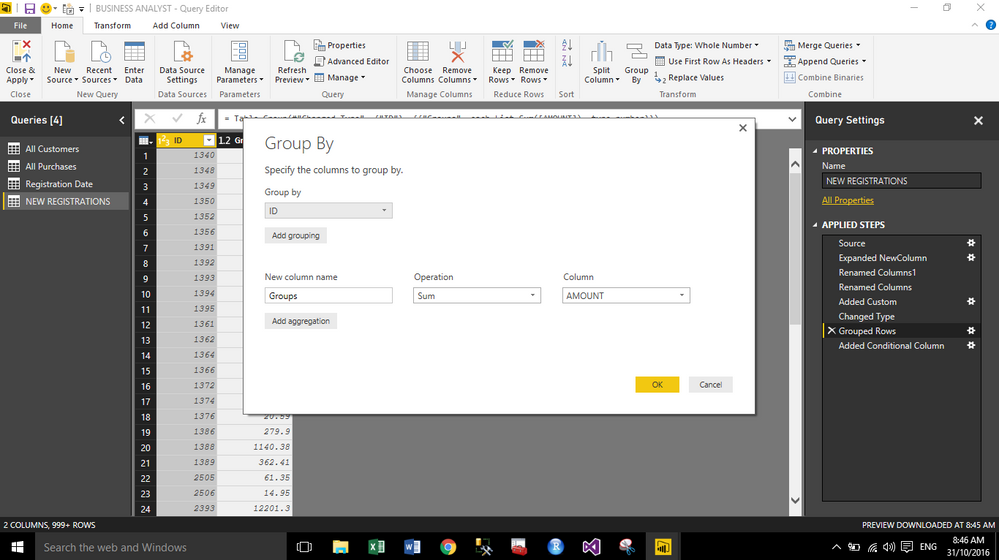
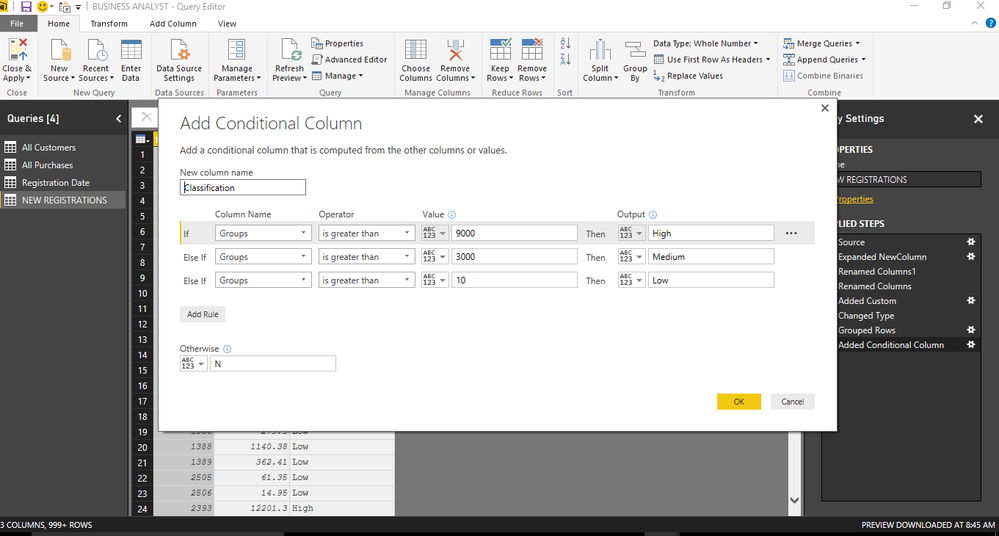
I have grouped the amount by IDs and then created a conditional column to achieve results. You can also use classification column as slicer( High, Medium, Low). Please see the screenshots.
GROUPBY
CONDITIONAL COLUMN
Since you need to get the count of the ID baesd on the Week Amount calculation aggregated on ID, Week Number and Week Number of Registration, you should have this calculation group on ID, Week Number and Week Number of Registration. In this scenario, you calculation aggregate on incorrect level so that ID will be count multiple times within current context scope.
Please change your Week Amount measure:
Week Amount = CALCULATE(sum(Merge[TotalAmount]),ALLEXCEPT(Merge,Merge[ID],Merge[Week number],Merge[Week Number of Registration]))
Also you need to distinctcount your ID:
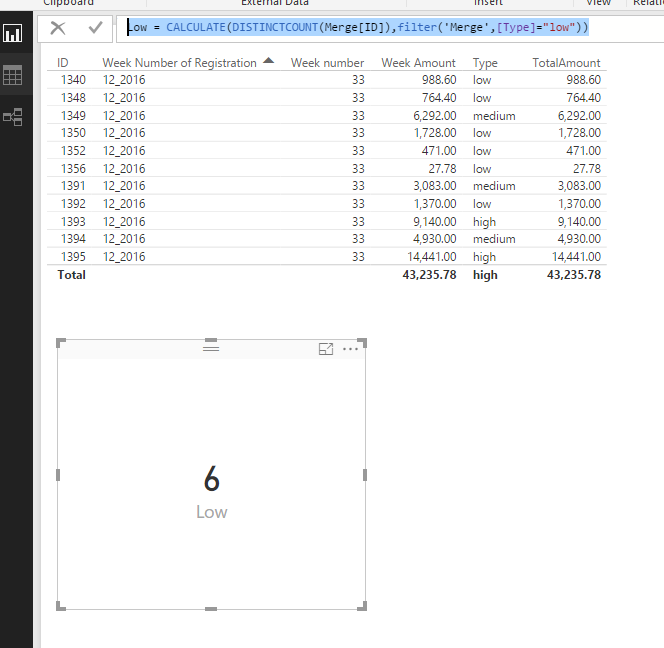
Low = CALCULATE(DISTINCTCOUNT(Merge[ID]),filter('Merge',[Type]="low"))
if you put total amount in the table you'll see the 241 rows.
the measure sales amount is suming the rows with equal id and weeknumber.
Check out the May 2026 Power BI update to learn about new features.
Sign up to receive a private message when registration opens and key events begin.
If you have recently started exploring Fabric, we'd love to hear how it's going. Your feedback can help with product improvements.
| User | Count |
|---|---|
| 32 | |
| 25 | |
| 24 | |
| 22 | |
| 13 |
| User | Count |
|---|---|
| 61 | |
| 47 | |
| 27 | |
| 24 | |
| 19 |