FabCon is coming to Atlanta
Join us at FabCon Atlanta from March 16 - 20, 2026, for the ultimate Fabric, Power BI, AI and SQL community-led event. Save $200 with code FABCOMM.
Register now!- Power BI forums
- Get Help with Power BI
- Desktop
- Service
- Report Server
- Power Query
- Mobile Apps
- Developer
- DAX Commands and Tips
- Custom Visuals Development Discussion
- Health and Life Sciences
- Power BI Spanish forums
- Translated Spanish Desktop
- Training and Consulting
- Instructor Led Training
- Dashboard in a Day for Women, by Women
- Galleries
- Data Stories Gallery
- Themes Gallery
- Contests Gallery
- QuickViz Gallery
- Quick Measures Gallery
- Visual Calculations Gallery
- Notebook Gallery
- Translytical Task Flow Gallery
- TMDL Gallery
- R Script Showcase
- Webinars and Video Gallery
- Ideas
- Custom Visuals Ideas (read-only)
- Issues
- Issues
- Events
- Upcoming Events
Get Fabric Certified for FREE during Fabric Data Days. Don't miss your chance! Request now
- Power BI forums
- Forums
- Get Help with Power BI
- Desktop
- Re: Calculate dynamic average age by cuttoff date
- Subscribe to RSS Feed
- Mark Topic as New
- Mark Topic as Read
- Float this Topic for Current User
- Bookmark
- Subscribe
- Printer Friendly Page


- Mark as New
- Bookmark
- Subscribe
- Mute
- Subscribe to RSS Feed
- Permalink
- Report Inappropriate Content
Calculate dynamic average age by cuttoff date
Hello,
Thanks everyone for taking time to read my post and especially to those who are trying to provide any solution!!
Please find the pbix file here: https://drive.google.com/open?id=1EDgaPSgfhTQaQBZcWkIAkJfP5pMS0njz
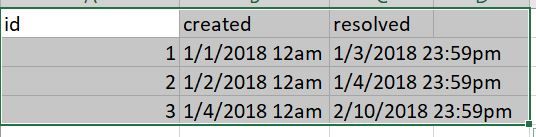
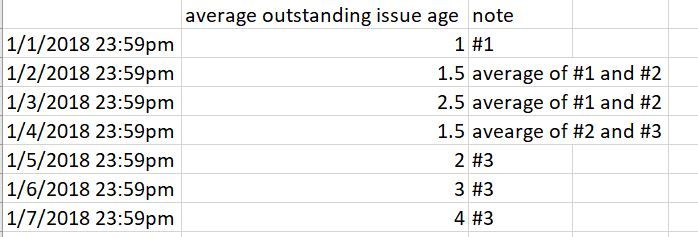
I want to calculate the dynamic average age of outstanding issues based on cutt off date.
outstanding issues are those issues whoese resolved date is after cutt off date.
issue age = [cutt off date] -[created]
The result table is expected to be like this:
Below measure is not working.
average outstanding age = CALCULATE(AVERAGEX(FILTER(ids,FORMAT(ids[created],"yyyy-mm-dd")<FORMAT(MAX(Dates[date]),"yyyy-mm-dd")&&FORMAT(ids[resolved],"yyyy-mm-yy")>FORMAT(MAX(Dates[date]),"yyyy-mm-dd")),DATEDIFF(ids[created],MAX(Dates[date]),DAY)))
Solved! Go to Solution.


- Mark as New
- Bookmark
- Subscribe
- Mute
- Subscribe to RSS Feed
- Permalink
- Report Inappropriate Content
Hi zxl1031,
The return value of "Format" function is text type, so you can't use "Format" function, you should modify your date like pattern
yyyy\MM\dd HH:mm:ss
And then click Modeling-> Date type to change text type to datetime.
Regards,
Jimmy Tao
- Mark as New
- Bookmark
- Subscribe
- Mute
- Subscribe to RSS Feed
- Permalink
- Report Inappropriate Content
Hi zxl1031,
You should convert column [resolved ] to from text type to date type than use the comparisation condition if your filter. Please check if it can solve your issue.
Regards,
Jimmy Tao
- Mark as New
- Bookmark
- Subscribe
- Mute
- Subscribe to RSS Feed
- Permalink
- Report Inappropriate Content
Hi Jimmy,
Yes, I have converted the format of "resolve" column. But not working.
average outstanding age = CALCULATE(AVERAGEX(FILTER(ids,FORMAT(ids[created],"yyyy-mm-dd")<FORMAT(MAX(Dates[date]),"yyyy-mm-dd")&&FORMAT(ids[resolved],"yyyy-mm-yy")>FORMAT(MAX(Dates[date]),"yyyy-mm-dd")),DATEDIFF(ids[created],MAX(Dates[date]),DAY)))
Sorry about the typo in the above measure. It is:
average outstanding age = CALCULATE(AVERAGEX(FILTER(ids,FORMAT(ids[created],"yyyy-mm-dd")<FORMAT(MAX(Dates[date]),"yyyy-mm-dd")&&FORMAT(ids[resolved],"yyyy-mm-dd")>FORMAT(MAX(Dates[date]),"yyyy-mm-dd")),DATEDIFF(ids[created],MAX(Dates[date]),DAY)))
- Mark as New
- Bookmark
- Subscribe
- Mute
- Subscribe to RSS Feed
- Permalink
- Report Inappropriate Content
Hi zxl1031,
The return value of "Format" function is text type, so you can't use "Format" function, you should modify your date like pattern
yyyy\MM\dd HH:mm:ss
And then click Modeling-> Date type to change text type to datetime.
Regards,
Jimmy Tao


- Mark as New
- Bookmark
- Subscribe
- Mute
- Subscribe to RSS Feed
- Permalink
- Report Inappropriate Content
Year-month-year makes no sense...
- Mark as New
- Bookmark
- Subscribe
- Mute
- Subscribe to RSS Feed
- Permalink
- Report Inappropriate Content
sorry for the typo....
- Mark as New
- Bookmark
- Subscribe
- Mute
- Subscribe to RSS Feed
- Permalink
- Report Inappropriate Content
How is the user selecting a cutoff date?
- Mark as New
- Bookmark
- Subscribe
- Mute
- Subscribe to RSS Feed
- Permalink
- Report Inappropriate Content
Another date table was created for that.

Helpful resources

Power BI Monthly Update - November 2025
Check out the November 2025 Power BI update to learn about new features.

Fabric Data Days
Advance your Data & AI career with 50 days of live learning, contests, hands-on challenges, study groups & certifications and more!

FabCon Atlanta 2026
Join us at FabCon Atlanta, March 16-20, for the ultimate Fabric, Power BI, AI and SQL community-led event. Save $200 with code FABCOMM.


