cancel
Showing results for 
Search instead for 
Did you mean: 

The Power BI Data Visualization World Championships is back! Get ahead of the game and start preparing now! Learn more

Reply
MahaAli_00
New Member

Calculate distinct count with accurate sum

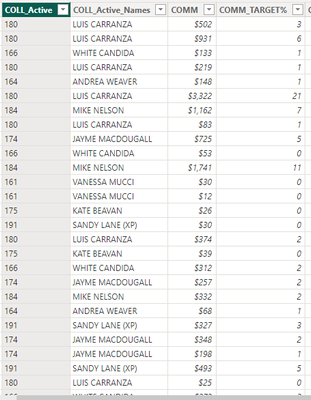
MahaAli_00_0-1696608985957.png

Hi I want to calculate the distinct count of column "COLL_ACTIVE" which filters out the total "COMM_TARGET%" witha a range but I am getting wrong values I have used multiple Measure to calculate this what I am using right now is 

50%-69.9%(Q) = CALCULATE(DISTINCTCOUNTNOBLANK(MainList[COLL_Active]),FILTER(MainList,MainList[COMM_T%]>=50 && MainList[COMM_T%]<=69.9))+0

'Mainlist' is the table name "COMM_T" it is returning me blank but I have COLL_ACTIVE that has total of more than 50, how should I do it please help 

1 ACCEPTED SOLUTION
Anonymous
Not applicable

Hi @MahaAli_00 ,


What's the difference between [COMM_T%] and [COMM_TARGET%]? Based on my understanding, [COMM_TARGET%] is a column.

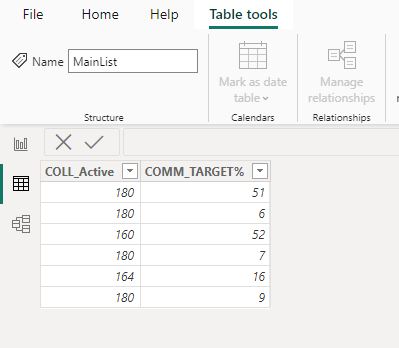
To find out a possible solution, I created sample data and a measure. Please refer to

vstephenmsft_1-1696929512032.png

Measure = CALCULATE(DISTINCTCOUNT('MainList'[COLL_Active]),FILTER('MainList',[COMM_TARGET%]>=50&&[COMM_TARGET%]<=69.9))

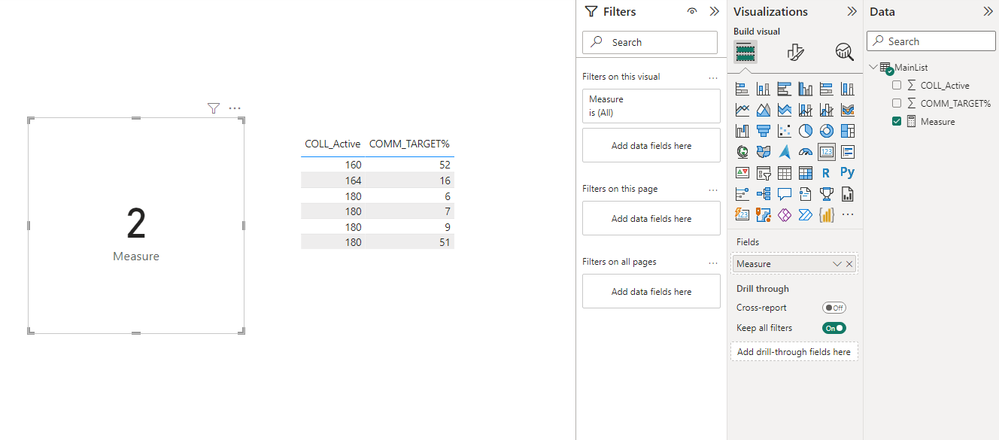
The measure in the card visual:

vstephenmsft_2-1696929545757.png

Best Regards,

Stephen Tao


If this post helps, then please consider Accept it as the solution to help the other members find it more quickly.           

View solution in original post

2 REPLIES 2
Anonymous
Not applicable

Hi @MahaAli_00 ,


What's the difference between [COMM_T%] and [COMM_TARGET%]? Based on my understanding, [COMM_TARGET%] is a column.

To find out a possible solution, I created sample data and a measure. Please refer to

vstephenmsft_1-1696929512032.png

Measure = CALCULATE(DISTINCTCOUNT('MainList'[COLL_Active]),FILTER('MainList',[COMM_TARGET%]>=50&&[COMM_TARGET%]<=69.9))

The measure in the card visual:

vstephenmsft_2-1696929545757.png

Best Regards,

Stephen Tao


If this post helps, then please consider Accept it as the solution to help the other members find it more quickly.           

pradeep_kare12
Resolver I
Resolver I

@MahaAli_00  try this dax function 


DebugTable =
SUMMARIZECOLUMNS (MainList[COMM_T%],
"Distinct Count", DISTINCTCOUNTNOBLANK(MainList[COLL_Active])
)

Helpful resources

Announcements
Power BI DataViz World Championships

Power BI Dataviz World Championships

The Power BI Data Visualization World Championships is back! Get ahead of the game and start preparing now!

November Power BI Update Carousel

Power BI Monthly Update - November 2025

Check out the November 2025 Power BI update to learn about new features.

FabCon Atlanta 2026 carousel

FabCon Atlanta 2026

Join us at FabCon Atlanta, March 16-20, for the ultimate Fabric, Power BI, AI and SQL community-led event. Save $200 with code FABCOMM.