Join us at FabCon Atlanta from March 16 - 20, 2026, for the ultimate Fabric, Power BI, AI and SQL community-led event. Save $200 with code FABCOMM.
Register now!Get Fabric Certified for FREE during Fabric Data Days. Don't miss your chance! Request now
Hi guys,
I need help to obtain this table (my goal is to calculate the column % difference):
| 14/04/2022 | 14/04/2023 | % difference | |
| Budget | 1000000 | 1100000 | 9% |
| Assegnato | 750000 | 700000 | -7% |
| Impegnato | 300000 | 350000 | 14% |
My problem is that in the original table i have data in this format:
| Category | Value | Date |
| Budget | 1000000 | 14/04/2022 |
| Assegnato | 750000 | 14/04/2022 |
| Impegnato | 300000 | 14/04/2022 |
| Budget | 1100000 | 14/04/2023 |
| Assegnato | 700000 | 14/04/2023 |
| Impegnato | 350000 | 14/04/2023 |
I create a data model that allow my user to select a Month (in this case April) and I can automatically filter my datatable with two set of data from April 2023 and the same date in 2022.
So how can I reference in a new measure to the date that will be generated by slicer when I select a month?
Tks in advance,
M
@MattiaMaetini Try something like:
Measure =
VAR __Category = MAX('Table'[Category])
VAR __Value = MAX('Table'[Value])
VAR __Date = MAX('Table'[Date])
VAR __LYDate = DATE(YEAR(__Date) - 1, MONTH(__Date), DAY(__Date))
VAR __LYValue = MAXX(FILTER('Table', [Category] = __Category && [Date] = __LYDate), [Value])
VAR __Result = DIVIDE( __Value - __LYValue), __LYValue)
RETURN
__Result
@Greg_Deckler two questions:
1) formula for calculate date couldn't work 'cause the two dates not necessary refer to the same day: I have a table where I stored these informations (for every month i create two record, one for every year):
| Date | Month | Month_Label |
| 14/04/2022 | 4 | April |
| 14/04/2023 | 4 | April |
2) MAX(Category) could work only for one Category, I need to iterate for all values in order to obtain my goal
Tks
@MattiaMaetini I was guessing that you were going to have Category in some sort of visual. Is that not the case? If not, are you creating a calculated table or ??? If you are creating a calculated table, you might be able to do this with a bit of modification to the below measure like replacing the first few MAX with MAXX( __Table, [Category]), MAXX(__Table, [Value]), etc.
Caculted Table =
VAR __Table =
ADDCOLUMNS(
SUMMARIZE(
'Table',
[Category],
[Date],
"Value", SUM('Table'[Value])
),
"__Percent", [Measure]
)
RETURN
__Table
Now that you have let me know about an additional table you can do this:
Measure =
VAR __Category = MAX('Table'[Category])
VAR __Value = MAX('Table'[Value])
VAR __Date = MAX('Table'[Date])
VAR __LYDate =
MAXX(
FILTER(
'DatesTable',
YEAR([Date]) = YEAR(__Date) - 1 &&
[Month] = MONTH(__Date)
),
[Date]
)
VAR __LYValue = MAXX(FILTER('Table', [Category] = __Category && [Date] = __LYDate), [Value])
VAR __Result = DIVIDE( __Value - __LYValue), __LYValue)
RETURN
__Result
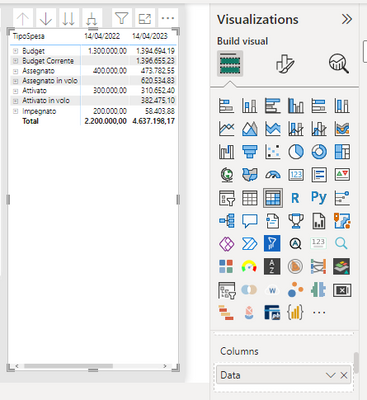
@Greg_Deckler I have Category in my visual, but how you can see in the screenshot I have two date filtered by only one column in original table (column name is Data).
I need to refer to these two date, for each Category, and calculate percentage difference.
Tks,
Check out the November 2025 Power BI update to learn about new features.
Advance your Data & AI career with 50 days of live learning, contests, hands-on challenges, study groups & certifications and more!