Don't miss your chance to take the Fabric Data Engineer (DP-600) exam for FREE! Find out how by watching the DP-600 session on-demand now through April 28th.
Learn moreJoin the FabCon + SQLCon recap series. Up next: Power BI, Real-Time Intelligence, IQ and AI, and Data Factory take center stage. All sessions are available on-demand after the live show. Register now
This is how I got my working days calculations
I added the working days calculations to a "date" table in my Power BI workbook. However, I do not understand how to use the working days column I now have to determine the difference between two dates.
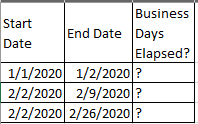
Here's my table:
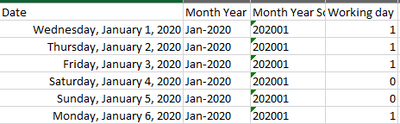
Here's an example of my Date table:
Since I know the working days (by 1) and the non-working days (0), how can I add another column or a measure (Business Days Elapsed) to see how many working days is between start date and end date? I do not understand this part.
Solved! Go to Solution.
@Anonymous
You could use this code:
WorkingDaysDiff =
VAR BlankDate = ISBLANK(Weekday5[Start Date]) || ISBLANK(Weekday5[End Date])
RETURN
IF(BlankDate, 0,
CALCULATE(
COUNTROWS ( 'Calendar'),
DATESBETWEEN ( 'Calendar'[Date], 'Weekday5'[Start Date], 'Weekday5'[End Date] ),
'Calendar'["IsWorkingDay"] = TRUE,
ALL ( 'Weekday5' )
)
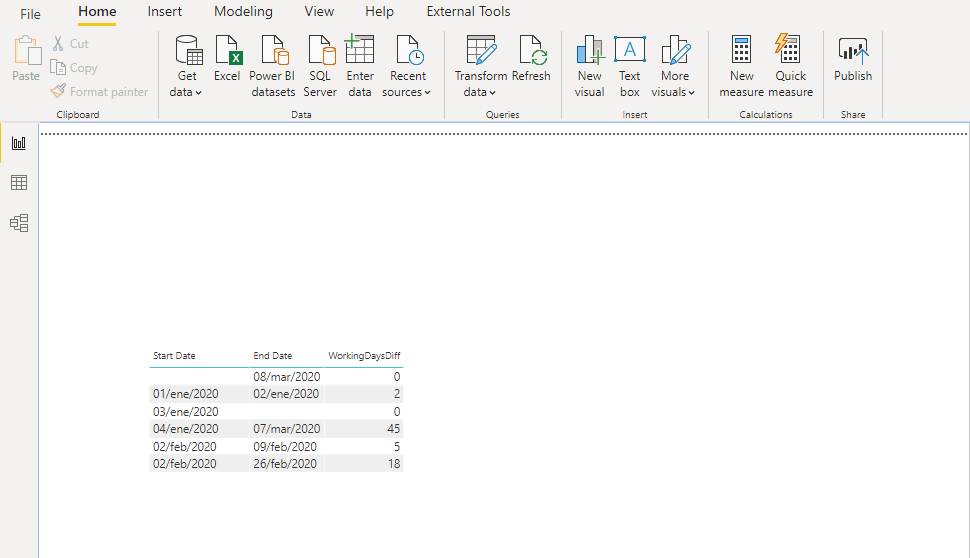
)And you'll get this result:
Hope it helps.
Regards,
Fernando
P.S. If it helped, please consider liking the post and marking it as an answer.
@Anonymous
Try this measure: make sure you change the Table/column names as per your table
Hi @Anonymous ,
It's time for you to start your long journey to meet the great SQLBI guys here.
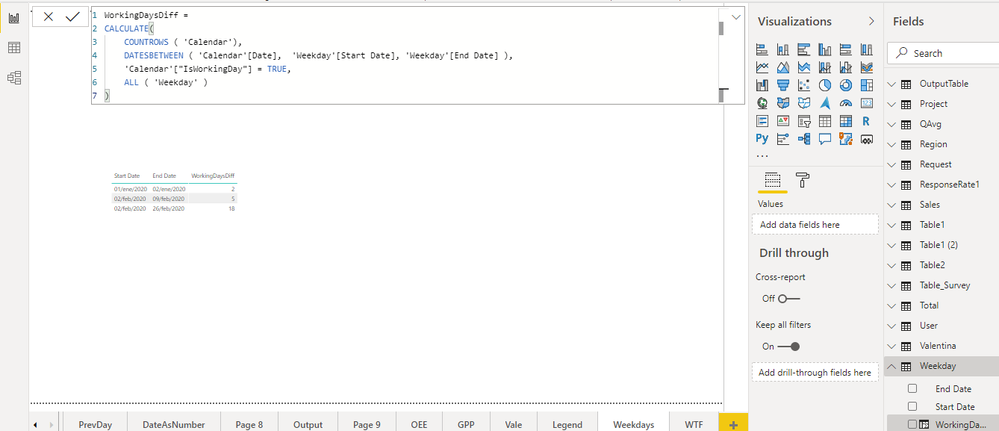
Use this code in a new column in your table:
WorkingDaysDiff =
CALCULATE(
COUNTROWS ( 'Calendar'),
DATESBETWEEN ( 'Calendar'[Date], 'Weekday'[Start Date], 'Weekday'[End Date] ),
'Calendar'["IsWorkingDay"] = TRUE,
ALL ( 'Weekday' )
)You get this:
Regards,
Fernando
@calerof Thank you. This solution worked, but I see one error. If there is no date for either the Weekday[Start Date] or Weekday[End Date], such as if we have no data for the order dates, it sets WorkingDaysDiff to the maximum possible days in the calendar. Since mine goes back 2 years, I have thousands of rows set to 783 now.
How can I default them to 0 if there's no data present?
@Anonymous
You could use this code:
WorkingDaysDiff =
VAR BlankDate = ISBLANK(Weekday5[Start Date]) || ISBLANK(Weekday5[End Date])
RETURN
IF(BlankDate, 0,
CALCULATE(
COUNTROWS ( 'Calendar'),
DATESBETWEEN ( 'Calendar'[Date], 'Weekday5'[Start Date], 'Weekday5'[End Date] ),
'Calendar'["IsWorkingDay"] = TRUE,
ALL ( 'Weekday5' )
)
)And you'll get this result:
Hope it helps.
Regards,
Fernando
P.S. If it helped, please consider liking the post and marking it as an answer.
Check out the April 2026 Power BI update to learn about new features.
If you have recently started exploring Fabric, we'd love to hear how it's going. Your feedback can help with product improvements.
A new Power BI DataViz World Championship is coming this June! Don't miss out on submitting your entry.
| User | Count |
|---|---|
| 45 | |
| 38 | |
| 34 | |
| 21 | |
| 17 |
| User | Count |
|---|---|
| 65 | |
| 62 | |
| 31 | |
| 26 | |
| 25 |