Share feedback directly with Fabric product managers, participate in targeted research studies and influence the Fabric roadmap.
Sign up nowGet Fabric certified for FREE! Don't miss your chance! Learn more
Hi,
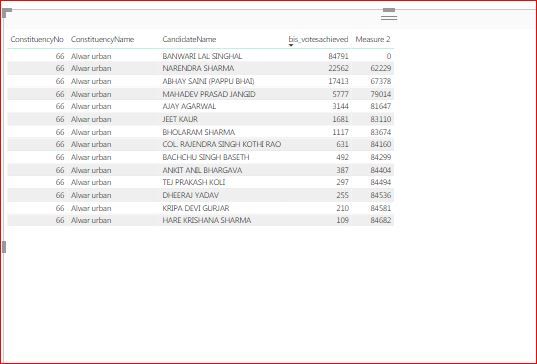
I need to calculate difference between rows based on max value for that column in a specific area.
I can calculate difference between rows based on max value for that column (votes achieved) but not on specific area(constituency name). I have used below forumla for same.
Measure 2 = CALCULATE(MAX(bis_candidates[bis_votesachieved]), ALLSELECTED(bis_candidates)) - MAX(bis_candidates[bis_votesachieved])
How can I calculate difference based on area in whole table.
PFA.
Please help.
Solved! Go to Solution.
Hi @Anu
Try this MEASURE
Measure =
VAR Max4Constituency =
CALCULATE (
MAX ( bis_candidates[bis_votesachieved] ),
ALLEXCEPT ( bis_candidates, bis_candidates[ConstituencyName] )
)
RETURN
Max4Constituency - SELECTEDVALUE ( bis_candidates[bis_votesachieved] )
Yes I believe this feature doesn't exist currently. But hopefully soon it will be available. Each month new updates are released
You can support this idea by VOTING for it
BOOKs provide an organized source of LEARNING. I have all these books ![]()
Learn to Write DAX: A practical guide to learning Power Pivot for Excel and Power BI
Hi @Anu
Try this MEASURE
Measure =
VAR Max4Constituency =
CALCULATE (
MAX ( bis_candidates[bis_votesachieved] ),
ALLEXCEPT ( bis_candidates, bis_candidates[ConstituencyName] )
)
RETURN
Max4Constituency - SELECTEDVALUE ( bis_candidates[bis_votesachieved] )
Thanks @Zubair_Muhammad It worked.! ![]()
I need to further do ascending sorting on consituency no. and descending sorting on votes achieved. I researched and found that multiple sorting on columns can't be applied in power BI table. Is it so?
I am new to Power BI. Can you suggest from where should I learn making formula like these?
Have a great day!
Yes I believe this feature doesn't exist currently. But hopefully soon it will be available. Each month new updates are released
You can support this idea by VOTING for it
BOOKs provide an organized source of LEARNING. I have all these books ![]()
Learn to Write DAX: A practical guide to learning Power Pivot for Excel and Power BI
If you love stickers, then you will definitely want to check out our Community Sticker Challenge!
Check out the January 2026 Power BI update to learn about new features.
| User | Count |
|---|---|
| 62 | |
| 61 | |
| 41 | |
| 21 | |
| 18 |
| User | Count |
|---|---|
| 122 | |
| 117 | |
| 37 | |
| 34 | |
| 30 |