Join us at FabCon Atlanta from March 16 - 20, 2026, for the ultimate Fabric, Power BI, AI and SQL community-led event. Save $200 with code FABCOMM.
Register now!Get Fabric Certified for FREE during Fabric Data Days. Don't miss your chance! Request now
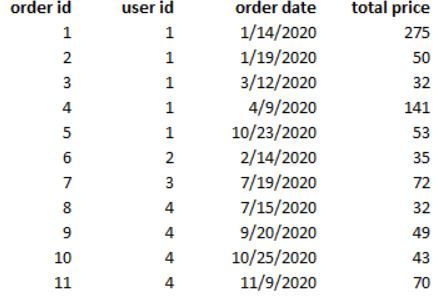
How can I calculate the number of days between order n and order n+1 for each customer in Power BI?
I want to show and analyze the timespan*(in the day)* between first and second, second and third, etc orders.
Solved! Go to Solution.
Hi @KiKa ,
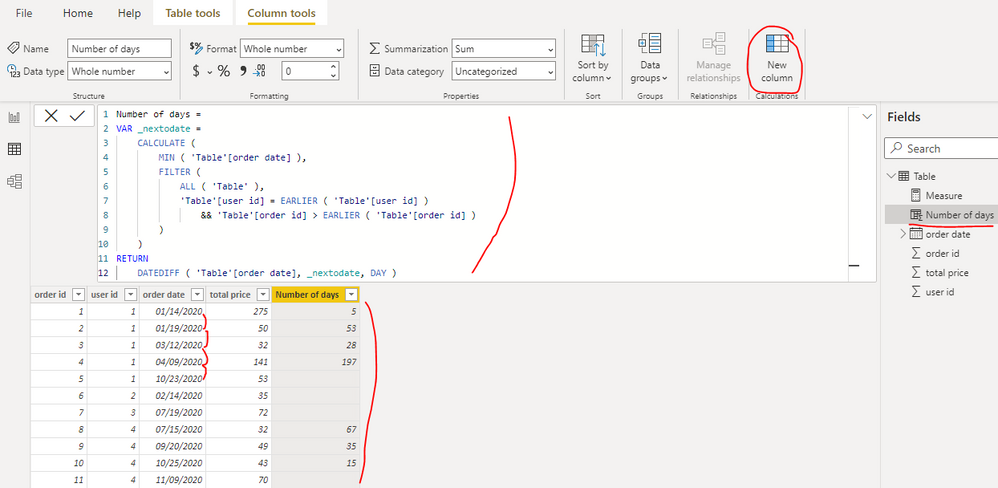
You can create a calculated column as below to get it:
Number of days =
VAR _nextodate =
CALCULATE (
MIN ( 'Table'[order date] ),
FILTER (
ALL ( 'Table' ),
'Table'[user id] = EARLIER ( 'Table'[user id] )
&& 'Table'[order id] > EARLIER ( 'Table'[order id] )
)
)
RETURN
DATEDIFF ( 'Table'[order date], _nextodate, DAY )
Best Regards
Hi @KiKa ,
You can create a calculated column as below to get it:
Number of days =
VAR _nextodate =
CALCULATE (
MIN ( 'Table'[order date] ),
FILTER (
ALL ( 'Table' ),
'Table'[user id] = EARLIER ( 'Table'[user id] )
&& 'Table'[order id] > EARLIER ( 'Table'[order id] )
)
)
RETURN
DATEDIFF ( 'Table'[order date], _nextodate, DAY )
Best Regards
@KiKa , Try a new column like
New column =
var _max = maxx(filter(Table, [User Id] =earlier([User Id]) && [Order Id] < earlier([Order Id]) ),[Order ID])
return
datediff([order Date] , maxx(filter(Table, [User Id] =earlier([User Id]) && [Order Id]= _max ),[Order Date]) , Day)+1
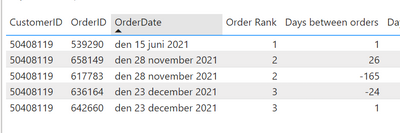
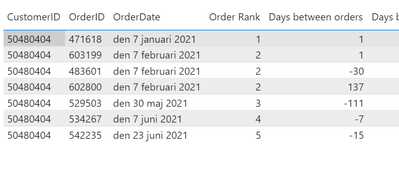
Hey! I used your proposed solution above to solve a similar problem. However, the formula seems to struggle whenever the second order is in a new year or whenever a customer has placed two orders at the same day (see below example). In those cases it turns out negative.
this is how the formula looks like with my data
Check out the November 2025 Power BI update to learn about new features.
Advance your Data & AI career with 50 days of live learning, contests, hands-on challenges, study groups & certifications and more!