Share feedback directly with Fabric product managers, participate in targeted research studies and influence the Fabric roadmap.
Sign up nowGet Fabric certified for FREE! Don't miss your chance! Learn more
Hi I need help with the following calculation:
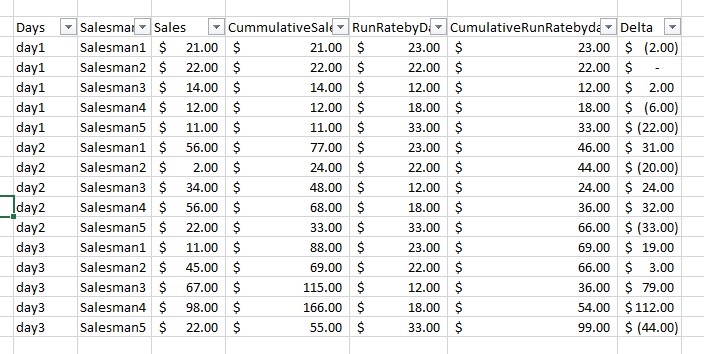
Based on the table below, I need to calculate the cummulative sum for each salesman based on the date as it shows in the "CummulativeRunRate" coulmn. A start date needs to be define and the numbers of days of the fiscal month. Also create the Delta column.
thanks,
Reggie
Solved! Go to Solution.
How do you want to create your fiscal calendar?
I assume you already have a Calendar date in your table, then you can create a fiscal month column like:
Fiscal Month = IF(MONTH('Table'[Date])-MONTH(NOW())<=0,MONTH(NOW())-MONTH('Table'[Date])+1,MONTH(NOW())-MONTH('Table'[Date])+13)
Then generate a Fiscal Year column like:
Fiscal Year =
IF (
Table[Fiscal Month] < MONTH ( Table[Date] ),
YEAR ( Table[Date] ),
YEAR ( Table[Date] ) + 1
)
You can still keep the Day part from Calendar Date.
To calculate the cumulative date, you can create column like below:
Cumulative Total =
CALCULATE (
SUM ( Table[Sales] ),
FILTER (
Table,
Table[Fiscal Year] = EARLIER ( Table[Fiscal Year] )
&& Table[Fiscal Month] = EARLIER ( Table[Fiscal Month] )
&& Table[Day] <= EARLIER ( Table[Day] )
&& Table[SalesMan] = EARLIER ( Table[SalesMan] )
)
)
Regards,
How do you want to create your fiscal calendar?
I assume you already have a Calendar date in your table, then you can create a fiscal month column like:
Fiscal Month = IF(MONTH('Table'[Date])-MONTH(NOW())<=0,MONTH(NOW())-MONTH('Table'[Date])+1,MONTH(NOW())-MONTH('Table'[Date])+13)
Then generate a Fiscal Year column like:
Fiscal Year =
IF (
Table[Fiscal Month] < MONTH ( Table[Date] ),
YEAR ( Table[Date] ),
YEAR ( Table[Date] ) + 1
)
You can still keep the Day part from Calendar Date.
To calculate the cumulative date, you can create column like below:
Cumulative Total =
CALCULATE (
SUM ( Table[Sales] ),
FILTER (
Table,
Table[Fiscal Year] = EARLIER ( Table[Fiscal Year] )
&& Table[Fiscal Month] = EARLIER ( Table[Fiscal Month] )
&& Table[Day] <= EARLIER ( Table[Day] )
&& Table[SalesMan] = EARLIER ( Table[SalesMan] )
)
)
Regards,
If you love stickers, then you will definitely want to check out our Community Sticker Challenge!
Check out the January 2026 Power BI update to learn about new features.
| User | Count |
|---|---|
| 64 | |
| 63 | |
| 49 | |
| 21 | |
| 18 |
| User | Count |
|---|---|
| 122 | |
| 120 | |
| 38 | |
| 36 | |
| 29 |