cancel
Showing results for 
Search instead for 
Did you mean: 

Level up your Power BI skills this month - build one visual each week and tell better stories with data! Get started

Reply
taher
Helper II
Helper II

Calculate count of column values where ( count (another_column) = 2)

Hi all,


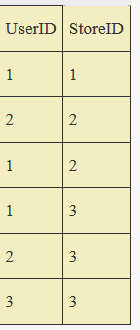
I have this sample table:

table.PNG

 I want to calculate the count of users, which have two different stores . I use direct query, so i can not use summerize or groub by.
I've tried this code but it needs a shot, which i can not find.

Count of users with two stores = CALCULATE(DISTINCTCOUNT('table'[UserId]);FILTER(ALLSELECTED(table'[UserId]);DISTINCTCOUNT('table'[Store])=2))

Could someone help me please 🙂
Taher


2 ACCEPTED SOLUTIONS
Zubair_Muhammad
Community Champion
Community Champion

@taher


Try this MEASURE


Measure =
COUNTROWS (
    FILTER (
        SUMMARIZE (
            'Table',
            'Table'[UserID],
            "Count", DISTINCTCOUNT ( 'Table'[StoreID] )
        ),
        [Count] = 2
    )
)

View solution in original post

@taher


Sorry I didn't read you can't use summarize


Try this


Measure 2 =
COUNTX (
    FILTER (
        ALL ( 'Table'[UserID] ),
        CALCULATE ( DISTINCTCOUNT ( 'Table'[StoreID] ) ) = 2
    ),
    CALCULATE ( DISTINCTCOUNT ( 'Table'[StoreID] ) )
)

View solution in original post

4 REPLIES 4
Zubair_Muhammad
Community Champion
Community Champion

@taher


Try this MEASURE


Measure =
COUNTROWS (
    FILTER (
        SUMMARIZE (
            'Table',
            'Table'[UserID],
            "Count", DISTINCTCOUNT ( 'Table'[StoreID] )
        ),
        [Count] = 2
    )
)

Hi @Zubair_Muhammad,


thank u very much.  You have really saved me with this measure 🙂
The measure with SUMMERIZE WORKED WELL ( I DONT KNOW HOW WITH DIRECT QUERY !!).

I'll try the second measure as well.
I'm very gratefull, thnx a lot 🙂
Taher

@taher


Sorry I didn't read you can't use summarize


Try this


Measure 2 =
COUNTX (
    FILTER (
        ALL ( 'Table'[UserID] ),
        CALCULATE ( DISTINCTCOUNT ( 'Table'[StoreID] ) ) = 2
    ),
    CALCULATE ( DISTINCTCOUNT ( 'Table'[StoreID] ) )
)

Hi @Zubair_Muhammad,


the second formula works too!

Thanx,

Taher

Helpful resources

Announcements
April Power BI Update Carousel

Power BI Monthly Update - April 2026

Check out the April 2026 Power BI update to learn about new features.

Fabric SQL PBI Data Days

Data Days 2026 coming soon!

Sign up to receive a private message when registration opens and key events begin.

New to Fabric survey Carousel

New to Fabric Survey

If you have recently started exploring Fabric, we'd love to hear how it's going. Your feedback can help with product improvements.

Power BI DataViz World Championships carousel

Power BI DataViz World Championships - June 2026

A new Power BI DataViz World Championship is coming this June! Don't miss out on submitting your entry.