Join us at FabCon Atlanta from March 16 - 20, 2026, for the ultimate Fabric, Power BI, AI and SQL community-led event. Save $200 with code FABCOMM.
Register now!The Power BI Data Visualization World Championships is back! Get ahead of the game and start preparing now! Learn more
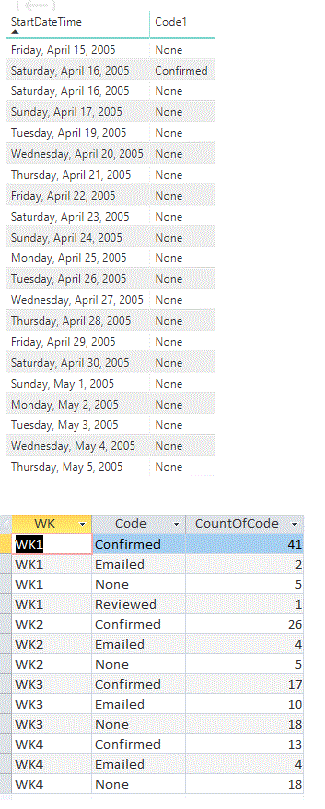
I have a table with a startDateTime and Code1.
I need to be able to Filter the date using a calendar table by doing
FILTER(ALL('Calendar'[Date]),
AND('Calendar'[Date] >= TODAY(), 'Calendar'[Date] <= TODAY()+27)))Then I have to CALCULATE the Code1 by categories
Finally I will need to create a table that will have the weeks(WK), code1(Code) and Sum of the codes by category(CountOfCode)
I tried to use CALCULATE to SUM code1 by category and Filter by date but I am getting an error.
This is the code that is not working
sumcode = CALCULATE(SUM(MovesConfirm[Code1]),
FILTER(ALL('Calendar'[Date]),
AND('Calendar'[Date] >= TODAY(), 'Calendar'[Date] <= TODAY()+27)))The error that I am getting is that SUM can only work with numbers.
Can someone please help? I an new to DAX.
The 1st table is the raw data and the 2nd table is what the final result.
Solved! Go to Solution.
HI @TiaCamilian ,
You can try to use following measure if it works for your requirement:
SumCode6 =
CALCULATE (
COUNT ( MovesConfirm[Code1] ),
ALLSELECTED ( 'MovesConfirm' ),
VALUES ( 'MovesConfirm'[WeekNumber] )
)
Regards,
Xiaoxin Sheng
Correct, SUM will not work with text, perhaps try COUNT or COUNTA
Thank you for the suggestion. I tried the following:
SumCode6 =
CALCULATE(COUNT(MovesConfirm[Code1]),
FILTER(ALL('Calendar'),
AND('Calendar'[Date] >= TODAY(), 'Calendar'[Date] <= TODAY()+27)))This is counting the Code1 colum by date. I need to calculate by week and needs to be between TODAY() and TODAY()+27
I created a colum with the following code
WeekNumber4 = IF(MovesConfirm[DateWithoutTime] = TODAY(), "WK1") & IF(MovesConfirm[DateWithoutTime] = Today()+1, "WK2")
To put WK1, WK2, WK3 and WK4 I need to do this repeted IF statement by TODAY() and TODAY()+ 1, etc.
to distingush the weeks. I was hopping that once I have this code I can calculate the code1 by WeekNumber4?
This is an exaple of my new data:
Code1 DateWithoutTime SumCode6 WeekNumber
Cof 2/19/2019 4 WK1
En 2/19/2019 1 WK1
Mai 2/19/2019 3 WK1
That SumCode6 is counting by date but I want to count by week.
Any help?
Thank you.
HI @TiaCamilian ,
You can try to use following measure if it works for your requirement:
SumCode6 =
CALCULATE (
COUNT ( MovesConfirm[Code1] ),
ALLSELECTED ( 'MovesConfirm' ),
VALUES ( 'MovesConfirm'[WeekNumber] )
)
Regards,
Xiaoxin Sheng
This works.
Thank you
The Power BI Data Visualization World Championships is back! Get ahead of the game and start preparing now!
| User | Count |
|---|---|
| 40 | |
| 35 | |
| 34 | |
| 31 | |
| 28 |
| User | Count |
|---|---|
| 137 | |
| 102 | |
| 71 | |
| 67 | |
| 64 |