Join us at FabCon Atlanta from March 16 - 20, 2026, for the ultimate Fabric, Power BI, AI and SQL community-led event. Save $200 with code FABCOMM.
Register now!The Power BI Data Visualization World Championships is back! It's time to submit your entry. Live now!
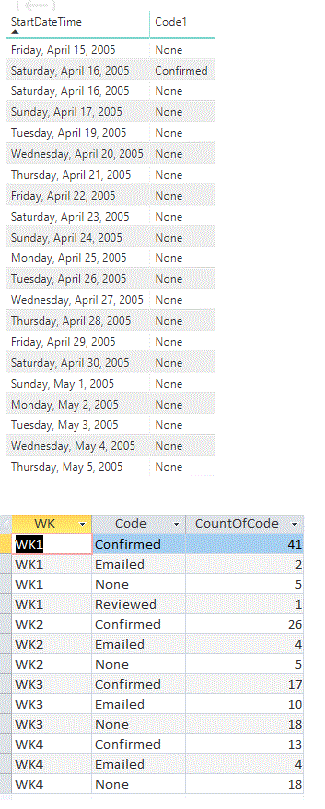
I have a table with a startDateTime and Code1.
I need to be able to Filter the date using a calendar table by doing
FILTER(ALL('Calendar'[Date]),
AND('Calendar'[Date] >= TODAY(), 'Calendar'[Date] <= TODAY()+27)))Then I have to CALCULATE the Code1 by categories
Finally I will need to create a table that will have the weeks(WK), code1(Code) and Sum of the codes by category(CountOfCode)
I tried to use CALCULATE to SUM code1 by category and Filter by date but I am getting an error.
This is the code that is not working
sumcode = CALCULATE(SUM(MovesConfirm[Code1]),
FILTER(ALL('Calendar'[Date]),
AND('Calendar'[Date] >= TODAY(), 'Calendar'[Date] <= TODAY()+27)))The error that I am getting is that SUM can only work with numbers.
Can someone please help? I an new to DAX.
The 1st table is the raw data and the 2nd table is what the final result.
Solved! Go to Solution.
HI @TiaCamilian ,
You can try to use following measure if it works for your requirement:
SumCode6 =
CALCULATE (
COUNT ( MovesConfirm[Code1] ),
ALLSELECTED ( 'MovesConfirm' ),
VALUES ( 'MovesConfirm'[WeekNumber] )
)
Regards,
Xiaoxin Sheng
Correct, SUM will not work with text, perhaps try COUNT or COUNTA
Thank you for the suggestion. I tried the following:
SumCode6 =
CALCULATE(COUNT(MovesConfirm[Code1]),
FILTER(ALL('Calendar'),
AND('Calendar'[Date] >= TODAY(), 'Calendar'[Date] <= TODAY()+27)))This is counting the Code1 colum by date. I need to calculate by week and needs to be between TODAY() and TODAY()+27
I created a colum with the following code
WeekNumber4 = IF(MovesConfirm[DateWithoutTime] = TODAY(), "WK1") & IF(MovesConfirm[DateWithoutTime] = Today()+1, "WK2")
To put WK1, WK2, WK3 and WK4 I need to do this repeted IF statement by TODAY() and TODAY()+ 1, etc.
to distingush the weeks. I was hopping that once I have this code I can calculate the code1 by WeekNumber4?
This is an exaple of my new data:
Code1 DateWithoutTime SumCode6 WeekNumber
Cof 2/19/2019 4 WK1
En 2/19/2019 1 WK1
Mai 2/19/2019 3 WK1
That SumCode6 is counting by date but I want to count by week.
Any help?
Thank you.
HI @TiaCamilian ,
You can try to use following measure if it works for your requirement:
SumCode6 =
CALCULATE (
COUNT ( MovesConfirm[Code1] ),
ALLSELECTED ( 'MovesConfirm' ),
VALUES ( 'MovesConfirm'[WeekNumber] )
)
Regards,
Xiaoxin Sheng
This works.
Thank you
The Power BI Data Visualization World Championships is back! It's time to submit your entry.
Check out the January 2026 Power BI update to learn about new features.
| User | Count |
|---|---|
| 61 | |
| 49 | |
| 39 | |
| 25 | |
| 23 |
| User | Count |
|---|---|
| 142 | |
| 111 | |
| 65 | |
| 38 | |
| 33 |