Join us at FabCon Atlanta from March 16 - 20, 2026, for the ultimate Fabric, Power BI, AI and SQL community-led event. Save $200 with code FABCOMM.
Register now!The Power BI Data Visualization World Championships is back! Get ahead of the game and start preparing now! Learn more
Hi everyone,
I came across a problem today.
This is my current measure:
CALCULATE(
[Measure],
FILTER(
[Table1],
(Table1[Column1] <> 0 && Table1[Column1] <> 100) &&
Table1[Column2] <> FALSE() &&
Table1[Column3] = "active"
)
)
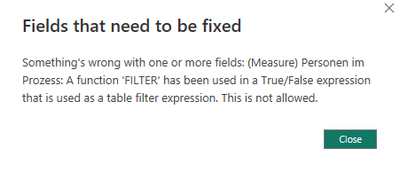
The measure gives me this error
Table1[Column2] <> FALSE() with this expression I am trying to filter on all but the Trues (so including blanks)
Can anyone tell me how to adjust my Measure so that it works?
Thanks in advance!
Solved! Go to Solution.
Hello,
For the calculate measure it's not necessary to put filter into it, as it already understands that has to filter and expression. Try this instead:
CALCULATE(
[Measure],
Table1[Column1] <> 0, Table1[Column1] <> 100,
Table1[Column2] <> FALSE() ,
Table1[Column3] = "active"
)
Hello,
For the calculate measure it's not necessary to put filter into it, as it already understands that has to filter and expression. Try this instead:
CALCULATE(
[Measure],
Table1[Column1] <> 0, Table1[Column1] <> 100,
Table1[Column2] <> FALSE() ,
Table1[Column3] = "active"
)
CALCULATE(
[Measure],
Table1[Column1] <> 0, Table1[Column1] <> 100,
Table1[Column2] <> TRUE() ,
Table1[Column3] = "active"
)
this worked fine, thank you! 🙂
The Power BI Data Visualization World Championships is back! Get ahead of the game and start preparing now!
| User | Count |
|---|---|
| 38 | |
| 37 | |
| 34 | |
| 31 | |
| 27 |
| User | Count |
|---|---|
| 136 | |
| 99 | |
| 73 | |
| 66 | |
| 65 |