FabCon is coming to Atlanta
Join us at FabCon Atlanta from March 16 - 20, 2026, for the ultimate Fabric, Power BI, AI and SQL community-led event. Save $200 with code FABCOMM.
Register now!- Power BI forums
- Get Help with Power BI
- Desktop
- Service
- Report Server
- Power Query
- Mobile Apps
- Developer
- DAX Commands and Tips
- Custom Visuals Development Discussion
- Health and Life Sciences
- Power BI Spanish forums
- Translated Spanish Desktop
- Training and Consulting
- Instructor Led Training
- Dashboard in a Day for Women, by Women
- Galleries
- Data Stories Gallery
- Themes Gallery
- Contests Gallery
- QuickViz Gallery
- Quick Measures Gallery
- Visual Calculations Gallery
- Notebook Gallery
- Translytical Task Flow Gallery
- TMDL Gallery
- R Script Showcase
- Webinars and Video Gallery
- Ideas
- Custom Visuals Ideas (read-only)
- Issues
- Issues
- Events
- Upcoming Events
The Power BI Data Visualization World Championships is back! Get ahead of the game and start preparing now! Learn more
- Power BI forums
- Forums
- Get Help with Power BI
- Desktop
- Re: Calculate balance of account with accunt trans...
- Subscribe to RSS Feed
- Mark Topic as New
- Mark Topic as Read
- Float this Topic for Current User
- Bookmark
- Subscribe
- Printer Friendly Page


- Mark as New
- Bookmark
- Subscribe
- Mute
- Subscribe to RSS Feed
- Permalink
- Report Inappropriate Content
Calculate balance of account with accunt transactions table
Hi all, i need some help with this case.
I have 3 tables:
DimDateTable
Account Transactions Table
Account Table
I design my report with Matrix:
In rows, Account Number
In Columns Date
And need to calculate account balance for Values.
Set up a DateSlicer to Column matrix
I need to calculate de balance of each account for every date but into account transactions i have all the transactions for all dates.
Solved! Go to Solution.


- Mark as New
- Bookmark
- Subscribe
- Mute
- Subscribe to RSS Feed
- Permalink
- Report Inappropriate Content
Hi @pelucapampa,
Please new a measure like this:
Account Total =
CALCULATE (
    SUM ( 'Table'[ MONTOREAL ] ),
    FILTER (
        ALLEXCEPT ( 'Table', 'Table'[CUENTA] ),
        'Table'[FECHAMODIFICACION] <= MAX ( 'Table'[FECHAMODIFICACION] )
    )
)
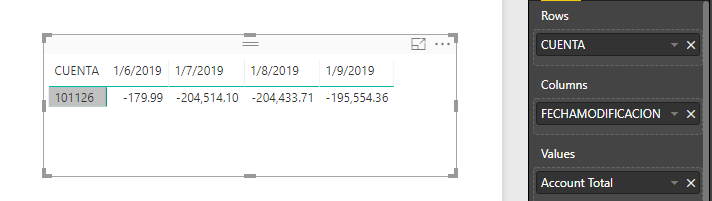
Best regards,
Yuliana Gu
If this post helps, then please consider Accept it as the solution to help the other members find it more quickly.
- Mark as New
- Bookmark
- Subscribe
- Mute
- Subscribe to RSS Feed
- Permalink
- Report Inappropriate Content
Hi @pelucapampa,
Please provide some dummy data and show us your desired output, as suggested in below link. Especially, please describe more about "I need to calculate de balance of each account for every date".
How to Get Your Question Answered Quickly
Regards,
Yuliana Gu
If this post helps, then please consider Accept it as the solution to help the other members find it more quickly.
- Mark as New
- Bookmark
- Subscribe
- Mute
- Subscribe to RSS Feed
- Permalink
- Report Inappropriate Content
Ok, sorry.
Data table
| CODIGOASIENTO | CUENTA | FECHAMODIFICACION | MONTOREAL |
| 167956 | 101126 | 09/01/2019 | $ 1.440,00 |
| 167952 | 101126 | 09/01/2019 | $ 7.439,35 |
| 167833 | 101126 | 08/01/2019 | $ 80,00 |
| 167796 | 101126 | 08/01/2019 | $ 0,39 |
| 167650 | 101126 | 07/01/2019 | -$ 33.166,05 |
| 167647 | 101126 | 07/01/2019 | -$ 123.196,01 |
| 167645 | 101126 | 07/01/2019 | -$ 47.972,05 |
| 167638 | 101126 | 06/01/2019 | $ 170,00 |
| 167630 | 101126 | 06/01/2019 | -$ 350,00 |
| 167629 | 101126 | 06/01/2019 | $ 0,01 |
And I need insert into a Matrix Table with calculate the balance for every day, for example:
Balance 06/01/2019 = (0,01 - 350 - 170)
Balance 07/01/2019 = (Balance 06/01/2019) - 47972,05 - 123.196,01 - 33.166,05)
...
Example
| Cuenta | 06/01/2019 | 07/01/2019 | 08/01/2019 | 09/01/2019 |
| 101126 | -$ 179,99 | -$ 204.514,10 | -$ 204.433,71 | -$ 195.554,36 |


- Mark as New
- Bookmark
- Subscribe
- Mute
- Subscribe to RSS Feed
- Permalink
- Report Inappropriate Content
Hi,
Build a Calendar Table and create a relationship from the FECHAMODIFICACION column of the Data Table to the Date column of the Calendar Table. In the Matrix visual, drag the first 2 fields in the Row labels and the Date column from the Calendar Table to the column labels. Enter this measure
=SUM(Data[MONTOREAL])
Hope this helps.
Regards,
Ashish Mathur
http://www.ashishmathur.com
https://www.linkedin.com/in/excelenthusiasts/
- Mark as New
- Bookmark
- Subscribe
- Mute
- Subscribe to RSS Feed
- Permalink
- Report Inappropriate Content
Thanks for your reply, but this measure sum the lines for the date, I need to sum all lines include this date, because the account balance contain the summary.
- Mark as New
- Bookmark
- Subscribe
- Mute
- Subscribe to RSS Feed
- Permalink
- Report Inappropriate Content
Hi @pelucapampa,
Please new a measure like this:
Account Total =
CALCULATE (
    SUM ( 'Table'[ MONTOREAL ] ),
    FILTER (
        ALLEXCEPT ( 'Table', 'Table'[CUENTA] ),
        'Table'[FECHAMODIFICACION] <= MAX ( 'Table'[FECHAMODIFICACION] )
    )
)
Best regards,
Yuliana Gu
If this post helps, then please consider Accept it as the solution to help the other members find it more quickly.


- Mark as New
- Bookmark
- Subscribe
- Mute
- Subscribe to RSS Feed
- Permalink
- Report Inappropriate Content
With info provided, all you need is a measure:
Account Total = SUM ( Table[MONOTOREAL] )

Helpful resources

Power BI Dataviz World Championships
The Power BI Data Visualization World Championships is back! Get ahead of the game and start preparing now!

Power BI Monthly Update - November 2025
Check out the November 2025 Power BI update to learn about new features.

FabCon Atlanta 2026
Join us at FabCon Atlanta, March 16-20, for the ultimate Fabric, Power BI, AI and SQL community-led event. Save $200 with code FABCOMM.

| User | Count |
|---|---|
| 59 | |
| 43 | |
| 42 | |
| 23 | |
| 17 |


| User | Count |
|---|---|
| 190 | |
| 122 | |
| 96 | |
| 66 | |
| 47 |


