Join us at FabCon Atlanta from March 16 - 20, 2026, for the ultimate Fabric, Power BI, AI and SQL community-led event. Save $200 with code FABCOMM.
Register now!Get Fabric Certified for FREE during Fabric Data Days. Don't miss your chance! Request now
Hi dear community !
I have a table on my report where i put the number of cars at date 1, the % of the total1 (by adding the same column and put it as "percent of a grand total"), number of cars at date 2 and % of the total2 for this date (same process).
But I want to add a column to my table to compute this formula : (%of total2 - %of total1)/ %of total2.
I tried with measures, quick measures.... but the issue is that I can't work with these columns values as variables like the number of cars (which are 2 calculated measures), it's calculated only in the table.
I think the solution is not so complicated but to find it I need your help.
Thank you !
Solved! Go to Solution.
Hi @Anonymous
% total_2 =
CALCULATE ( SUM ( 'Table'[number] ), ALLEXCEPT ( 'Table', 'Table'[date] ) )
/ CALCULATE ( SUM ( 'Table'[number] ), ALL ( 'Table' ) )
Change the measure as below
% total_2 =
SUMX(ALLEXCEPT ( 'Table', 'Table'[date] ),'Table'[number])
/ SUMX( ALL ( 'Table' ) ,'Table'[number])
Best Regards
Maggie
Community Support Team _ Maggie Li
If this post helps, then please consider Accept it as the solution to help the other members find it more quickly.
Hi @Anonymous
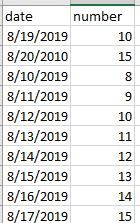
Assume you have a table as below
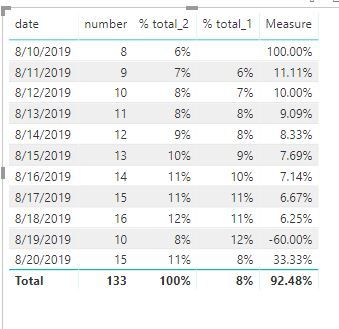
% of total2 = (numbers of cars for each date)/(numbers of cars for all dates)
% of total1= (numbers of cars for each previous date)/(numbers of cars for all dates)
Something as below:
You could create measures
% total_2 =
CALCULATE ( SUM ( 'Table'[number] ), ALLEXCEPT ( 'Table', 'Table'[date] ) )
/ CALCULATE ( SUM ( 'Table'[number] ), ALL ( 'Table' ) )
% total_1 = CALCULATE([% total_2],FILTER(ALL('Table'),'Table'[date]=MAX('Table'[date])-1))
Measure = ([% total_2]-[% total_1])/[% total_2]
Best Regards
Maggie
Community Support Team _ Maggie Li
If this post helps, then please consider Accept it as the solution to help the other members find it more quickly.
Hi Maggie,
I think we are close to the solution. I have only a little issue with you method, i cant call Table'number' because in my case it's a measure. So i can't call a measure in the funciton SUM.
I'll try to find a way !
If you have any suggestion, i'm open.
Thank you 🙂
Hi @Anonymous
% total_2 =
CALCULATE ( SUM ( 'Table'[number] ), ALLEXCEPT ( 'Table', 'Table'[date] ) )
/ CALCULATE ( SUM ( 'Table'[number] ), ALL ( 'Table' ) )
Change the measure as below
% total_2 =
SUMX(ALLEXCEPT ( 'Table', 'Table'[date] ),'Table'[number])
/ SUMX( ALL ( 'Table' ) ,'Table'[number])
Best Regards
Maggie
Community Support Team _ Maggie Li
If this post helps, then please consider Accept it as the solution to help the other members find it more quickly.
Check out the November 2025 Power BI update to learn about new features.
Advance your Data & AI career with 50 days of live learning, contests, hands-on challenges, study groups & certifications and more!