Don't miss your chance to take the Fabric Data Engineer (DP-700) exam on us!
Learn moreWe've captured the moments from FabCon & SQLCon that everyone is talking about, and we are bringing them to the community, live and on-demand. Starts on April 14th. Register now
I have two fact tables: f_scripts and f_rebates. Each has a quantity column showing sum of units by date (I also have them linked to a calendar table). I'm trying to create a matrix visual showing the number of units by product from f_scripts in one column and the same thing from f_rebates in the next column (I've accomplished this part). The last part is to create a column showing the delta between the two.
If it's helpful, I could try to create a dummy file to share, but the live file has a ton of sensitive info in it.
Solved! Go to Solution.
HI @mcmullenrich,
What type of aggregate that you want to apply to these grouped ranges of records? Can you please share some more detail?
How to Get Your Question Answered Quickly
Here is a sample measure formaul about average of records based on current hierarchy group.
formula =
CALCULATE (
AVERAGE ( Table[Purchased] ),
ALLSELECTED ( Table ),
VALUES ( Table[Common Drag Name] ),
VALUES ( Table[Pharmacy] )
)
Regards,
Xiaoxin Sheng
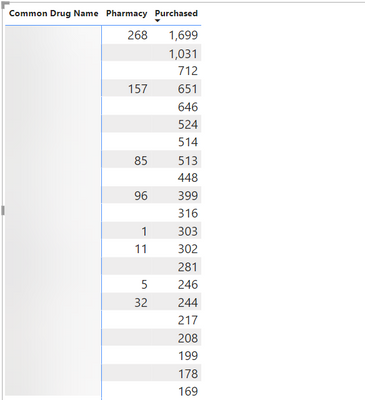
Hi @vojtechsima. Here is a snapshot of the visual as it stands now. The two columns shown come from different tables. I'd like to have a column to the right of "Purchased" showing [Purchased] - [Pharmacy]. This visual is controlled by a Month Year dropdown slicer which comes from my calendar table.
HI @mcmullenrich,
What type of aggregate that you want to apply to these grouped ranges of records? Can you please share some more detail?
How to Get Your Question Answered Quickly
Here is a sample measure formaul about average of records based on current hierarchy group.
formula =
CALCULATE (
AVERAGE ( Table[Purchased] ),
ALLSELECTED ( Table ),
VALUES ( Table[Common Drag Name] ),
VALUES ( Table[Pharmacy] )
)
Regards,
Xiaoxin Sheng
Hi, @mcmullenrich
If you could share some sample data or help me picture how exactly the delta should be shown (absolute, relative etc.)
Thank you
If you have recently started exploring Fabric, we'd love to hear how it's going. Your feedback can help with product improvements.
A new Power BI DataViz World Championship is coming this June! Don't miss out on submitting your entry.
Share feedback directly with Fabric product managers, participate in targeted research studies and influence the Fabric roadmap.
| User | Count |
|---|---|
| 55 | |
| 35 | |
| 31 | |
| 19 | |
| 17 |
| User | Count |
|---|---|
| 75 | |
| 72 | |
| 38 | |
| 35 | |
| 25 |