cancel
Showing results for 
Search instead for 
Did you mean: 

The Power BI Data Visualization World Championships is back! Get ahead of the game and start preparing now! Learn more

Reply
CMOLINA
Frequent Visitor

Calculate Value with filter and use i tinto the same field

Hello community


I need your help with this case:

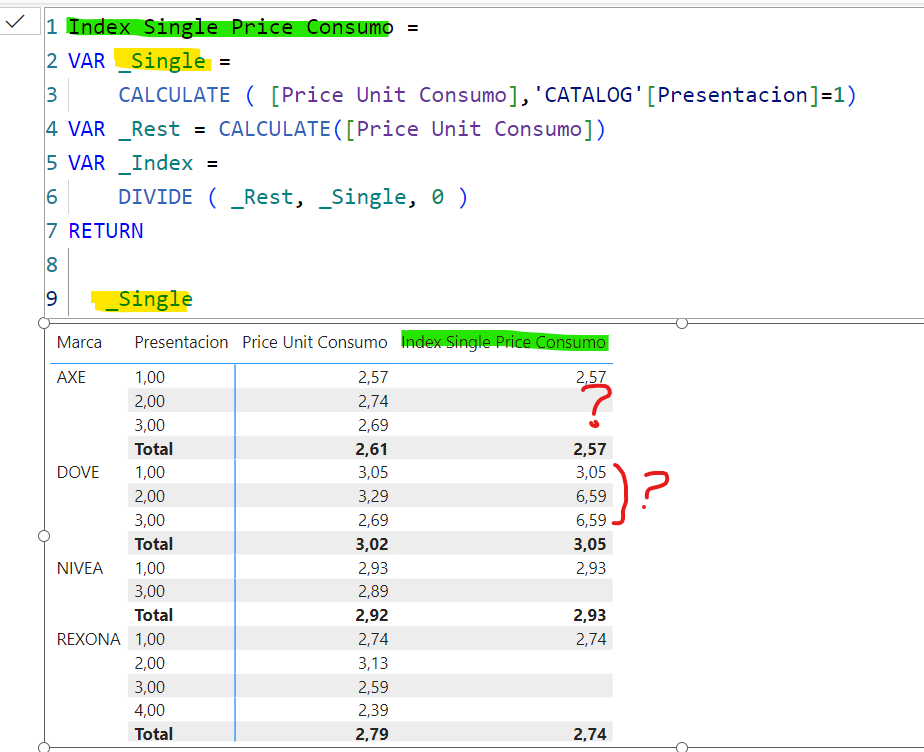
I need to calculate the Index value using a value base ("Presentacion=1") into the same field with the rest of differents values (Presentacion = 2, 3, 4.. etc) but the problem is tha value doesn't appear in the calculate


I don't undestand why my var: _Single show that values

I need to divide (_rest, _single) but the value _single doesn't works correctly

see attach_Single doesn't work_Single doesn't work


Thanks for your support

1 ACCEPTED SOLUTION

pls try this

Index Single Price Consumo = 
VAR _Single =  CALCULATE( [Price Unit Consumo],'CATALOG'[Presentacion]=1,ALLEXCEPT('CATALOG','CATALOG'[Marca],'CATALOG'[SubCategoria], 'CATALOG'[Subfuncionalidad], 'CATALOG'[Segmento],'CATALOG'[Fact_Conversion])
)
              
VAR _Rest = CALCULATE([Price Unit Consumo])
VAR _Index =
    DIVIDE ( _Rest, _Single, 0 )
RETURN

   _Index

View solution in original post

6 REPLIES 6
CMOLINA
Frequent Visitor

Hi @Ahmedx  this is an example file:
Excel File

[Price Unit Consumo]= divide (sum(POS SALES DOLAR), sum(UNIDAD CONSUMO))

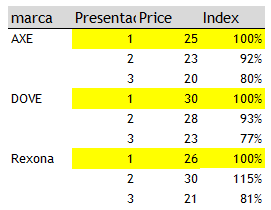
I need  calculate de "Index Presentacion"
This an example:
CMOLINA_0-1711210631759.png

Thanks for your support

regards
CMolina


I need your pbix file to understand what's wrong

Hi @Ahmedx this is link for my file: 

PBI file


pls try this

Index Single Price Consumo = 
VAR _Single =  CALCULATE( [Price Unit Consumo],'CATALOG'[Presentacion]=1,ALLEXCEPT('CATALOG','CATALOG'[Marca],'CATALOG'[SubCategoria], 'CATALOG'[Subfuncionalidad], 'CATALOG'[Segmento],'CATALOG'[Fact_Conversion])
)
              
VAR _Rest = CALCULATE([Price Unit Consumo])
VAR _Index =
    DIVIDE ( _Rest, _Single, 0 )
RETURN

   _Index

THANKS A LOT

It's this work correctly 

Ahmedx
Super User
Super User

share your file to help you

Helpful resources

Announcements
Power BI DataViz World Championships

Power BI Dataviz World Championships

The Power BI Data Visualization World Championships is back! Get ahead of the game and start preparing now!

November Power BI Update Carousel

Power BI Monthly Update - November 2025

Check out the November 2025 Power BI update to learn about new features.

FabCon Atlanta 2026 carousel

FabCon Atlanta 2026

Join us at FabCon Atlanta, March 16-20, for the ultimate Fabric, Power BI, AI and SQL community-led event. Save $200 with code FABCOMM.