
cancel
Showing results for 
Search instead for 
Did you mean: 

The Power BI Data Visualization World Championships is back! Get ahead of the game and start preparing now! Learn more

Reply
MickyG
Frequent Visitor

Calculate Sum of Latest Date Instead of Zero Values

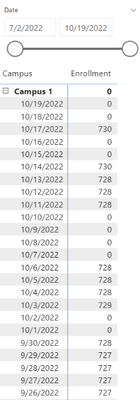
`           I am trying to calculate the number of children enrolled in each campus per date, but I would like for the latest value to roll over until there is new enrollment data to be calculated. For example, campus 1 has enrollment data for 9/29 & 9/30, but not for 10/1. Instead of a zero value, I would like to write a measure that would calculate the enrollment sum for the latest date available. So the values for 10/1 & 10/2 would be 728 until 10/3, where the latest value would be 729.

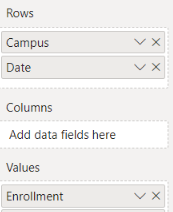
            I have included the matrix with the results I am getting for the enrollment data and the DAX measure. The matrix rows use the campus from the campus table and the dates from the dates table. The values [Enrollment] is the measure I have attached. All the examples I’ve seen online use only one table, but I am using the dates table so it's been difficult getting an exact example.

NOTE: Also I just want to make it clear I am not asking for a cumulative or rolling sum. Just the sum of the latest date where there is enrollment data.


MickyG_0-1666299795535.png

MickyG_3-1666300621389.png


MickyG_2-1666300010249.png


1 ACCEPTED SOLUTION
v-zhangti
Community Support
Community Support

Hi, @MickyG 


You can try the following methods.
Column:

Column = IF([Value]=0,BLANK(),[Value])
Column2 = CALCULATE (
LASTNONBLANK('Enrollment Data'[Attendance Date],1),
FILTER (
'Enrollment Data' ,
[Attendance Date] <= EARLIER ( 'Enrollment Data'[Attendance Date] )
&&[Column]<>BLANK()))
Column 3 = 
CALCULATE(MAX('Enrollment Data'[Value]),FILTER('Enrollment Data',[Attendance Date]=EARLIER('Enrollment Data'[Column2])))

vzhangti_0-1666598338176.png

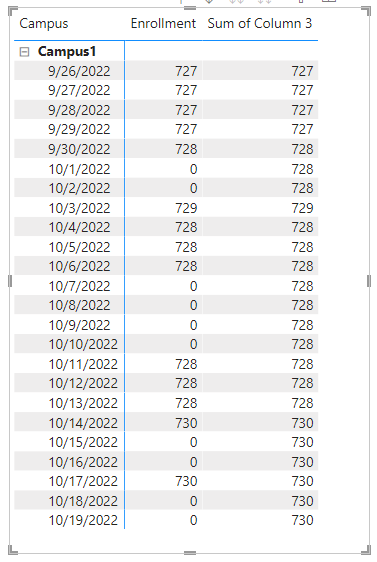
Result:

vzhangti_1-1666598371353.png

Is this the result you expect?


Best Regards,

Community Support Team _Charlotte

If this post helps, then please consider Accept it as the solution to help the other members find it more quickly.


View solution in original post

3 REPLIES 3
v-zhangti
Community Support
Community Support

Hi, @MickyG 


You can try the following methods.
Column:

Column = IF([Value]=0,BLANK(),[Value])
Column2 = CALCULATE (
LASTNONBLANK('Enrollment Data'[Attendance Date],1),
FILTER (
'Enrollment Data' ,
[Attendance Date] <= EARLIER ( 'Enrollment Data'[Attendance Date] )
&&[Column]<>BLANK()))
Column 3 = 
CALCULATE(MAX('Enrollment Data'[Value]),FILTER('Enrollment Data',[Attendance Date]=EARLIER('Enrollment Data'[Column2])))

vzhangti_0-1666598338176.png

Result:

vzhangti_1-1666598371353.png

Is this the result you expect?


Best Regards,

Community Support Team _Charlotte

If this post helps, then please consider Accept it as the solution to help the other members find it more quickly.


TomMartens
Super User
Super User

Hey @MickyG ,


try to use the DAX function LASTNONBLANKVALUE: LASTNONBLANKVALUE – DAX Guide


Hopefully, this provides an idea on how to solve this.


Regards,

Tom


Did I answer your question? Mark my post as a solution, this will help others!

Proud to be a Super User!
I accept Kudos 😉
Hamburg, Germany

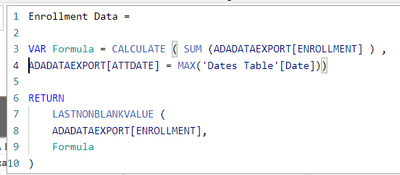
I previously looked into this and I'm getting the same result. This is the formula I'm using. Not sure what I'm doing incorrectly?

MickyG_0-1666363370796.png


Helpful resources

Announcements
November Power BI Update Carousel

Power BI Monthly Update - November 2025

Check out the November 2025 Power BI update to learn about new features.

Fabric Data Days Carousel

Fabric Data Days

Advance your Data & AI career with 50 days of live learning, contests, hands-on challenges, study groups & certifications and more!

FabCon Atlanta 2026 carousel

FabCon Atlanta 2026

Join us at FabCon Atlanta, March 16-20, for the ultimate Fabric, Power BI, AI and SQL community-led event. Save $200 with code FABCOMM.

Top Solution Authors
Top Kudoed Authors