
Join us at FabCon Atlanta from March 16 - 20, 2026, for the ultimate Fabric, Power BI, AI and SQL community-led event. Save $200 with code FABCOMM.
Register now!The Power BI Data Visualization World Championships is back! Get ahead of the game and start preparing now! Learn more
Hello everyone,
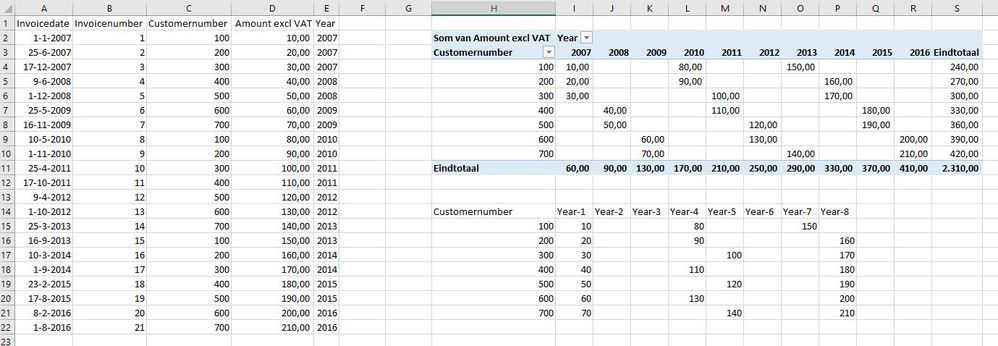
Can someone help me with the dax-formulas to calculate the sales in the first, second year and so on?
The table:
| Invoicedate | Invoicenumber | Customernumber | Amount excl VAT | Year |
| 1-1-2007 | 1 | 100 | 10,00 | 2007 |
| 25-6-2007 | 2 | 200 | 20,00 | 2007 |
| 17-12-2007 | 3 | 300 | 30,00 | 2007 |
| 9-6-2008 | 4 | 400 | 40,00 | 2008 |
| 1-12-2008 | 5 | 500 | 50,00 | 2008 |
| 25-5-2009 | 6 | 600 | 60,00 | 2009 |
| 16-11-2009 | 7 | 700 | 70,00 | 2009 |
| 10-5-2010 | 8 | 100 | 80,00 | 2010 |
| 1-11-2010 | 9 | 200 | 90,00 | 2010 |
| 25-4-2011 | 10 | 300 | 100,00 | 2011 |
| 17-10-2011 | 11 | 400 | 110,00 | 2011 |
| 9-4-2012 | 12 | 500 | 120,00 | 2012 |
| 1-10-2012 | 13 | 600 | 130,00 | 2012 |
| 25-3-2013 | 14 | 700 | 140,00 | 2013 |
| 16-9-2013 | 15 | 100 | 150,00 | 2013 |
| 10-3-2014 | 16 | 200 | 160,00 | 2014 |
| 1-9-2014 | 17 | 300 | 170,00 | 2014 |
| 23-2-2015 | 18 | 400 | 180,00 | 2015 |
| 17-8-2015 | 19 | 500 | 190,00 | 2015 |
| 8-2-2016 | 20 | 600 | 200,00 | 2016 |
| 1-8-2016 | 21 | 700 | 210,00 | 2016 |
For example,
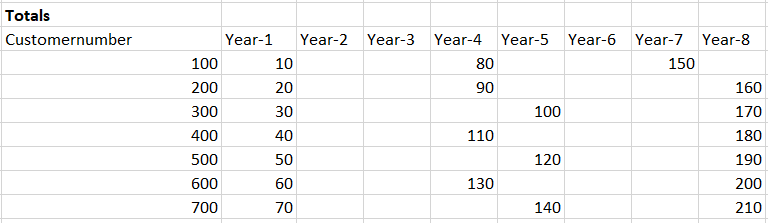
Customer 100 had a salesamount in his first year of 10 and his fourth year of 80, customer 700 had a salesamount in his first year of 70 and in his 8th year of 210.
Thanks in advance,
With kind regards,
Cor
Solved! Go to Solution.
@Anonymous,
You may use DAX below to add a calculated column.
Column =
Table1[Year]
- MINX (
FILTER ( Table1, Table1[Customernumber] = EARLIER ( Table1[Customernumber] ) ),
Table1[Year]
)
+ 1
HI @Anonymous
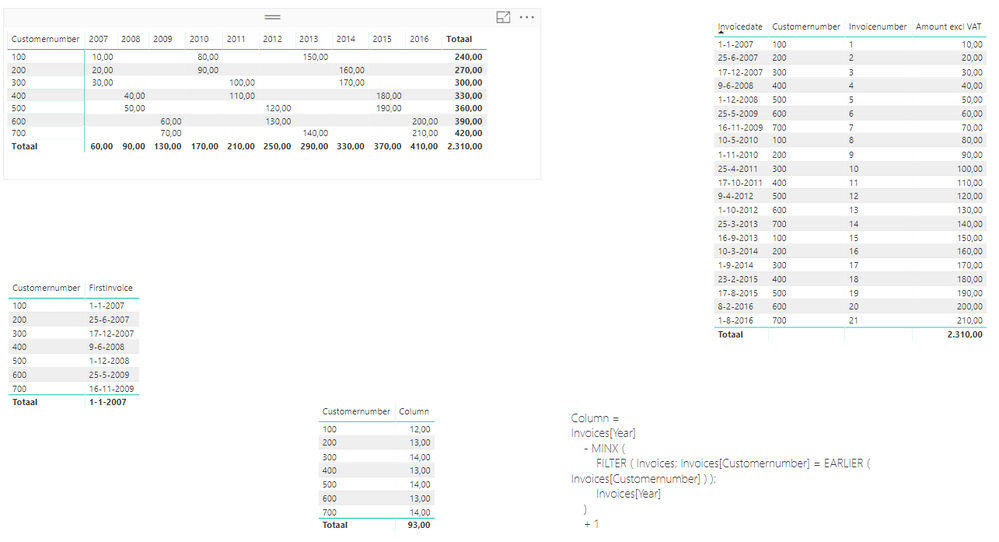
Sam's @v-chuncz-msft formula gave the correct results when i tried it
Please see attached file
To get the average you can use
Measure = AVERAGE ( Table1[ Amount excl VAT ] )
@Anonymous,
You may use DAX below to add a calculated column.
Column =
Table1[Year]
- MINX (
FILTER ( Table1, Table1[Customernumber] = EARLIER ( Table1[Customernumber] ) ),
Table1[Year]
)
+ 1
Hi Sam and Zubair,
Thanks for your replies!
I was expecting the next result:
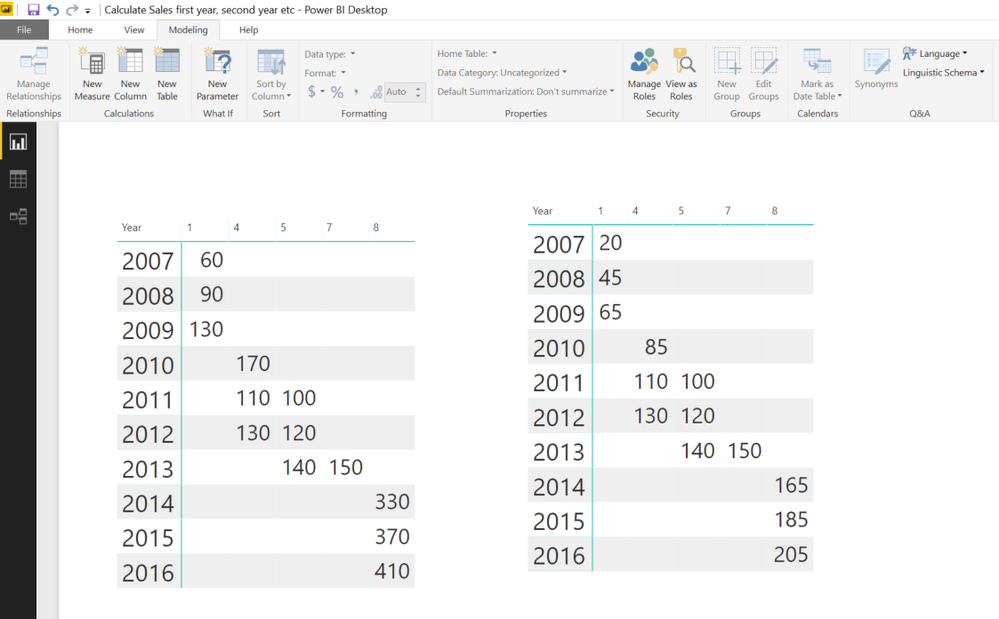
The result I get in PBI was:
What goes wrong?
Can you both also help me with the averages for each year? I mean the average in the first year for the 2007-customers is 20, for the 2008-customers is the average in their first year 45 and so on.
Thanks in advance,
Cor
HI @Anonymous
Sam's @v-chuncz-msft formula gave the correct results when i tried it
Please see attached file
To get the average you can use
Measure = AVERAGE ( Table1[ Amount excl VAT ] )
Hi Zubair,,
You're absolutely right, the formule of @v-chuncz-msft works, I did something wrong with my rows and filters.
I'm sorry for that. Your average-measure also works fine, thank you and @v-chuncz-msft very much!
Greeting from The Netherlands,
Cor
The Power BI Data Visualization World Championships is back! Get ahead of the game and start preparing now!
| User | Count |
|---|---|
| 41 | |
| 38 | |
| 36 | |
| 31 | |
| 28 |
| User | Count |
|---|---|
| 129 | |
| 88 | |
| 79 | |
| 68 | |
| 63 |