FabCon is coming to Atlanta
Join us at FabCon Atlanta from March 16 - 20, 2026, for the ultimate Fabric, Power BI, AI and SQL community-led event. Save $200 with code FABCOMM.
Register now!- Power BI forums
- Get Help with Power BI
- Desktop
- Service
- Report Server
- Power Query
- Mobile Apps
- Developer
- DAX Commands and Tips
- Custom Visuals Development Discussion
- Health and Life Sciences
- Power BI Spanish forums
- Translated Spanish Desktop
- Training and Consulting
- Instructor Led Training
- Dashboard in a Day for Women, by Women
- Galleries
- Data Stories Gallery
- Themes Gallery
- Contests Gallery
- QuickViz Gallery
- Quick Measures Gallery
- Visual Calculations Gallery
- Notebook Gallery
- Translytical Task Flow Gallery
- TMDL Gallery
- R Script Showcase
- Webinars and Video Gallery
- Ideas
- Custom Visuals Ideas (read-only)
- Issues
- Issues
- Events
- Upcoming Events
Get Fabric Certified for FREE during Fabric Data Days. Don't miss your chance! Request now
- Power BI forums
- Forums
- Get Help with Power BI
- Desktop
- Re: Calculate SUM of a field depending upon a filt...
- Subscribe to RSS Feed
- Mark Topic as New
- Mark Topic as Read
- Float this Topic for Current User
- Bookmark
- Subscribe
- Printer Friendly Page

- Mark as New
- Bookmark
- Subscribe
- Mute
- Subscribe to RSS Feed
- Permalink
- Report Inappropriate Content
Calculate SUM of a field depending upon a filter of another table (not related)
I have a column Col1 Table A which I would like to SUM on depending on another table B.
I have been trying out various DAX expression but without much success:
Please can someone shed some light. (Sorry I cannot share the pbi or the data).
Measure =
VAR Selection = SELECTEDVALUE(TableB[SomeTextCol], "")
RETURN
CALCULATE(sum(TableA[Red]), max(TableA[SameSomeTextCol]) = Selection)
Solved! Go to Solution.


- Mark as New
- Bookmark
- Subscribe
- Mute
- Subscribe to RSS Feed
- Permalink
- Report Inappropriate Content
hi, @Anonymous
Try this formula:
Redirects From Filter =
VAR Selection =
    SELECTEDVALUE ( NonVoice_Union[Journey], "" )
RETURN
    CALCULATE (
        SUM ( NonVoice_Redirects[Redirects] ),
        FILTER ( NonVoice_Redirects, NonVoice_Redirects[Journey]
            = Selection
    ))
and Why you need to use SEARCH in it.
Best Regards,
Lin
If this post helps, then please consider Accept it as the solution to help the other members find it more quickly.


- Mark as New
- Bookmark
- Subscribe
- Mute
- Subscribe to RSS Feed
- Permalink
- Report Inappropriate Content
Hi @Anonymous
I can see that you have your solution already however, you might still consider the below alternative.
CALCULATE(
    SUM( TableA[Red] ),
    TREATAS( VALUES( TableB[SomeTextCol] ), TableA[SameSomeTextCol] )
)
Hope this helps
Mariusz
- Mark as New
- Bookmark
- Subscribe
- Mute
- Subscribe to RSS Feed
- Permalink
- Report Inappropriate Content
HI, @Anonymous
For your problem, It is a syntax mistake.
Measure =
VAR Selection = SELECTEDVALUE(TableB[SomeTextCol], "")
RETURN
CALCULATE(sum(TableA[Red]), max(TableA[SameSomeTextCol]) = Selection)
you should add a FILTER conditional in your formula as below:
Measure =
VAR Selection = SELECTEDVALUE(TableB[SomeTextCol], "")
RETURN
CALCULATE(sum(TableA[Red]), FILTER(TableA,max(TableA[SameSomeTextCol]) = Selection))
or adjust your formula as below:
Measure 2 =
VAR Selection = SELECTEDVALUE(TableB[SomeTextCol], "")
RETURN
CALCULATE(sum(TableA[Red]), TableA[SameSomeTextCol] = Selection)
Best Regards,
Lin
If this post helps, then please consider Accept it as the solution to help the other members find it more quickly.
- Mark as New
- Bookmark
- Subscribe
- Mute
- Subscribe to RSS Feed
- Permalink
- Report Inappropriate Content
@v-lili6-msft wrote:HI, @Anonymous
For your problem, It is a syntax mistake.
Measure =
VAR Selection = SELECTEDVALUE(TableB[SomeTextCol], "")
RETURN
CALCULATE(sum(TableA[Red]), max(TableA[SameSomeTextCol]) = Selection)
you should add a FILTER conditional in your formula as below:
Measure =
VAR Selection = SELECTEDVALUE(TableB[SomeTextCol], "")
RETURN
CALCULATE(sum(TableA[Red]), FILTER(TableA,max(TableA[SameSomeTextCol]) = Selection))
or adjust your formula as below:
Measure 2 =
VAR Selection = SELECTEDVALUE(TableB[SomeTextCol], "")
RETURN
CALCULATE(sum(TableA[Red]), TableA[SameSomeTextCol] = Selection)
Best Regards,
Lin
No matter what I try I get tehe below error:
A function 'FILTER' has been used in a True/False expression that is used as a table filter expression. This is not allowed.
I have even tried the below but gives the same error:
Redirects From Filter =
VAR Selection = SELECTEDVALUE(NonVoice_Union[Journey], "")
RETURN
CALCULATE(sum(NonVoice_Redirects[Redirects]),filter(NonVoice_Redirects, NonVoice_Redirects[Journey]) =
SEARCH(
    Selection,
    MAX(NonVoice_Redirects[Journey]),,BLANK()
)
)
- Mark as New
- Bookmark
- Subscribe
- Mute
- Subscribe to RSS Feed
- Permalink
- Report Inappropriate Content
hi, @Anonymous
Try this formula:
Redirects From Filter =
VAR Selection =
    SELECTEDVALUE ( NonVoice_Union[Journey], "" )
RETURN
    CALCULATE (
        SUM ( NonVoice_Redirects[Redirects] ),
        FILTER ( NonVoice_Redirects, NonVoice_Redirects[Journey]
            = Selection
    ))
and Why you need to use SEARCH in it.
Best Regards,
Lin
If this post helps, then please consider Accept it as the solution to help the other members find it more quickly.
- Mark as New
- Bookmark
- Subscribe
- Mute
- Subscribe to RSS Feed
- Permalink
- Report Inappropriate Content
Created a simple example with Table1 is just a list of colors and Table2 is a list of color with sales. You can use these measures:
Total Sales = SUM( Table2[Sales] )

Value Selected = SELECTEDVALUE(Table1[Color])

Filtering without a Relationship=
IF (
    HASONEFILTER(Table2[Color]),
        CALCULATE(
            [Total Sales],
            FILTER(
                Table2,
                VALUES( Table2[Color] ) = [Value Selected]
            )
        )
)
- Mark as New
- Bookmark
- Subscribe
- Mute
- Subscribe to RSS Feed
- Permalink
- Report Inappropriate Content
@Anonymous wrote:Created a simple example with Table1 is just a list of colors and Table2 is a list of color with sales. You can use these measures:
Total Sales = SUM( Table2[Sales] )

Value Selected = SELECTEDVALUE(Table1[Color])

Filtering without a Relationship=
IF (
    HASONEFILTER(Table2[Color]),
        CALCULATE(
            [Total Sales],
            FILTER(
                Table2,
                VALUES( Table2[Color] ) = [Value Selected]
            )
        )
)
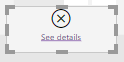
There is no error when I try this but I am not being able to use it e.g.g in a matrix or a table:
- Mark as New
- Bookmark
- Subscribe
- Mute
- Subscribe to RSS Feed
- Permalink
- Report Inappropriate Content
What error are you getting and give us at least 3 rows mock data by changing values?
Helpful resources

Power BI Monthly Update - November 2025
Check out the November 2025 Power BI update to learn about new features.

Fabric Data Days
Advance your Data & AI career with 50 days of live learning, contests, hands-on challenges, study groups & certifications and more!

FabCon Atlanta 2026
Join us at FabCon Atlanta, March 16-20, for the ultimate Fabric, Power BI, AI and SQL community-led event. Save $200 with code FABCOMM.


