Join us at FabCon Atlanta from March 16 - 20, 2026, for the ultimate Fabric, Power BI, AI and SQL community-led event. Save $200 with code FABCOMM.
Register now!Get Fabric Certified for FREE during Fabric Data Days. Don't miss your chance! Request now
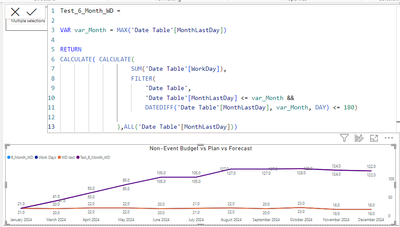
I am trying to get a rolling 180 day working days that will also exclude filtered months. I can get it working for all months with the below DAX, but when I exclude a month (Feb in the below example), it messes up and displays the first image below. The individual months work just fine.
If I unselect a month, I want it to grab the additional days in the past to keep a total of 180 days in the rolling total.
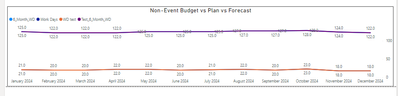
This is how it should continue to look, regardless of if I have a month or two removed (and just skip that month entirely, not show as 0).
Solved! Go to Solution.
@datachick2024 I would try this alternate approach that provides more flexibility and the ability to troubleshoot.
(3) Better Rolling Average - Microsoft Fabric Community
Note you can switch this to a SUM by using SUMX instead of AVERAGEX
@datachick2024 I would try this alternate approach that provides more flexibility and the ability to troubleshoot.
(3) Better Rolling Average - Microsoft Fabric Community
Note you can switch this to a SUM by using SUMX instead of AVERAGEX
Thank you! The below worked:
Better Rolling Average =
VAR __EndDate = MAX('Table'[Date])
VAR __6MonthsAgo = EOMONTH(__EndDate, -6)
VAR __StartDate = DATE(YEAR(__6MonthsAgo), MONTH(__6MonthsAgo), 1)
VAR __Table =
SUMMARIZE(
FILTER(ALL('Table'),[Date]>=__StartDate && [Date]<=__EndDate),
'Table'[Month],
"__Value",SUM('Table'[Value])
)
RETURN
SUMX(__Table,[__Value])
@datachick2024 And hence why you should avoid CALCULATE and DAX TI functions! 🙂
Check out the November 2025 Power BI update to learn about new features.
Advance your Data & AI career with 50 days of live learning, contests, hands-on challenges, study groups & certifications and more!