cancel
Showing results for 
Search instead for 
Did you mean: 

The Power BI Data Visualization World Championships is back! Get ahead of the game and start preparing now! Learn more

Reply
Hichamas4
Frequent Visitor

Calculate R12 based on year and month fields

Hi all,


I have a scenario where I am not using a dim.date as I only have a fiscal year and period columns which I merged to have yyyy.mm as following: 202201. 


I have used to calculate YTD based on this column and it works fine, but the R12 months doesn't.


How can I best calculate R12 in case no dim.date is available?


Thank you.


1 ACCEPTED SOLUTION
Anonymous
Not applicable

Hi @Hichamas4 ,

Please try below steps:

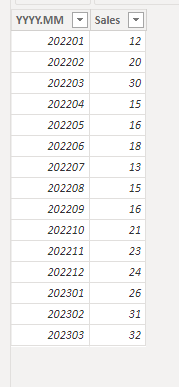
1. below is my test table

Table:

vbinbinyumsft_0-1679464768856.png

2. create measure with below dax formula

RK = RANKX(ALL('Table'),CALCULATE(MAX([YYYY.MM])),,ASC)
R12 =
VAR _rk = [RK]
VAR tmp =
    FILTER ( ALL ( 'Table' ), [RK] <= _rk && [RK] >= _rk - 11 )
RETURN
    SUMX ( tmp, [Sales] )

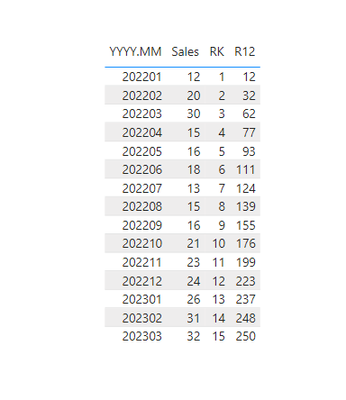
3. add a table visual with fields and measure

vbinbinyumsft_1-1679464876310.png

Please refer the attached .pbix file.


Best regards,
Community Support Team_Binbin Yu
If this post helps, then please consider Accept it as the solution to help the other members find it more quickly.

View solution in original post

5 REPLIES 5
Anonymous
Not applicable

Hi @Hichamas4 ,

Please try below steps:

1. below is my test table

Table:

vbinbinyumsft_0-1679464768856.png

2. create measure with below dax formula

RK = RANKX(ALL('Table'),CALCULATE(MAX([YYYY.MM])),,ASC)
R12 =
VAR _rk = [RK]
VAR tmp =
    FILTER ( ALL ( 'Table' ), [RK] <= _rk && [RK] >= _rk - 11 )
RETURN
    SUMX ( tmp, [Sales] )

3. add a table visual with fields and measure

vbinbinyumsft_1-1679464876310.png

Please refer the attached .pbix file.


Best regards,
Community Support Team_Binbin Yu
If this post helps, then please consider Accept it as the solution to help the other members find it more quickly.

FreemanZ
Super User
Super User

hi @Hichamas4 

what is R12?

Rolling 12 Months!

Aha, then try to add a column in dim.date table like:
Date = DATE([year], [period], 1)


then you are free to use all the Time Intelligence Functions, like: DATESBETWEEN, DATEINPERIOD for rolling calculations.

For the moment, I do not want to add no dim.date table. I only want to use the year.period column I created in the actual table.

Helpful resources

Announcements
November Power BI Update Carousel

Power BI Monthly Update - November 2025

Check out the November 2025 Power BI update to learn about new features.

Fabric Data Days Carousel

Fabric Data Days

Advance your Data & AI career with 50 days of live learning, contests, hands-on challenges, study groups & certifications and more!

FabCon Atlanta 2026 carousel

FabCon Atlanta 2026

Join us at FabCon Atlanta, March 16-20, for the ultimate Fabric, Power BI, AI and SQL community-led event. Save $200 with code FABCOMM.

Top Solution Authors
Top Kudoed Authors