Hello, I try to calculate percentile on time field by name. The format of the time field is HH:MM:SS. When I do the formula it always give me an error that I Can't display the visual. My visual is just a table.
Here is data sample:
| S Number | Name | time |
| 1 | blue | 00:06:40 |
| 1 | blue | 00:03:54 |
| 1 | blue | 00:04:52 |
| 1 | blue | 00:00:00 |
| 1 | blue | 00:09:01 |
| 1 | blue | 00:04:28 |
| 1 | blue | 00:06:08 |
| 2 | red | 00:08:40 |
| 2 | red | 00:04:00 |
| 2 | red | 00:08:48 |
| 2 | red | 00:05:00 |
| 2 | red | 00:00:00 |
| 2 | red | 00:04:04 |
| 2 | red | 00:08:43 |
| 3 | green | 00:04:06 |
| 3 | green | 00:05:19 |
| 3 | green | 00:02:30 |
| 3 | green | 00:05:27 |
| 3 | green | 00:08:40 |
| 3 | green | 00:00:00 |
| 4 | yellow | 00:03:23 |
| 4 | yellow | 00:06:18 |
| 4 | yellow | 00:07:21 |
| 4 | yellow | 00:07:22 |
| 4 | yellow | 00:09:50 |
| 4 | yellow | 00:00:03 |
Here is what I am trying to do:
Percentile of time = FORMAT(percentile.inc(DataTEST[time], 0.9), "HH:MM:SS")
I can calculate average on time using this formula: average time = FORMAT(averagea(DataTEST[time]), "HH:MM:SS")
I can also calculate the percentile on the "S Number" using this formula, I don't need it but it, but it just show how that should be done with the time field:percentile Number = percentile.inc(DataTEST[S Number], 0.75)
Here is my table with the working calculation:
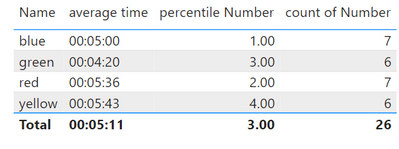
The result that I am hoping for is the percentile for each name: Blue, green, red, yellow.
I hope that I am clear enough.
Thank you


