Join us at FabCon Atlanta from March 16 - 20, 2026, for the ultimate Fabric, Power BI, AI and SQL community-led event. Save $200 with code FABCOMM.
Register now!The Power BI Data Visualization World Championships is back! Get ahead of the game and start preparing now! Learn more
Hello,
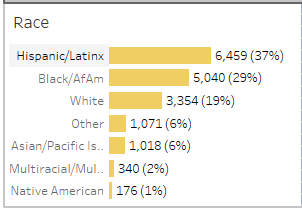
I have some demographic data and I am creating bar charts. The dataset is one row per respondant. I'd like to display both the number of and percentage of respondants for each race category in the bar chart, like in the example below (generated in Tableau). I have seen solutions for creating stacked column and line charts as a workaround, but the percentages do not display well on the smallest categories.
Any solutions for easily displaying displaying percentages? It does not necessarily need to be in the bar chart format, though that is preferable.
Solved! Go to Solution.
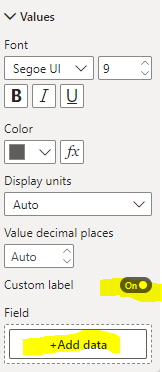
Bar charts and column charts by default can't include percentages in the labels but a workaround that may work is the next one.
Create a measure like this:
Proud to be a Super User!
Bar charts and column charts by default can't include percentages in the labels but a workaround that may work is the next one.
Create a measure like this:
Proud to be a Super User!
The Power BI Data Visualization World Championships is back! Get ahead of the game and start preparing now!
Check out the November 2025 Power BI update to learn about new features.
| User | Count |
|---|---|
| 59 | |
| 43 | |
| 42 | |
| 23 | |
| 17 |
| User | Count |
|---|---|
| 190 | |
| 122 | |
| 96 | |
| 66 | |
| 47 |