cancel
Showing results for 
Search instead for 
Did you mean: 

View all the Fabric Data Days sessions on demand. View schedule

Reply
Anonymous
Not applicable

Calculate Month Total with selected Filter date

Hi


I have a dataset as below :


Month    Day of Month    Values   Distinct count of days      Total(Values)      Average= Total(Values)/Distinct count of days

1             1                           20                    2                                 50                             50/2

1             2                           30                    2                                 50                             50/2

2             1                           30                    2                                 70                             70/2

2             2                           40                    2                                 70                             70/2


I want to calculate average for every month on basis of filter selection . For example :

If user selects 1 and 2 Day of Month from Month-1 and 1 and 2 Day of Month from Month-2 . The above total should calculate as shown.


I am able to achieve distinct count of days with this formula -

Distinct count of days = CALCULATE(COUNTROWS(FILTERS(Table[DAY_OF_MONTH])),ALLSELECTED(Table))
 
I am unable to calculate Total (Values) Monthwise.
Total (Values)= CALCULATE(SUM([Values]),ALLSELECTED(Table))  - This calculates the sum for all four selected entries , i want it to sum it monthwise.
 
Please Help.
 
Thank You in Advance
 
Power BI User


1 ACCEPTED SOLUTION
v-lili6-msft
Community Support
Community Support

hi, @Anonymous

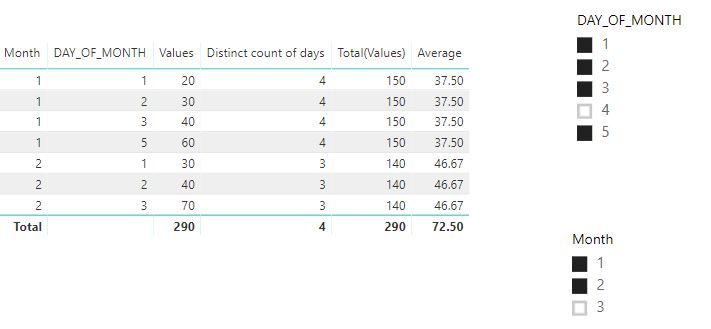
You could try these three formulas as below:

Distinct count of days = CALCULATE(DISTINCTCOUNT('Table'[DAY_OF_MONTH]),ALLSELECTED('Table'[DAY_OF_MONTH]))


Total(Values) = CALCULATE(SUM('Table'[Values]),ALLSELECTED('Table'[DAY_OF_MONTH]))


Average = [Total(Values)]/[Distinct count of days]

Result:

4.JPG


and here is pbix, please try it.


Best Regards,

Lin


Community Support Team _ Lin
If this post helps, then please consider Accept it as the solution to help the other members find it more quickly.

View solution in original post

3 REPLIES 3
v-lili6-msft
Community Support
Community Support

hi, @Anonymous

You could try these three formulas as below:

Distinct count of days = CALCULATE(DISTINCTCOUNT('Table'[DAY_OF_MONTH]),ALLSELECTED('Table'[DAY_OF_MONTH]))


Total(Values) = CALCULATE(SUM('Table'[Values]),ALLSELECTED('Table'[DAY_OF_MONTH]))


Average = [Total(Values)]/[Distinct count of days]

Result:

4.JPG


and here is pbix, please try it.


Best Regards,

Lin


Community Support Team _ Lin
If this post helps, then please consider Accept it as the solution to help the other members find it more quickly.
Anonymous
Not applicable

Thanks a lot Lin. 🙂


This Solution worked for me.

Anonymous
Not applicable

Hello,

See image I've attached and tell us if works for you.


CalculateMonthDaySelected.JPG

Helpful resources

Announcements
November Power BI Update Carousel

Power BI Monthly Update - November 2025

Check out the November 2025 Power BI update to learn about new features.

Fabric Data Days Carousel

Fabric Data Days

Advance your Data & AI career with 50 days of live learning, contests, hands-on challenges, study groups & certifications and more!

FabCon Atlanta 2026 carousel

FabCon Atlanta 2026

Join us at FabCon Atlanta, March 16-20, for the ultimate Fabric, Power BI, AI and SQL community-led event. Save $200 with code FABCOMM.

Top Solution Authors
Top Kudoed Authors