Join us at FabCon Atlanta from March 16 - 20, 2026, for the ultimate Fabric, Power BI, AI and SQL community-led event. Save $200 with code FABCOMM.
Register now!The Power BI Data Visualization World Championships is back! It's time to submit your entry. Live now!
I am using the following DAX expression to calculate the difference between Minutes Used and (Ad-hoc + Baseline). It works.
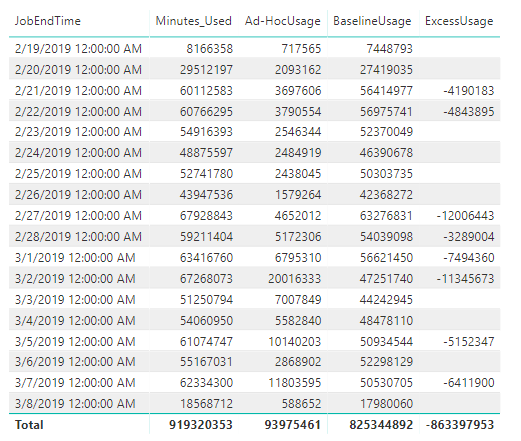
However, when I look at it in table format, image below, the ExcessUsage TOTAL = 863,397,953; which is incorrect. It should be 54,733,805. Any suggestions on why this is happening?
Solved! Go to Solution.
Try wrapping your function in SUMX:
SUMX( VALUES( Table [ Column] ), ....
Hi @emiec
Can you please post the raw datasets and pbix in google drive / onedrive and shre the link here to formulate a solution.
Cheers
CheenuSing
Try wrapping your function in SUMX:
SUMX( VALUES( Table [ Column] ), ....
I ended up writing the following DAX measure and it worked. Thanks for the suggestion.
Thanks for the suggestion. I did try but it didn't work.
The Power BI Data Visualization World Championships is back! It's time to submit your entry.
Check out the January 2026 Power BI update to learn about new features.
| User | Count |
|---|---|
| 56 | |
| 40 | |
| 38 | |
| 21 | |
| 21 |
| User | Count |
|---|---|
| 141 | |
| 105 | |
| 63 | |
| 36 | |
| 35 |