Join us at FabCon Atlanta from March 16 - 20, 2026, for the ultimate Fabric, Power BI, AI and SQL community-led event. Save $200 with code FABCOMM.
Register now!The Power BI Data Visualization World Championships is back! Get ahead of the game and start preparing now! Learn more
Hello Everyone,
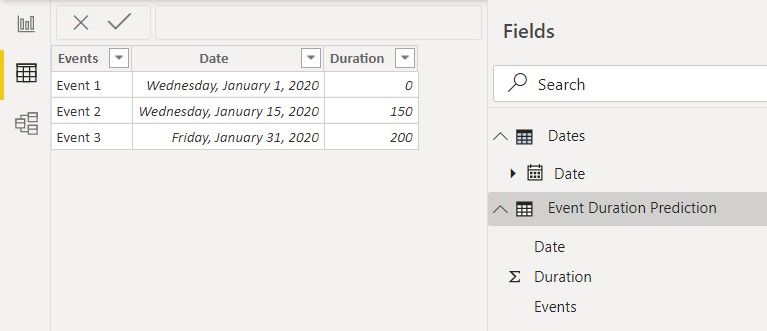
I have a Table "Event duration Prediction" with [Duration] Values for 01.01.2020 , 15.01.2020 and 31.01.2020 (shown below)
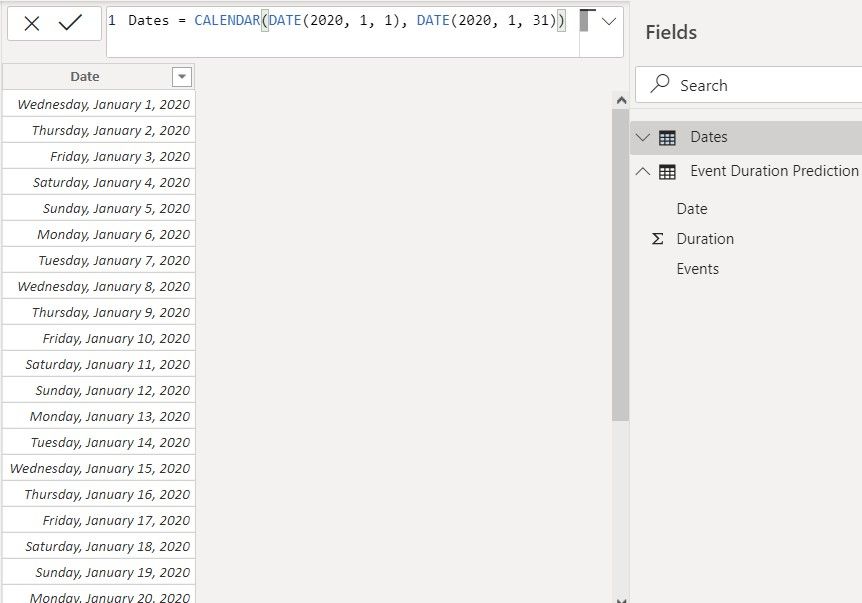
I have a "Dates" Table with [Date] from 01.01.2020 to 31.01.2020 (shown below) and there is a Date Relationship between both.
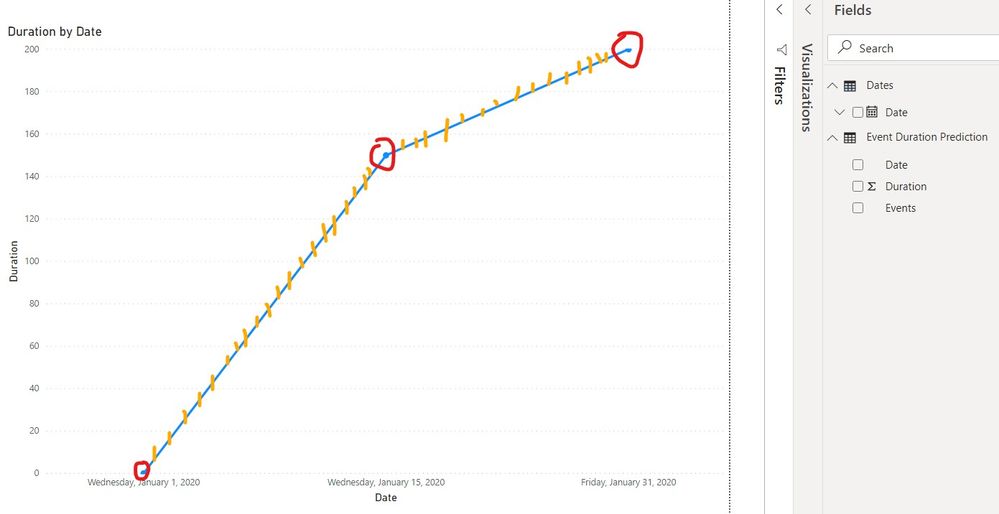
Below I plot in X axis my "Dates Table" [Date], and as Y axis my "Event Duration Prediction" [Duration] .
My goal is to be able to calculate (Interpolate) the Duration for Every single day in the [Dates] Table (Values shown below as Orange below)
At the moment I only have the 3 Values represented as Red
Any Idea how to accomplish that?
Thanks in advance,
Rui
Solved! Go to Solution.
Hi @trovisco (Rui),
Looking at the blog post you can adapt the code to the following https://community.powerbi.com/t5/Quick-Measures-Gallery/Linear-Interpolation/m-p/330712:
(thank you @Greg_Deckler )
You create a measure with the following syntax:
Interpolated Value =
VAR x3 = MAX(Dates[Date])
VAR match = CALCULATE(MAX('Event Duration Prediction'[Duration]);FILTER('Event Duration Prediction';'Event Duration Prediction'[Date]=x3))
VAR x1 = CALCULATE(MAX('Event Duration Prediction'[Date]);FILTER('Event Duration Prediction';'Event Duration Prediction'[Date]<=x3))
VAR x2 = CALCULATE(MIN('Event Duration Prediction'[Date]);FILTER('Event Duration Prediction';'Event Duration Prediction'[Date]>=x3))
VAR y1 = CALCULATE(MAX('Event Duration Prediction'[Duration]);FILTER('Event Duration Prediction';'Event Duration Prediction'[Date]<=x3))
VAR y2 = CALCULATE(MIN('Event Duration Prediction'[Duration]);FILTER('Event Duration Prediction';'Event Duration Prediction'[Date]>=x3))
RETURN IF(NOT(ISBLANK(match));match;y1 + (x3 - x1) * (y2 - y1)/(x2 - x1))
Be aware that the trick is not to have the Date table and Events table related with each other.
Any questions please tell me.
Regards
Miguel Félix
Proud to be a Super User!
Check out my blog: Power BI em PortuguêsHi @trovisco (Rui),
Looking at the blog post you can adapt the code to the following https://community.powerbi.com/t5/Quick-Measures-Gallery/Linear-Interpolation/m-p/330712:
(thank you @Greg_Deckler )
You create a measure with the following syntax:
Interpolated Value =
VAR x3 = MAX(Dates[Date])
VAR match = CALCULATE(MAX('Event Duration Prediction'[Duration]);FILTER('Event Duration Prediction';'Event Duration Prediction'[Date]=x3))
VAR x1 = CALCULATE(MAX('Event Duration Prediction'[Date]);FILTER('Event Duration Prediction';'Event Duration Prediction'[Date]<=x3))
VAR x2 = CALCULATE(MIN('Event Duration Prediction'[Date]);FILTER('Event Duration Prediction';'Event Duration Prediction'[Date]>=x3))
VAR y1 = CALCULATE(MAX('Event Duration Prediction'[Duration]);FILTER('Event Duration Prediction';'Event Duration Prediction'[Date]<=x3))
VAR y2 = CALCULATE(MIN('Event Duration Prediction'[Duration]);FILTER('Event Duration Prediction';'Event Duration Prediction'[Date]>=x3))
RETURN IF(NOT(ISBLANK(match));match;y1 + (x3 - x1) * (y2 - y1)/(x2 - x1))
Be aware that the trick is not to have the Date table and Events table related with each other.
Any questions please tell me.
Regards
Miguel Félix
Proud to be a Super User!
Check out my blog: Power BI em PortuguêsThe Power BI Data Visualization World Championships is back! Get ahead of the game and start preparing now!
Check out the November 2025 Power BI update to learn about new features.
| User | Count |
|---|---|
| 59 | |
| 46 | |
| 42 | |
| 23 | |
| 18 |
| User | Count |
|---|---|
| 193 | |
| 123 | |
| 99 | |
| 67 | |
| 49 |