FabCon is coming to Atlanta
Join us at FabCon Atlanta from March 16 - 20, 2026, for the ultimate Fabric, Power BI, AI and SQL community-led event. Save $200 with code FABCOMM.
Register now!- Power BI forums
- Get Help with Power BI
- Desktop
- Service
- Report Server
- Power Query
- Mobile Apps
- Developer
- DAX Commands and Tips
- Custom Visuals Development Discussion
- Health and Life Sciences
- Power BI Spanish forums
- Translated Spanish Desktop
- Training and Consulting
- Instructor Led Training
- Dashboard in a Day for Women, by Women
- Galleries
- Data Stories Gallery
- Themes Gallery
- Contests Gallery
- QuickViz Gallery
- Quick Measures Gallery
- Visual Calculations Gallery
- Notebook Gallery
- Translytical Task Flow Gallery
- TMDL Gallery
- R Script Showcase
- Webinars and Video Gallery
- Ideas
- Custom Visuals Ideas (read-only)
- Issues
- Issues
- Events
- Upcoming Events
Get Fabric Certified for FREE during Fabric Data Days. Don't miss your chance! Request now
- Power BI forums
- Forums
- Get Help with Power BI
- Desktop
- Re: Calculate Hourly Rate Changes by Amount
- Subscribe to RSS Feed
- Mark Topic as New
- Mark Topic as Read
- Float this Topic for Current User
- Bookmark
- Subscribe
- Printer Friendly Page

- Mark as New
- Bookmark
- Subscribe
- Mute
- Subscribe to RSS Feed
- Permalink
- Report Inappropriate Content
Calculate Hourly Rate Changes by Amount
Hi all,
I'm having trouble calculating hourly rate changes. I have a "Rates" tables and a "Skills" table that are currently matched at a many-to-many relationship (which I can delete if this is unnecessary). It's possible that I am going about solving this problem entirely wrong, but here's what I have right now.
A simplified version of these tables is as follows:
Rates Table:
Company Code Skill Type Hourly Rate Start Date End Date
1 Craftsman 20.00 1/1/19 7/31/19
1 Craftsman II 21.00 8/1/19 12/31/20
2 Journeyman 20.00 1/1/19 1/31/19
2 Ast. Journeyman 19.00 2/1/19 12/31/20
Skills Table:
Company Code Employee ID Skill Type Start Date End Date
1 1001 Craftsman 1/1/19 7/31/19
1 1001 Craftsman II 8/1/19 12/31/20
2 1002 Journeyman 1/1/19 1/31/19
2 1002 Ast. Journeyman 2/1/19 12/31/20
*Prev Skill *Prev Skill Date *Curr Skill *Prev Rate *Curr Rate
Craftsman 7/31/19 20.00
Craftsman II 21.00
Journeyman 1/31/19 20.00
Ast. Journeyman 19.00
*These are calculated columns I've created. (However, this leaves a lot of blank fields).
Calculated Columns are written as:
My end goal is to calculate the rate changes by amount.
For instance, in the example above employee # 1001 had a $1.00/hour increase, while employee # 1002 had a rate change of -1.00/hour.
Solved! Go to Solution.


- Mark as New
- Bookmark
- Subscribe
- Mute
- Subscribe to RSS Feed
- Permalink
- Report Inappropriate Content
@Anonymous hopefully this is what you are looking for
E Table
| Company | EmployeeID | Skill | Start Date | End Date |
| 1 | 1001 | Craftsman | 1/1/2019 | 7/31/2019 |
| 1 | 1001 | Craftsman2 | 8/1/2019 | 12/31/2020 |
| 2 | 1002 | Journeyman | 1/1/2019 | 1/31/2019 |
| 2 | 1002 | Ast.Journeyman | 2/1/2019 | 12/31/2020 |
| 3 | 1003 | Craftsman | 1/1/2004 | 12/31/2004 |
| 3 | 1003 | Craftsman2 | 1/1/2005 | 12/31/2005 |
| 3 | 1003 | Journeyman | 1/1/2006 | 12/31/2006 |
T Table
| Company | Skill | Rate | Start Date | End Date |
| 1 | Craftsman | 20 | 1/1/2019 | 7/31/2019 |
| 1 | Craftsman2 | 21 | 8/1/2019 | 12/31/2020 |
| 2 | Journeyman | 20 | 1/1/2019 | 1/31/2019 |
| 2 | Ast.Journeyman | 19 | 2/1/2019 | 12/31/2020 |
| 3 | Craftsman | 20 | 1/1/2004 | 12/31/2004 |
| 3 | Craftsman2 | 25 | 1/1/2005 | 12/31/2005 |
| 3 | Journeyman | 50 | 1/1/2006 | 12/31/2006 |
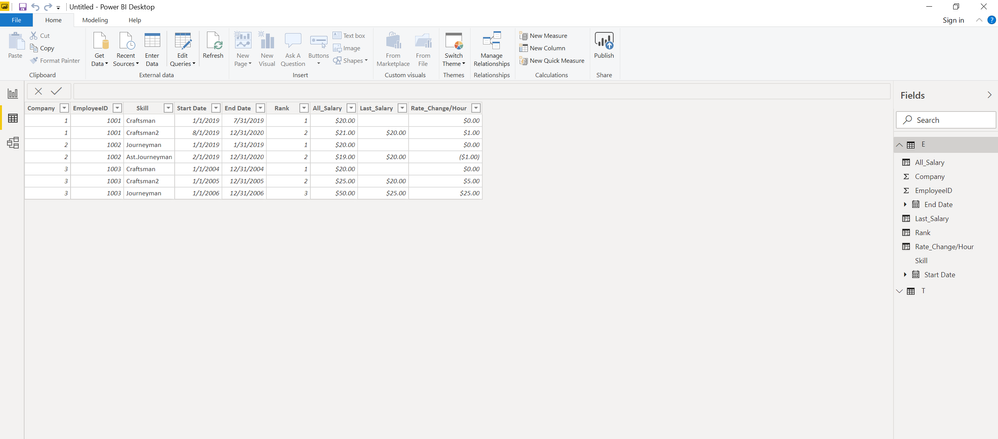
Calulated Columns are as following
Rank =
// To get a ranking of company-employeeID group based on EndDate
RANKX(
       FILTER(E,
               EARLIER(E[Company])=E[Company]
               &&
               EARLIER(E[EmployeeID])=E[EmployeeID]),
      E[End Date],
      ,ASC
)
All_Salary = LOOKUPVALUE(T[Rate],T[Company],E[Company],T[Skill],E[Skill],T[Start Date],E[Start Date],T[End Date],E[End Date])
Last_Salary = CALCULATE(MAX(E[All_Salary]),FILTER(E, E[Rank]=EARLIER(E[Rank])-1))
Rate_Change/Hour = IF(ISBLANK(E[Last_Salary]),0,[All_Salary]-[Last_Salary])
- Mark as New
- Bookmark
- Subscribe
- Mute
- Subscribe to RSS Feed
- Permalink
- Report Inappropriate Content
@Anonymous hopefully this is what you are looking for
E Table
| Company | EmployeeID | Skill | Start Date | End Date |
| 1 | 1001 | Craftsman | 1/1/2019 | 7/31/2019 |
| 1 | 1001 | Craftsman2 | 8/1/2019 | 12/31/2020 |
| 2 | 1002 | Journeyman | 1/1/2019 | 1/31/2019 |
| 2 | 1002 | Ast.Journeyman | 2/1/2019 | 12/31/2020 |
| 3 | 1003 | Craftsman | 1/1/2004 | 12/31/2004 |
| 3 | 1003 | Craftsman2 | 1/1/2005 | 12/31/2005 |
| 3 | 1003 | Journeyman | 1/1/2006 | 12/31/2006 |
T Table
| Company | Skill | Rate | Start Date | End Date |
| 1 | Craftsman | 20 | 1/1/2019 | 7/31/2019 |
| 1 | Craftsman2 | 21 | 8/1/2019 | 12/31/2020 |
| 2 | Journeyman | 20 | 1/1/2019 | 1/31/2019 |
| 2 | Ast.Journeyman | 19 | 2/1/2019 | 12/31/2020 |
| 3 | Craftsman | 20 | 1/1/2004 | 12/31/2004 |
| 3 | Craftsman2 | 25 | 1/1/2005 | 12/31/2005 |
| 3 | Journeyman | 50 | 1/1/2006 | 12/31/2006 |
Calulated Columns are as following
Rank =
// To get a ranking of company-employeeID group based on EndDate
RANKX(
       FILTER(E,
               EARLIER(E[Company])=E[Company]
               &&
               EARLIER(E[EmployeeID])=E[EmployeeID]),
      E[End Date],
      ,ASC
)
All_Salary = LOOKUPVALUE(T[Rate],T[Company],E[Company],T[Skill],E[Skill],T[Start Date],E[Start Date],T[End Date],E[End Date])
Last_Salary = CALCULATE(MAX(E[All_Salary]),FILTER(E, E[Rank]=EARLIER(E[Rank])-1))
Rate_Change/Hour = IF(ISBLANK(E[Last_Salary]),0,[All_Salary]-[Last_Salary])
- Mark as New
- Bookmark
- Subscribe
- Mute
- Subscribe to RSS Feed
- Permalink
- Report Inappropriate Content
This is fantastic! Thank you.
I only made a couple of changes...
LOOKUPVALUE was still returning an error because of multiple values. So I used:
Last_Salary = CALCULATE(MAX(E[All_Salary]),FILTER(E, E[Rank]=EARLIER(E[Rank])-1))
Needed one more criteria... So I added this to the end...
Last_Salary = CALCULATE (MAX(E [All_Salary]), FILTER (E, E[Rank]=EARLIER(E[Rank])-1 && E[employee_id] = EARLIER(E[employee_id] ) ) )


- Mark as New
- Bookmark
- Subscribe
- Mute
- Subscribe to RSS Feed
- Permalink
- Report Inappropriate Content
@Anonymous
You may use LOOKUPVALUE Function to add a calculated column and then refer to this post.
If this post helps, then please consider Accept it as the solution to help the other members find it more quickly.
- Mark as New
- Bookmark
- Subscribe
- Mute
- Subscribe to RSS Feed
- Permalink
- Report Inappropriate Content
The trouble I'm having with LOOKUPVALUE is that it always returns "A table of multiple values was supplied where a single value was expected."
Helpful resources

Power BI Monthly Update - November 2025
Check out the November 2025 Power BI update to learn about new features.

Fabric Data Days
Advance your Data & AI career with 50 days of live learning, contests, hands-on challenges, study groups & certifications and more!

FabCon Atlanta 2026
Join us at FabCon Atlanta, March 16-20, for the ultimate Fabric, Power BI, AI and SQL community-led event. Save $200 with code FABCOMM.


