Join us at FabCon Atlanta from March 16 - 20, 2026, for the ultimate Fabric, Power BI, AI and SQL community-led event. Save $200 with code FABCOMM.
Register now!Get Fabric certified for FREE! Don't miss your chance! Learn more
Hi all,
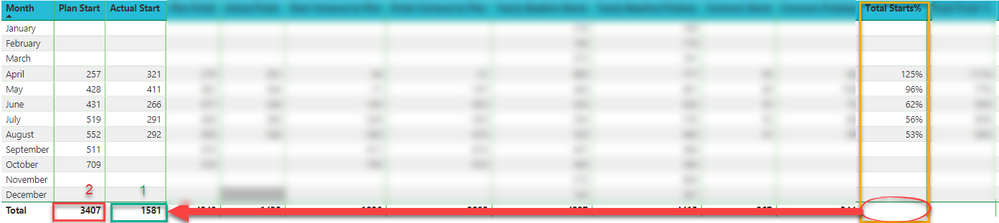
The problem I ran into I want to divide Actual Start over Plan Start (Actual Start divide Plan Start)
This is the calculated Actual Start Total, thanks to @Greg_Deckler
Actual Start = VAR __table = SUMMARIZE(MonthTable,[Month],"__value",[Actual Start]) RETURN IF(HASONEVALUE(MonthTable[Month]),[Actual Start],SUMX(__table,[__value]))
This is the calculated Plan Start Total
Plan Start = VAR __table = SUMMARIZE(MonthTable,[Month],"__value",[Plan Start]) RETURN IF(HASONEVALUE(MonthTable[Month]),[Plan Start],SUMX(__table,[__value]))
Now for the Total Finish%. I would like to count the difference Total by divide Actual Start Total over Plan Start Total to get Total Finish% total and not the total of the column
How should I write this function? Do I need to create a new measure for that?
Thanks guys ^^
Solved! Go to Solution.
I may be incorrect, but I am thinking that you could create a new measure like:
Total Finish % = DIVIDE([Actual Start],[Plan Start],BLANK())
Should work in the context of ALL (total row) and individual rows. You would format it as a %.
I may be incorrect, but I am thinking that you could create a new measure like:
Total Finish % = DIVIDE([Actual Start],[Plan Start],BLANK())
Should work in the context of ALL (total row) and individual rows. You would format it as a %.
@Greg_DecklerThank you so much for all your contributions and efforts to help other fellow users
Share feedback directly with Fabric product managers, participate in targeted research studies and influence the Fabric roadmap.
Check out the February 2026 Power BI update to learn about new features.
| User | Count |
|---|---|
| 70 | |
| 60 | |
| 47 | |
| 20 | |
| 16 |