


Join us at FabCon Atlanta from March 16 - 20, 2026, for the ultimate Fabric, Power BI, AI and SQL community-led event. Save $200 with code FABCOMM.
Register now!The Power BI Data Visualization World Championships is back! Get ahead of the game and start preparing now! Learn more
I need help, might be something simple. Trying to capture/ create measure per month per year and total overall.
Data Table
| Site # | Operating Day | Date |
| Site 1 | 20 | 1/1/2020 |
| Site 2 | 20 | 1/1/2020 |
| Site 3 | 20 | 1/1/2020 |
| Site 1 | 21 | 2/1/2020 |
| Site 2 | 21 | 2/1/2020 |
| Site 3 | 21 | 2/1/2020 |
| Site 1 | 20 | 3/1/2020 |
| Site 2 | 20 | 3/1/2020 |
| Site 3 | 20 | 3/1/2020 |
| Site 1 | 21 | 1/1/2021 |
| Site 2 | 21 | 1/1/2021 |
| Site 3 | 21 | 1/1/2021 |
| Site 1 | 19 | 2/1/2021 |
| Site 2 | 19 | 2/1/2021 |
| Site 3 | 19 | 2/1/2021 |
| Site 1 | 20 | 3/1/2021 |
| Site 2 | 20 | 3/1/2021 |
| Site 3 | 20 | 3/1/2021 |
| Site 1 | 20 | 1/1/2022 |
| Site 2 | 20 | 1/1/2022 |
| Site 3 | 20 | 1/1/2022 |
| Site 1 | 20 | 2/1/2022 |
| Site 2 | 20 | 2/1/2022 |
| Site 3 | 20 | 2/1/2022 |
| Site 1 | 22 | 3/1/2022 |
| Site 2 | 22 | 3/1/2022 |
| Site 3 | 22 | 3/1/2022 |
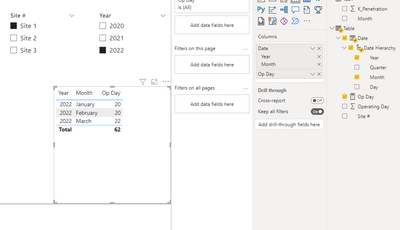
Desired output a single measure that user select time period and site to show operating day.
| Year | Op Day | Month |
| 2020 | 20 | Jan |
| 2020 | 21 | Feb |
| 2020 | 20 | Mar |
| 2020 Total | 61 | |
| 2021 | 21 | Jan |
| 2021 | 19 | Feb |
| 2021 | 20 | Mar |
| 2021 Total | 60 | |
| 2022 | 20 | Jan |
| 2022 | 20 | Feb |
| 2022 | 22 | Mar |
| 2022 Total | 62 | |
| Total Overall | 183 |
Solved! Go to Solution.
@Tevon713 hey did you managed or asked for this calculation?
@Tevon713 you just create this measure:
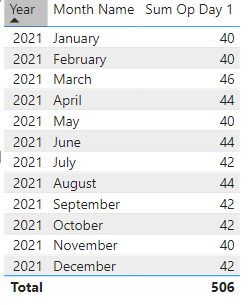
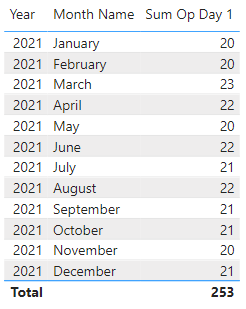
Thanks @SpartaBI. Problem found is if user select more than 1 region or site, it just sum up those per month. That is not correct.
With 2 sites selection
With 1 site (this is the correct)
Divide the sum by count of sites.
@Tevon713 hey did you managed or asked for this calculation?
Thank you again. Yes was exactly what I did.
@Tevon713 Great!
Hey, check out my showcase report:
https://community.powerbi.com/t5/Data-Stories-Gallery/SpartaBI-Feat-Contoso-100K/td-p/2449543
Give it a thumbs up if you liked it 🙂
The Power BI Data Visualization World Championships is back! Get ahead of the game and start preparing now!
| User | Count |
|---|---|
| 38 | |
| 38 | |
| 37 | |
| 28 | |
| 28 |
| User | Count |
|---|---|
| 124 | |
| 89 | |
| 73 | |
| 66 | |
| 65 |