This is best Fabric, Power BI, SQL and AI community event. How do we know? The last event sold out! Save €200 with code FABCMTY200.
Register nowA new Data Days event is coming soon! This time we’re going bigger than ever. Fabric, Power BI, SQL, AI and more. Don't miss out.
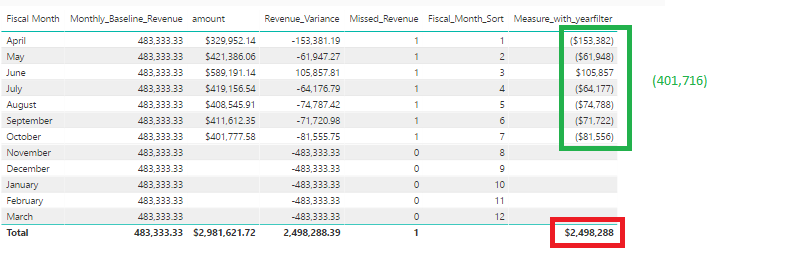
I am trying to sum up my variance for fiscal month to date and it's being troublesome, my DAX query is - Thank you in advance
Measure_with_yearfilter = CALCULATE([Revenue_Variance], FILTER(fact_invoice_tx_financials,[Missed_Revenue] = 1),FILTER(dim_date,YEAR(dim_date[Date]) = YEAR(TODAY())))
Solved! Go to Solution.
Hi @lmundia,
Try this
=SUMX(SUMMARIZE(fact_invoice_tx_financials,dim_date[Fiscal Month],"ABCD",CALCULATE([Revenue_Variance], FILTER(fact_invoice_tx_financials,[Missed_Revenue] = 1),FILTER(dim_date,YEAR(dim_date[Date]) = YEAR(TODAY())))),[ABCD])
Hope this helps.
Hi @lmundia,
Try this
=SUMX(SUMMARIZE(fact_invoice_tx_financials,dim_date[Fiscal Month],"ABCD",CALCULATE([Revenue_Variance], FILTER(fact_invoice_tx_financials,[Missed_Revenue] = 1),FILTER(dim_date,YEAR(dim_date[Date]) = YEAR(TODAY())))),[ABCD])
Hope this helps.
Hi @lmundia
Try this...
Measure_with_yearfilter =
var actualmonth = FIRSTNONBLANK(dim_date[Fiscal_Month_Sort];1)
return
CALCULATE
(
[Revenue_Variance],
ALL('dim_date'),
YEAR(dim_date[Date]) = YEAR(TODAY()),
dim_date[Fiscal_Month_Sort] <= actualmonth
)I hope this helps
Regards
BILASolution
returned the first fiscal month numbers, thank you for chipping in.
You are welcome.
Check out the May 2026 Power BI update to learn about new features.
Sign up to receive a private message when registration opens and key events begin.
If you have recently started exploring Fabric, we'd love to hear how it's going. Your feedback can help with product improvements.
| User | Count |
|---|---|
| 32 | |
| 26 | |
| 25 | |
| 24 | |
| 15 |
| User | Count |
|---|---|
| 62 | |
| 48 | |
| 27 | |
| 21 | |
| 20 |