Join us at FabCon Atlanta from March 16 - 20, 2026, for the ultimate Fabric, Power BI, AI and SQL community-led event. Save $200 with code FABCOMM.
Register now!The Power BI Data Visualization World Championships is back! Get ahead of the game and start preparing now! Learn more
Hello,
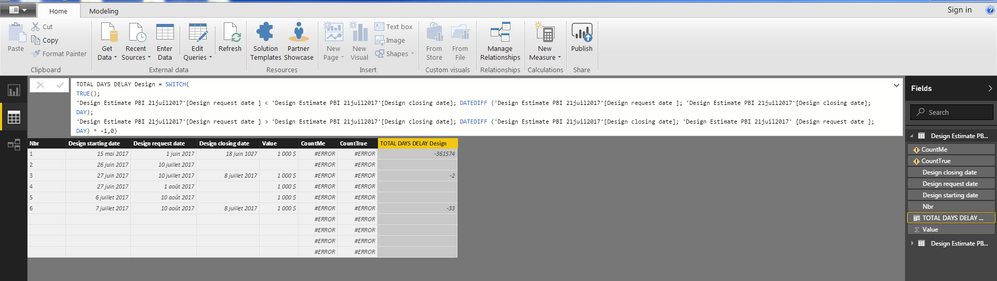
I create a new column (TOTAL DAYS DELAY Design) to calculate days number between two Date columns. If the 2 dates differed I can see how many days in between. If not the cell is empty and this is perfect.
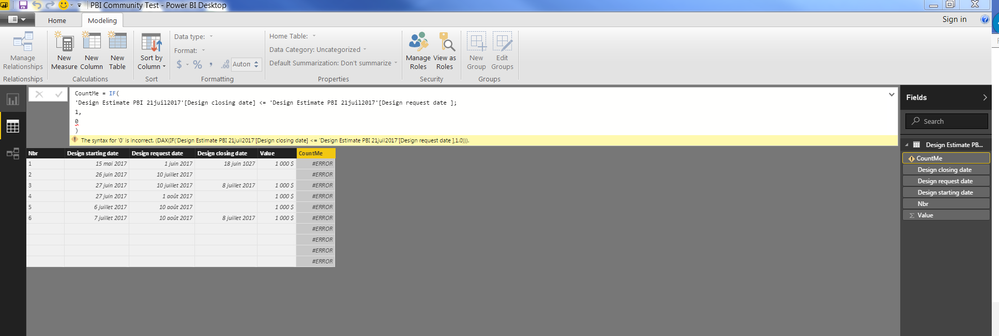
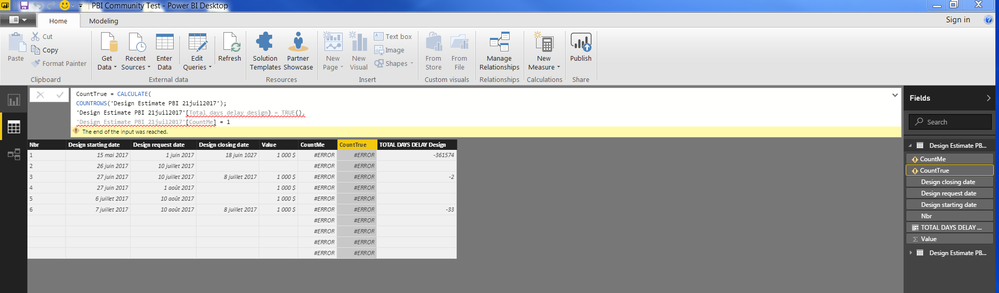
But the problem is I created an other column (Respecting Date) to show if the anticipated date is the same of the delivery date or if not. If the 2 dates are same and no difference in the column TOTAL DAYS DELAY Design (empty cell) put 1 in the column Respecting Date and if not put 0. I have to calculate how many projects respecting the anticipated dates and give a % on the total of project.
Respecting date (new column) = IF('Design Estimate'[TOTAL DELAYS DAYS Design] < 1, 1, 0)
Can you let me what is wrong in this measure, please.
I think your question in not pretty clear for me....
Hi @Guyloucou,
Can you please provide some sample data to help us understand your requirement?
Regards,
Xiaoxin Sheng
The third screenshot
Hi @Guyloucou,
I test on sample file without any issue, can you please provide your pbix file to test? It will be help for troubleshooting.
Regards,
Xiaoxin Sheng
Sorry I was absent yesterday.
Can you tell me what is wrong, please?
The Power BI Data Visualization World Championships is back! Get ahead of the game and start preparing now!
| User | Count |
|---|---|
| 40 | |
| 37 | |
| 35 | |
| 31 | |
| 28 |
| User | Count |
|---|---|
| 137 | |
| 102 | |
| 71 | |
| 67 | |
| 65 |