Get certified for free when you join Fabric Data Days 2026 and dive into Fabric, Power BI, SQL, AI, and other essential data skills.
Join nowData Days is here! Join us now for 60+ days of learning, challenges, and connection. Learn more
Hello,
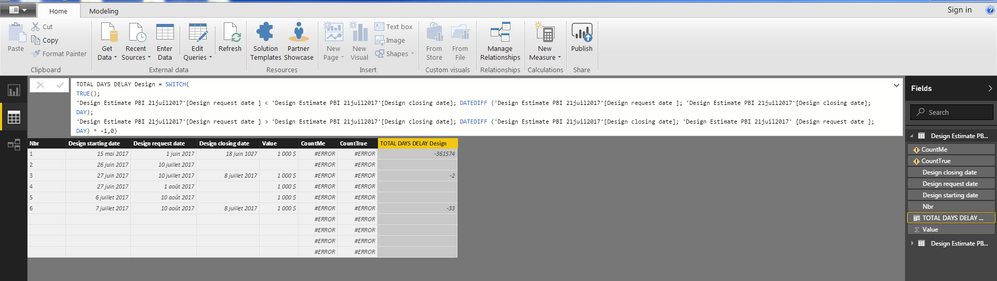
I create a new column (TOTAL DAYS DELAY Design) to calculate days number between two Date columns. If the 2 dates differed I can see how many days in between. If not the cell is empty and this is perfect.
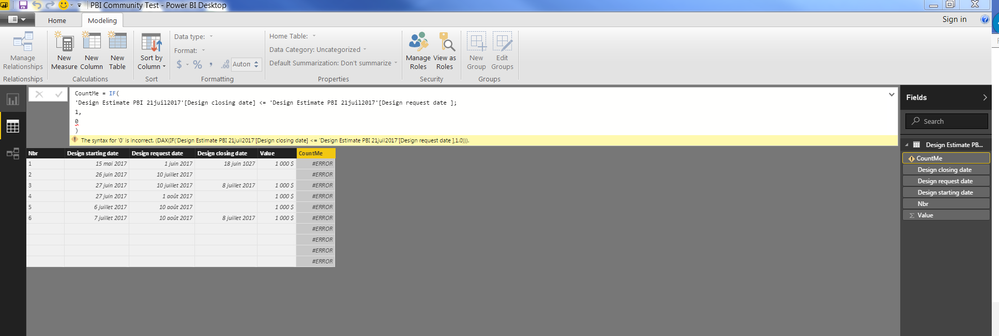
But the problem is I created an other column (Respecting Date) to show if the anticipated date is the same of the delivery date or if not. If the 2 dates are same and no difference in the column TOTAL DAYS DELAY Design (empty cell) put 1 in the column Respecting Date and if not put 0. I have to calculate how many projects respecting the anticipated dates and give a % on the total of project.
Respecting date (new column) = IF('Design Estimate'[TOTAL DELAYS DAYS Design] < 1, 1, 0)
Can you let me what is wrong in this measure, please.
I think your question in not pretty clear for me....
Hi @Guyloucou,
Can you please provide some sample data to help us understand your requirement?
Regards,
Xiaoxin Sheng
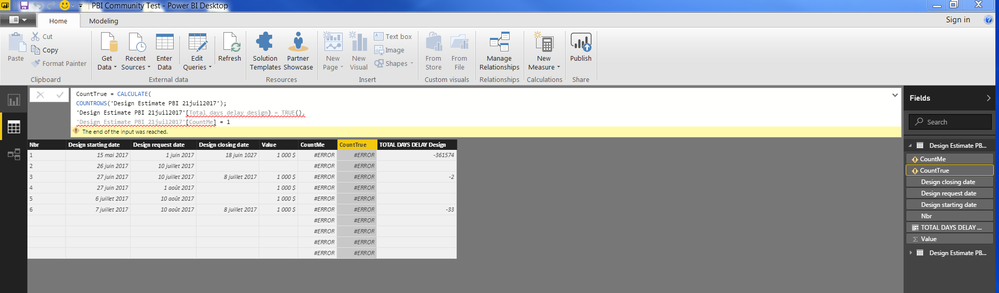
The third screenshot
Hi @Guyloucou,
I test on sample file without any issue, can you please provide your pbix file to test? It will be help for troubleshooting.
Regards,
Xiaoxin Sheng
Sorry I was absent yesterday.
Can you tell me what is wrong, please?
Don't miss out on Data Days, June 15 through August 7. Learn Fabric, Power BI, SQL, AI and more.
Check out the May 2026 Power BI update to learn about new features.
| User | Count |
|---|---|
| 23 | |
| 23 | |
| 21 | |
| 20 | |
| 15 |
| User | Count |
|---|---|
| 58 | |
| 54 | |
| 42 | |
| 30 | |
| 24 |