This time we’re going bigger than ever. Fabric, Power BI, SQL, AI and more. We're covering it all. You won't want to miss it.
Learn moreLevel up your Power BI skills this month - build one visual each week and tell better stories with data! Get started
Hello forum,
I hope you can help me on this one... ![]()
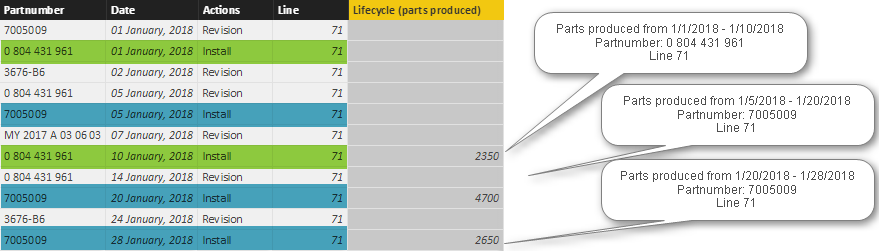
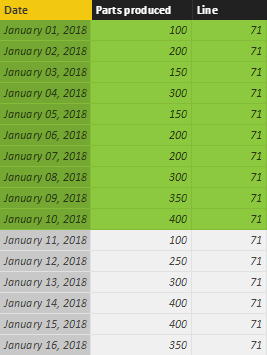
I got the following two tables Lifecycle and Parts produced:
Lifecycle
Parts produced
I would like to calculate the column Lifecycle (parts produced) in the Lifecycle table.
It should be based on the Action 'Install', Partnumber as well as Line.
For the green example:
Partnumber 0804 431 961 was installed on 1st Jan and 10th Jan --> Lifcecycle from 1/1/2018 - 1/10/2018
Partnumber 0804 431 961 belongs to Line 71 --> Parts produced table gives me the information that Line 71 produced a total of 2350 parts during the Lifcycle interval.
Is it possible to calculate such a column?
If what I am trying to do is not clear to you or your need further information please let me know.
Solved! Go to Solution.
Hi @zombieug
Try this calculated column in LifeCycle
LifeCycleProduction =
VAR PreviousInstallDate =
CALCULATE (
MAX ( Lifecycle[Date] ),
FILTER (
ALLEXCEPT ( Lifecycle, Lifecycle[PartNumber] ),
Lifecycle[Actions] = "Install"
&& Lifecycle[Date] < EARLIER ( Lifecycle[Date] )
)
)
RETURN
IF (
Lifecycle[Actions] = "Install"
&& NOT ( ISBLANK ( PreviousInstallDate ) ),
CALCULATE (
SUM ( PartsProduced[Partsproduced] ),
FILTER (
PartsProduced,
PartsProduced[Line] = Lifecycle[Line]
&& PartsProduced[Date] >= PreviousInstallDate
&& PartsProduced[Date] <= Lifecycle[Date]
)
)
)
Hi @zombieug
Try this calculated column in LifeCycle
LifeCycleProduction =
VAR PreviousInstallDate =
CALCULATE (
MAX ( Lifecycle[Date] ),
FILTER (
ALLEXCEPT ( Lifecycle, Lifecycle[PartNumber] ),
Lifecycle[Actions] = "Install"
&& Lifecycle[Date] < EARLIER ( Lifecycle[Date] )
)
)
RETURN
IF (
Lifecycle[Actions] = "Install"
&& NOT ( ISBLANK ( PreviousInstallDate ) ),
CALCULATE (
SUM ( PartsProduced[Partsproduced] ),
FILTER (
PartsProduced,
PartsProduced[Line] = Lifecycle[Line]
&& PartsProduced[Date] >= PreviousInstallDate
&& PartsProduced[Date] <= Lifecycle[Date]
)
)
)
Check out the April 2026 Power BI update to learn about new features.
Sign up to receive a private message when registration opens and key events begin.
If you have recently started exploring Fabric, we'd love to hear how it's going. Your feedback can help with product improvements.
| User | Count |
|---|---|
| 35 | |
| 32 | |
| 26 | |
| 21 | |
| 18 |
| User | Count |
|---|---|
| 68 | |
| 37 | |
| 32 | |
| 25 | |
| 23 |