
Join us at FabCon Atlanta from March 16 - 20, 2026, for the ultimate Fabric, Power BI, AI and SQL community-led event. Save $200 with code FABCOMM.
Register now!The Power BI Data Visualization World Championships is back! Get ahead of the game and start preparing now! Learn more
Hi guys,
I'm struggling with power bi DAX function.
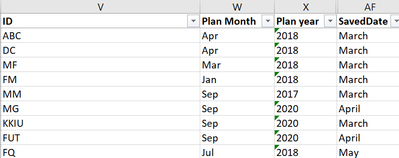
I have table consists of IDs, Plan Month, Plan Year, SavedDate.
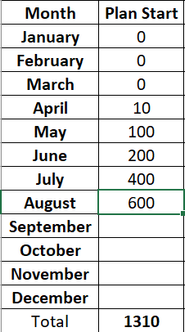
Back in Excel, I created 2 fields month and Plan Start manually.
For instance, I count the IDs filtered with Plan Month = April, Plan Year= 2018, SavedDate = March RETURN April = 10.
Another example, I count the IDs filtered with Plan Month = May, Plan Year= 2018, SavedDate = April RETURN May= 100.
I would like to know in power bi what would be the correct function for me to create a new calculated column or measure with different filters? or should created multiple measures?
Solved! Go to Solution.
hi, @Stuznet
You can try to use this formula
AprilStartPlan =
SWITCH (
TRUE (),
MAX ( DateTable[month] ) = "April", CALCULATE (
COUNT ( Data[ID] ),
FILTER (
Data,
[Plan Month] = "Apr"
&& [Plan Year] = "2018"
&& [SavedDate] = "March"
)
),
MAX ( DateTable[month] ) = "March", CALCULATE (
COUNT ( Data[ID] ),
FILTER (
Data,
[Plan Month] = "Mar"
&& [Plan Year] = "2018"
&& [SavedDate] = "March"
)
)
)Result:
here is pbix, please try it.
https://www.dropbox.com/s/gdwrikrf2gkih4h/Calculate%20Column%20With%20Filters.pbix?dl=0
By the way, your error that one ) is missing, there should be two ")" in this.
Best Regards,
Lin
Sooo, is there a pattern to that at all? If not, you could use a SWITCH TRUE statement like:
Measure =
SWITCH(
TRUE(),
MAX([Month]) = "April", CALCULATE(COUNT([ID]),FILTER('Table',[Plan Month]="April" && [Plan Year] = 2018 && [SavedDate]="March"),
MAX([Month]) = "May", CALCULATE(COUNT([ID]),FILTER('Table',[Plan Month]="May" && [Plan Year] = 2018 && [SavedDate]="April"),
)
@Greg_Decklerthank you for helping me. I used your provided solution but I'm getting an error
A function 'MAX' has been used in a True/False expression that is used as a table filter expression. This is not allowed.
AprilStartPlan = SWITCH(TRUE(),
MAX('DateTable[month])="April", CALCULATE(COUNT(Data[ID]),
FILTER(Data,[Plan Month] = "April" &&
[Plan Year] = "2018" &&
[SavedDate] = "March"),
MAX(DateTable[month]) = "May", CALCULATE(COUNT(Data[ID]),
FILTER(Data,[Plan Month] = "May" &&
[Plan Year] = "2018" &&
[SavedDate] = "April"))))
hi, @Stuznet
You can try to use this formula
AprilStartPlan =
SWITCH (
TRUE (),
MAX ( DateTable[month] ) = "April", CALCULATE (
COUNT ( Data[ID] ),
FILTER (
Data,
[Plan Month] = "Apr"
&& [Plan Year] = "2018"
&& [SavedDate] = "March"
)
),
MAX ( DateTable[month] ) = "March", CALCULATE (
COUNT ( Data[ID] ),
FILTER (
Data,
[Plan Month] = "Mar"
&& [Plan Year] = "2018"
&& [SavedDate] = "March"
)
)
)Result:
here is pbix, please try it.
https://www.dropbox.com/s/gdwrikrf2gkih4h/Calculate%20Column%20With%20Filters.pbix?dl=0
By the way, your error that one ) is missing, there should be two ")" in this.
Best Regards,
Lin
The Power BI Data Visualization World Championships is back! Get ahead of the game and start preparing now!
| User | Count |
|---|---|
| 38 | |
| 36 | |
| 33 | |
| 32 | |
| 29 |
| User | Count |
|---|---|
| 129 | |
| 88 | |
| 79 | |
| 68 | |
| 63 |