cancel
Showing results for 
Search instead for 
Did you mean: 

Get Fabric Certified for FREE during Fabric Data Days. Don't miss your chance! Request now

Reply
naoyixue1
Post Patron
Post Patron

Calculate Coefficient as column not measure

Hey all,


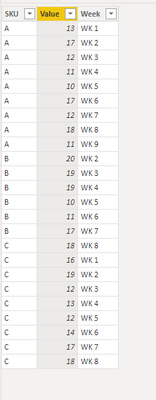
Since I want to add the attributes of coefficient of variance at SKU level, I want to calculate that as column not measure. (see below examples) 

Coefficient of variance = standard deviation /  average 


Given that, i should calculate

    1: the weekly average value based on how many weeks total for each item.

    2: the standard deviation of value at SKU level

    3: standard deviation / average 


Do you know how to calculate that in the column? Since I finally want to pull some graph based on the attributes of coefficient of variance. So that one have to be calculated not the measure. Any thoughts? Thanks!


naoyixue1_0-1670894409090.png


1 ACCEPTED SOLUTION
Anonymous
Not applicable

Hi @naoyixue1 ,

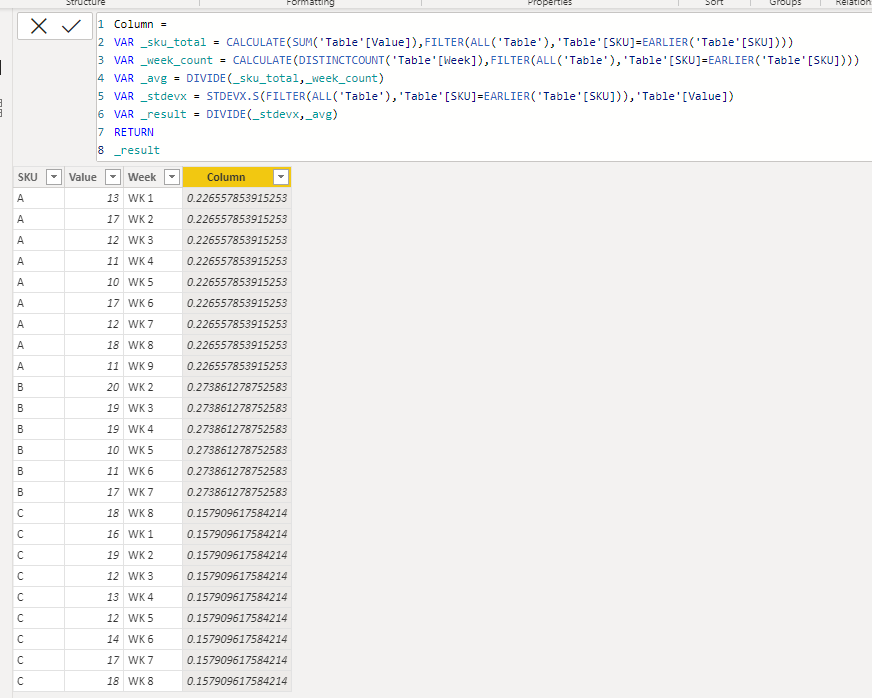
Please check if this is the output you want?

Column = 
VAR _sku_total = CALCULATE(SUM('Table'[Value]),FILTER(ALL('Table'),'Table'[SKU]=EARLIER('Table'[SKU])))
VAR _week_count = CALCULATE(DISTINCTCOUNT('Table'[Week]),FILTER(ALL('Table'),'Table'[SKU]=EARLIER('Table'[SKU])))
VAR _avg = DIVIDE(_sku_total,_week_count)
VAR _stdevx = STDEVX.S(FILTER(ALL('Table'),'Table'[SKU]=EARLIER('Table'[SKU])),'Table'[Value])
VAR _result = DIVIDE(_stdevx,_avg)
RETURN
_result

vcgaomsft_0-1671008885489.png

Best Regards,
Gao

Community Support Team


If there is any post helps, then please consider Accept it as the solution  to help the other members find it more quickly. If I misunderstand your needs or you still have problems on it, please feel free to let us know. Thanks a lot!

How to get your questions answered quickly --  How to provide sample data in the Power BI Forum

View solution in original post

3 REPLIES 3
naoyixue1
Post Patron
Post Patron

@Anonymous Thanks, Gao! It works for me. 

naoyixue1
Post Patron
Post Patron

Any thoughts? 

Anonymous
Not applicable

Hi @naoyixue1 ,

Please check if this is the output you want?

Column = 
VAR _sku_total = CALCULATE(SUM('Table'[Value]),FILTER(ALL('Table'),'Table'[SKU]=EARLIER('Table'[SKU])))
VAR _week_count = CALCULATE(DISTINCTCOUNT('Table'[Week]),FILTER(ALL('Table'),'Table'[SKU]=EARLIER('Table'[SKU])))
VAR _avg = DIVIDE(_sku_total,_week_count)
VAR _stdevx = STDEVX.S(FILTER(ALL('Table'),'Table'[SKU]=EARLIER('Table'[SKU])),'Table'[Value])
VAR _result = DIVIDE(_stdevx,_avg)
RETURN
_result

vcgaomsft_0-1671008885489.png

Best Regards,
Gao

Community Support Team


If there is any post helps, then please consider Accept it as the solution  to help the other members find it more quickly. If I misunderstand your needs or you still have problems on it, please feel free to let us know. Thanks a lot!

How to get your questions answered quickly --  How to provide sample data in the Power BI Forum

Helpful resources

Announcements
November Power BI Update Carousel

Power BI Monthly Update - November 2025

Check out the November 2025 Power BI update to learn about new features.

Fabric Data Days Carousel

Fabric Data Days

Advance your Data & AI career with 50 days of live learning, contests, hands-on challenges, study groups & certifications and more!

FabCon Atlanta 2026 carousel

FabCon Atlanta 2026

Join us at FabCon Atlanta, March 16-20, for the ultimate Fabric, Power BI, AI and SQL community-led event. Save $200 with code FABCOMM.

Top Solution Authors
Top Kudoed Authors