cancel
Showing results for 
Search instead for 
Did you mean: 

The Power BI Data Visualization World Championships is back! Get ahead of the game and start preparing now! Learn more

Reply
Namoh
Post Partisan
Post Partisan

Calculate Average from Top 3 from Last 5 Years

Hi PowerBI goeroes.


I have the following issue, hopefully someone can help me.


I've created a Measure which calculates the Unplanned Downtime Ratio.


I'm using this Measure in a graph with on x-axis the Date and a filter for selecting the Facilities.


I'm looking to add a column in the Graph which shows the Average of the Top 3 values (lower is better) from the Last 5 Years.


Datetable = DateTable

Datefield = CalendarMonthYear

MeasureTable = KPI

MeasureField = AY Unplanned Loss Ratio


I created a Measure for just the Top 3, but when I add this in a Table or Matrix, I get an error:  A table of multiple values was supplied where a single value was expected.


How should this "Top 3 over Last 5 Years" Measure look like?


5 REPLIES 5
Namoh
Post Partisan
Post Partisan

I've split up my issue in little steps.


I've combined the 3 columns into a new column.


With this new column I've added a ranking based on the Value column.


Now I need to calculate the average of the lowest 3 values from each unique value on the Combined column.


How to do this?


Combined          Value         Ranking        Average

ABC                    0.152               1                  0.2393333   

ABC                    0.364               4                  0.2393333

ABC                    0.481               5                  0.2393333

ABC                    0.251               2                  0.2393333

ABC                    0.314               3                  0.2393333

XYZ                    0.615               4                  0.5336666  

XYZ                    0.518               2                  0.5336666

XYZ                    0.492               1                  0.5336666

XYZ                    0.741               5                  0.5336666

XYZ                    0.591               3                  0.5336666


Namoh
Post Partisan
Post Partisan

Hi. I think I’ve tried to run a marathon without having learned how to walk. 


Let me explain how my pbix file is set up.


My main source is an excel file that is loaded with monthly data from different facilities with different losses (data is refreshed monthly).


On the M-Query side I’ve added columns / made formulas to add applicable information and to make sure inconsistent data is ignored (eg. some formulas are ratios, and when there’s a 0 in the data you would get an error. This has been taken care off with the formulas).


On the DAX side I made the same formulas.


I’ve made a copy from this table and Grouped the data on year level (hope I explain this correctly) to get year-data.


Then I’ve added those two, so I could get month and year data in one column which I could use for my graph, see below.
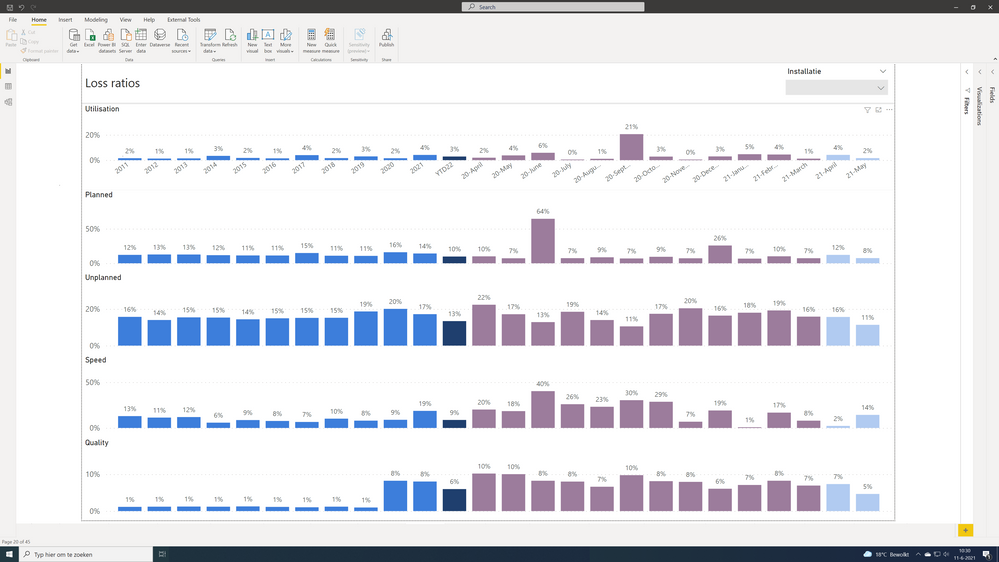
 

Example_current_ graph.png


This works perfectly.


What I now want, is to add a 3-monthly average from the best 3 months from the last 5 years, and in this case best means lowest values.


Below are the columns and the required column with the expected outcome, how should the formula look like?


Any help is appreciatted.
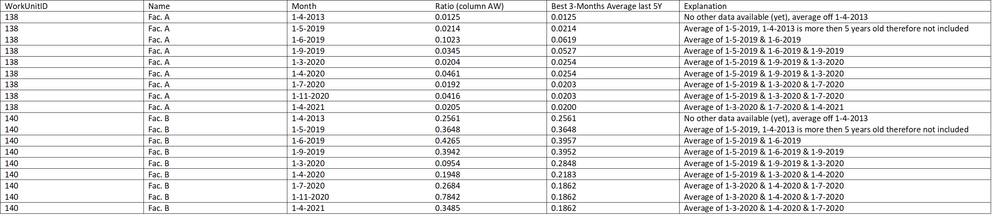
 

Table.png

Anonymous
Not applicable

HI @Namoh 

Can you please share your sample pbix file?


Hi Rajashri_Viz, I would love to, but it has classified data in it, and I'm not allowed to share this. 😞

Anonymous
Not applicable

Thats understandable @Namoh . 

"  error:  A table of multiple values was supplied where a single value was expected." this one usually appears in a measure when there are multiple values, you have to specify an aggregation, either max, min or count and then add this measure along with the aggregated column in your table, that should resolve your problem.

Please let me know, after trying it.

Thnx

Helpful resources

Announcements
Power BI DataViz World Championships

Power BI Dataviz World Championships

The Power BI Data Visualization World Championships is back! Get ahead of the game and start preparing now!

December 2025 Power BI Update Carousel

Power BI Monthly Update - December 2025

Check out the December 2025 Power BI Holiday Recap!

FabCon Atlanta 2026 carousel

FabCon Atlanta 2026

Join us at FabCon Atlanta, March 16-20, for the ultimate Fabric, Power BI, AI and SQL community-led event. Save $200 with code FABCOMM.