Join us at FabCon Atlanta from March 16 - 20, 2026, for the ultimate Fabric, Power BI, AI and SQL community-led event. Save $200 with code FABCOMM.
Register now!The Power BI Data Visualization World Championships is back! Get ahead of the game and start preparing now! Learn more
Hi everyone,
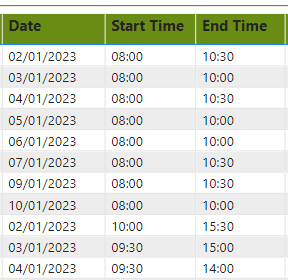
when I export my report data to csv, time fields display wrong values. in the csv file, time fields display a date in every row. This is how power bi report shows the time fields.
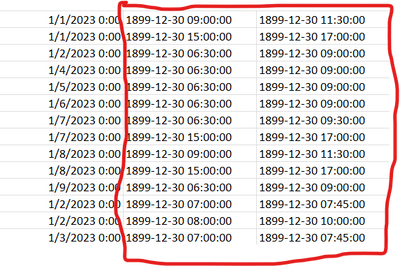
This is how exported csv file shows the time fields.
I opened this as a text file also. but the same issue reflects there as well. what's the solution for this & what's the reason to happens this.
Solved! Go to Solution.
Time values are basically just formatted integers, and so are dates - you can read more about it here. If you need the time value to show exactly as in the power BI report, you can use the FORMAT function to return the value as a string.
Hi everyone,
when I export my report data to csv, time fields display wrong values. in the csv file, time fields display a date in every row. This is how power bi report shows the time fields.
This is how exported csv file shows the time fields.
I opened this as a text file also. but the same issue reflects there as well. what's the solution for this & what's the reason to happens this.
Time values are basically just formatted integers, and so are dates - you can read more about it here. If you need the time value to show exactly as in the power BI report, you can use the FORMAT function to return the value as a string.
The Power BI Data Visualization World Championships is back! Get ahead of the game and start preparing now!
| User | Count |
|---|---|
| 63 | |
| 55 | |
| 42 | |
| 41 | |
| 23 |
| User | Count |
|---|---|
| 165 | |
| 132 | |
| 118 | |
| 79 | |
| 53 |