Join us at FabCon Atlanta from March 16 - 20, 2026, for the ultimate Fabric, Power BI, AI and SQL community-led event. Save $200 with code FABCOMM.
Register now!The Power BI Data Visualization World Championships is back! Get ahead of the game and start preparing now! Learn more
Good morning
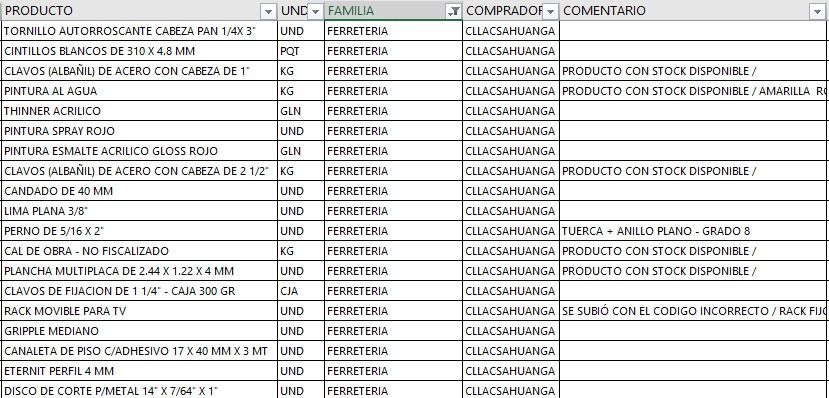
I have the following table
On which I want to calculate the percentage of product lines that do not have a text, in the comment column, I understand that for this I must generate a measure that transforms into numerical value the cells that have or do not have value, I have tried through COUNTX, but reflects the real data.
You can help me, thanks in advance
Solved! Go to Solution.
Hi @Syndicate_Admin ,
You can try the following:
1) Create a measure to count all products in the table- please adjust for your table and field names
ProductCount= COUNT(TableName[Producto])
2) Create a measure to count non-blank comments
CommentCount= COUNT(TableName[Comentario])
3) Divide the 2 measures to get percent with comments
PercentWithComments= DIVIDE([CommentCount],[ProductCount],0)
The COUNT function ignores blank values:
https://learn.microsoft.com/en-us/dax/count-function-dax
Please mark as solution if this answers the question- thanks!
Hi @Syndicate_Admin ,
You can try the following:
1) Create a measure to count all products in the table- please adjust for your table and field names
ProductCount= COUNT(TableName[Producto])
2) Create a measure to count non-blank comments
CommentCount= COUNT(TableName[Comentario])
3) Divide the 2 measures to get percent with comments
PercentWithComments= DIVIDE([CommentCount],[ProductCount],0)
The COUNT function ignores blank values:
https://learn.microsoft.com/en-us/dax/count-function-dax
Please mark as solution if this answers the question- thanks!
The Power BI Data Visualization World Championships is back! Get ahead of the game and start preparing now!
| User | Count |
|---|---|
| 39 | |
| 37 | |
| 33 | |
| 32 | |
| 29 |
| User | Count |
|---|---|
| 133 | |
| 88 | |
| 85 | |
| 68 | |
| 64 |