cancel
Showing results for 
Search instead for 
Did you mean: 

Join the FabCon + SQLCon recap series. Up next: Power BI, Real-Time Intelligence, IQ and AI, and Data Factory take center stage. All sessions are available on-demand after the live show. Register now

Reply
Trosa_220568
Regular Visitor

COUNT

Hi,

I have a table of distinct Account records, and I want a measure that counts how many Activities each Account have in a table of Activities. If an Account doesn't have any Activities, show Blank, otherwise show the number of Activities. I will basically count how many times the AccountId appears in the Activity table.


Account A3
Account B2
Account C 
Account D5
Account E 


Thanks

1 ACCEPTED SOLUTION
Anonymous
Not applicable

Hi @Trosa_220568 ,

There are two ways, please choose:

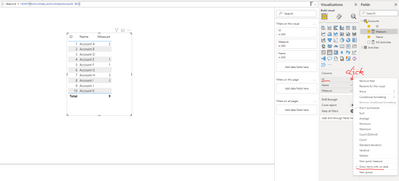
First way: select "Show items with no data"

vbinbinyumsft_0-1659098676379.png


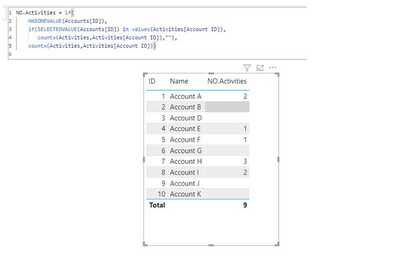
Second way: adjust your DAX formula

NO.Activities =
IF (
    HASONEVALUE ( Accounts[ID] ),
    IF (
        SELECTEDVALUE ( Accounts[ID] ) IN VALUES ( Activities[Account ID] ),
        COUNTX ( Activities, Activities[Account ID] ),
        ""
    ),
    COUNTX ( Activities, Activities[Account ID] )
)

vbinbinyumsft_1-1659098774994.png


Best regards,
Community Support Team_ Binbin Yu
If this post helps, then please consider Accept it as the solution to help the other members find it more quickly.

View solution in original post

4 REPLIES 4
Anonymous
Not applicable

Hi @Trosa_220568 ,

There are two ways, please choose:

First way: select "Show items with no data"

vbinbinyumsft_0-1659098676379.png


Second way: adjust your DAX formula

NO.Activities =
IF (
    HASONEVALUE ( Accounts[ID] ),
    IF (
        SELECTEDVALUE ( Accounts[ID] ) IN VALUES ( Activities[Account ID] ),
        COUNTX ( Activities, Activities[Account ID] ),
        ""
    ),
    COUNTX ( Activities, Activities[Account ID] )
)

vbinbinyumsft_1-1659098774994.png


Best regards,
Community Support Team_ Binbin Yu
If this post helps, then please consider Accept it as the solution to help the other members find it more quickly.

SpartaBI
Community Champion
Community Champion

@Trosa_220568 need a little bit more info about your model 🙂 Are the tables related? In what way? Where do you want to present this result? as a new column? In a visual?
Can you share a sample file and answer the above questions and I could send back the code

Hi,

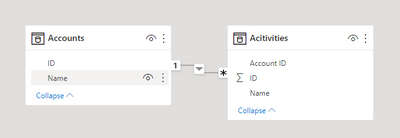
Tables related from Accounts to Activities

Trosa_220568_0-1658927137815.png

Table data:

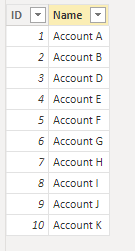
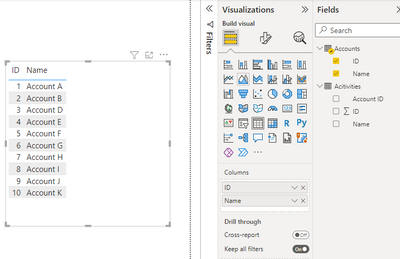
Accounts:

Trosa_220568_3-1658927379119.png

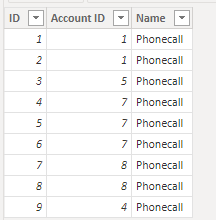
Activities:

Trosa_220568_2-1658927346469.png


Trosa_220568_1-1658927220705.png

I want a count for each account on the left hand side of how many times the Account ID appears in the Activities table. I currently have this measure: 

No. Activities = COUNTX(Acitivities,Acitivities[Account ID])

That filters down the table to only show Accounts with an Activity. I need a measure that will show ALL the Accounts regardless if they have an Activity or not. Show blank if there are no activities.

Trosa_220568_4-1658927535955.png


Does this make more sense?


@Trosa_220568 hey, will be back to desk in few minutes. Do you want to do a quick zoom?

Helpful resources

Announcements
April Power BI Update Carousel

Power BI Monthly Update - April 2026

Check out the April 2026 Power BI update to learn about new features.

New to Fabric survey Carousel

New to Fabric Survey

If you have recently started exploring Fabric, we'd love to hear how it's going. Your feedback can help with product improvements.

Power BI DataViz World Championships carousel

Power BI DataViz World Championships - June 2026

A new Power BI DataViz World Championship is coming this June! Don't miss out on submitting your entry.

FabCon and SQLCon Highlights Carousel

FabCon & SQLCon Highlights

Experience the highlights from FabCon & SQLCon, available live and on-demand starting April 14th.