Don't miss your chance to take the Fabric Data Engineer (DP-600) exam for FREE! Find out how by attending the DP-600 session on April 23rd (pacific time), live or on-demand.
Learn moreNext up in the FabCon + SQLCon recap series: The roadmap for Microsoft SQL and Maximizing Developer experiences in Fabric. All sessions are available on-demand after the live show. Register now
Hello!
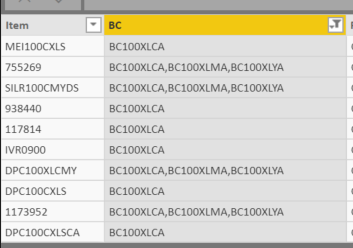
I have a data set and would like to use a simple COUNT function to return me a total of each row in column 2. For example, some of the rows contain more than 1 "BC", so I would like it to return that value to me. When I use the COUNTA functionality, it only returns the number "1" for each output.
Any help would be appreciated, thanks!
Hi @Anonymous,
If I understand you correctly you want to count how many values are on the BC column so in this case on 1, 4, 5 and 6 would be 1 and on row 2 and 3 the result would be 3 and so on.
Using the Power query create the following column:
List.Count(Text.Split([BC],","))
Using Dax you should use the following code:
DAX COUNT = LEN(BCCOUNT[BC])-LEN(SUBSTITUTE(BCCOUNT[BC];",";""))+1
Regards,
MFelix
Regards
Miguel Félix
Proud to be a Super User!
Check out my blog: Power BI em PortuguêsIf you have recently started exploring Fabric, we'd love to hear how it's going. Your feedback can help with product improvements.
A new Power BI DataViz World Championship is coming this June! Don't miss out on submitting your entry.
Experience the highlights from FabCon & SQLCon, available live and on-demand starting April 14th.
| User | Count |
|---|---|
| 48 | |
| 40 | |
| 39 | |
| 20 | |
| 16 |
| User | Count |
|---|---|
| 70 | |
| 67 | |
| 32 | |
| 27 | |
| 25 |