Don't miss your chance to take the Fabric Data Engineer (DP-700) exam on us!
Learn moreWe've captured the moments from FabCon & SQLCon that everyone is talking about, and we are bringing them to the community, live and on-demand. Starts on April 14th. Register now
hi all
i have a report on when developers complete training modules. each developer is assigned 4 modules to complete and an assigned date/time is applied to the relevant dev row
the table looks like the below
the Module columns are date/time
| Developer | Module 1 | Module 2 | Module 3 | Module 4 |
| Dev 1 | 05/08/2019 | |||
| Dev 2 | 12/08/2019 | 05/08/2019 | ||
| Dev 3 | 09/08/2019 |
what i am trying to achieve is a trend chart that shows the accumalated count of developers per module
my problem is i am unable to get the accumulated total over time but rather gives me the total completed on a specific date. also if the date/time stamp happens to be the exactly the same it isnt a distinct count
im not sure what i am doing wrong that is unable to determine the accmulated/trend count
any help would be appreciated
Solved! Go to Solution.
Hello @Anonymous
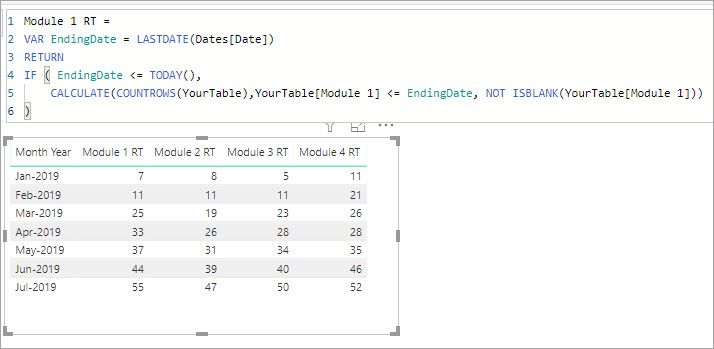
This measure uses a date table and to get the running total target.
Module 1 RT =
VAR EndingDate = LASTDATE(Dates[Date])
RETURN
IF ( EndingDate <= EOMONTH ( TODAY() ),
CALCULATE(COUNTROWS(YourTable),YourTable[Module 1] <= EndingDate, NOT ISBLANK(YourTable[Module 1]))
)There are four of these measures, one for each module. I uploaded my sample file here ModuleRT.pbix
Hello @Anonymous
This measure uses a date table and to get the running total target.
Module 1 RT =
VAR EndingDate = LASTDATE(Dates[Date])
RETURN
IF ( EndingDate <= EOMONTH ( TODAY() ),
CALCULATE(COUNTROWS(YourTable),YourTable[Module 1] <= EndingDate, NOT ISBLANK(YourTable[Module 1]))
)There are four of these measures, one for each module. I uploaded my sample file here ModuleRT.pbix
@jdbuchanan71
thankyou for your effort.....that works great
is there a way to show the current count of this month? as August figures wont appear
Hi @Anonymous
Sorry, I should have done the active month check against the end of the month list this.
Module 1 RT =
VAR EndingDate = LASTDATE(Dates[Date])
RETURN
IF ( EndingDate <= EOMONTH ( TODAY(), 0 ),
CALCULATE(COUNTROWS(YourTable),YourTable[Module 1] <= EndingDate, NOT ISBLANK(YourTable[Module 1]))
)The 4th line changed to go through the end of the current month. You would just change that in each of the measures.
@jdbuchanan71
no apology needed
that is perfect.
thank you for your time. it is very much appreciated
If you have recently started exploring Fabric, we'd love to hear how it's going. Your feedback can help with product improvements.
A new Power BI DataViz World Championship is coming this June! Don't miss out on submitting your entry.
Share feedback directly with Fabric product managers, participate in targeted research studies and influence the Fabric roadmap.
| User | Count |
|---|---|
| 55 | |
| 34 | |
| 31 | |
| 19 | |
| 17 |
| User | Count |
|---|---|
| 74 | |
| 71 | |
| 37 | |
| 35 | |
| 25 |