cancel
Showing results for 
Search instead for 
Did you mean: 

Learn from the best! Meet the four finalists headed to the FINALS of the Power BI Dataviz World Championships! Register now

Reply
jsmooth47
Advocate I
Advocate I

CONSTANT LINE

I want to have a constant line that will be able to change when I sort through staff.  I have a line chart that shows hours worked, and I want a contant line to show where employee is required to be. The hours required changes for each employee, so i would need to change the constant lines number every time.  I have a measure that is "hour worked target".  Since I cant add a measure to the constant line, does anyone have any ideas?

6 REPLIES 6
Eric_Zhang
Microsoft Employee
Microsoft Employee

@jsmooth47


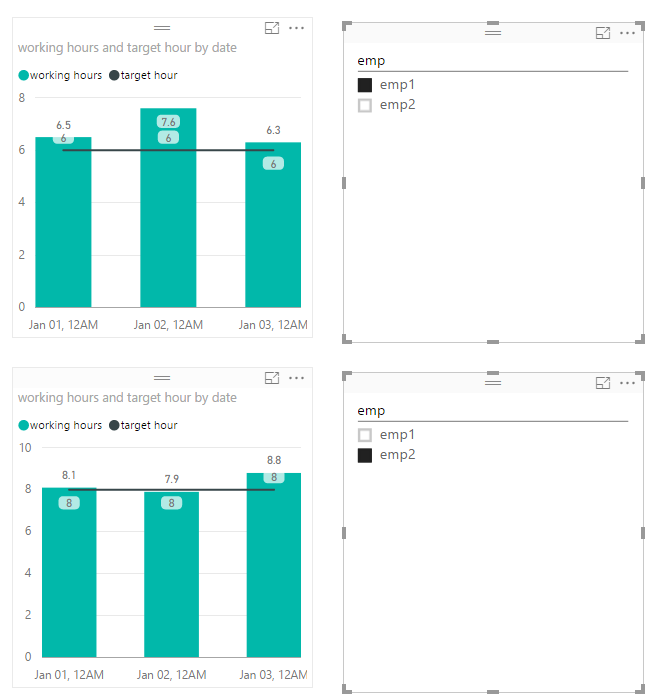
If the new feature Dynamic reference lines in Aug's releast doesn't meet your requirement, you can try a combo chart and create a proper measure as the line value.


Capture.PNG


Super helpful pointer, thanks!

Thanks SOOO much for posting this Eric. I have spent HOURS testing/looking for a way to add a target line to a staff productivity combo chart - finally found your example and it worked perfectly. 🙂

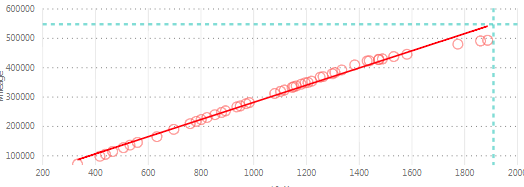
I have similar issue with scatter chart in analytic function.

I can't use measure to define the constant lines and It is impossible to add the value manually since there are hundreds different lines.

Any workaround for this?

screenshot_constantline.PNG

Is there a fix for this?  Power BI should at min offer the same funtionality as excel.  The Analytics attributes should accept measures rather than just fixed values. 

grapefruitmoon
Advocate I
Advocate I

I've got something similar but used a Line And Stacked Column chart, which allows a measure to be used in the line value. Not sure if this would suits your needs however.

Helpful resources

Announcements
Power BI DataViz World Championships carousel

Power BI DataViz World Championships - June 2026

A new Power BI DataViz World Championship is coming this June! Don't miss out on submitting your entry.

Join our Fabric User Panel

Join our Fabric User Panel

Share feedback directly with Fabric product managers, participate in targeted research studies and influence the Fabric roadmap.

March Power BI Update Carousel

Power BI Community Update - March 2026

Check out the March 2026 Power BI update to learn about new features.