cancel
Showing results for 
Search instead for 
Did you mean: 

The Power BI Data Visualization World Championships is back! Get ahead of the game and start preparing now! Learn more

Reply
RanHo
Helper V
Helper V

COMPARING 2 COLUMNS AND FIND A MATCH ON ITS DATA


Good day Guys!

               I just want to ask how I can compare 2 columns to find the matching data  in same table
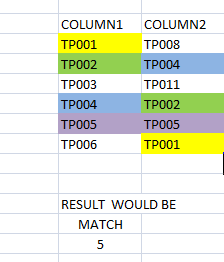
Here's my example: 
As you can see I have 2 columns if the data on COLUMN1 has matched on COLUMN2 then it counts. 

RanHo_0-1662606326901.png
Thanks in advance!

~Ran


1 ACCEPTED SOLUTION
johnt75
Super User
Super User

You can try

Num matches =
COUNTROWS (
    INTERSECT ( VALUES ( 'Table'[Column1] ), VALUES ( 'Table'[Column2] ) )
)

View solution in original post

6 REPLIES 6
Anonymous
Not applicable

Hi @RanHo,

I test with a sample formula that is similar to 'johnt75' provided and it work well, did any whitespace or special character in your fact table records?

Can you please some dummy data that keep the raw data structure and paste it here in table format? It should help us clarify your scenario and test to coding formula.

How to Get Your Question Answered Quickly  

Regards,

Xiaoxin Sheng

@Anonymous  Yes I already accepted it as a solution. My bad self error, but it's solved now thanks.

johnt75
Super User
Super User

You can try

Num matches =
COUNTROWS (
    INTERSECT ( VALUES ( 'Table'[Column1] ), VALUES ( 'Table'[Column2] ) )
)

@johnt75  My bad, I retry your measure and it smoothly worked. Thanks a lot.

@johnt75  I already try it but unfortunately it's not working the output was blank. But thanks for reply.

~Ran

Anonymous
Not applicable

Hi @RanHo ,

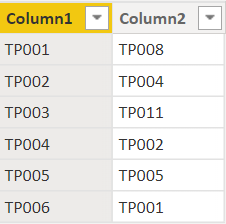
This is not the best solution but should produce the output you are looking for. Assuming you have 1 table below:

Dax_Noob_1-1662972541952.png


Step 1: Create a calculated table using " Column 2"

Table = SUMMARIZE(Sheet1,Sheet1[Column2])


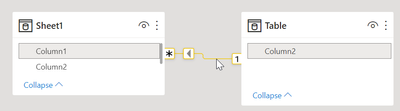
Step 2: Build a relationship between the two tables 

Dax_Noob_2-1662972616367.png


Step 3: Create a new measure

Measure = 

CALCULATE(
    COUNT(Sheet1[Column1]),
    FILTER(Sheet1,Sheet1[Column1] = RELATED('Table'[Column2])
    )
)


Step 4: Visualize

Dax_Noob_3-1662972664823.png


BR

Helpful resources

Announcements
Power BI DataViz World Championships

Power BI Dataviz World Championships

The Power BI Data Visualization World Championships is back! Get ahead of the game and start preparing now!

December 2025 Power BI Update Carousel

Power BI Monthly Update - December 2025

Check out the December 2025 Power BI Holiday Recap!

FabCon Atlanta 2026 carousel

FabCon Atlanta 2026

Join us at FabCon Atlanta, March 16-20, for the ultimate Fabric, Power BI, AI and SQL community-led event. Save $200 with code FABCOMM.