Join us at FabCon Atlanta from March 16 - 20, 2026, for the ultimate Fabric, Power BI, AI and SQL community-led event. Save $200 with code FABCOMM.
Register now!The Power BI Data Visualization World Championships is back! It's time to submit your entry. Live now!
Solved! Go to Solution.
Hi @Anonymous ,
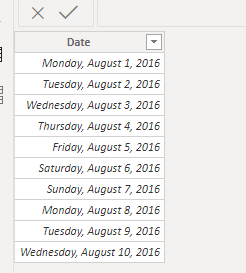
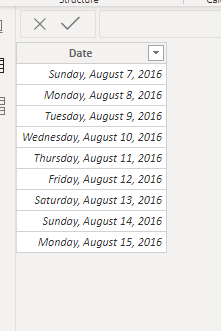
I created 3 date tables as a sample:
Then you need first to create a new table combing all the dates using below dax expression:
Table 2 =
UNION(DISTINCT('Table'[Date]),DISTINCT('Table (2)'[Date]),DISTINCT('Table (3)'[Date]))
Finally create a new table to get a calendar date containing the min date and max date:
Table 3 = CALENDAR(MIN('Table 2'[Date]),MAX('Table 2'[Date]))
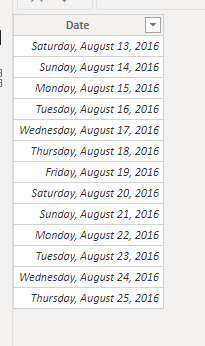
And you will see:
For the related .pbix file,pls click here.
Hi @Anonymous ,
I created 3 date tables as a sample:
Then you need first to create a new table combing all the dates using below dax expression:
Table 2 =
UNION(DISTINCT('Table'[Date]),DISTINCT('Table (2)'[Date]),DISTINCT('Table (3)'[Date]))
Finally create a new table to get a calendar date containing the min date and max date:
Table 3 = CALENDAR(MIN('Table 2'[Date]),MAX('Table 2'[Date]))
And you will see:
For the related .pbix file,pls click here.
I would use CALENDARAUTO.
The Power BI Data Visualization World Championships is back! It's time to submit your entry.
Check out the January 2026 Power BI update to learn about new features.
| User | Count |
|---|---|
| 60 | |
| 49 | |
| 30 | |
| 25 | |
| 23 |
| User | Count |
|---|---|
| 131 | |
| 103 | |
| 58 | |
| 39 | |
| 31 |