This is best Fabric, Power BI, SQL and AI community event. How do we know? The last event sold out! Save €200 with code FABCMTY200.
Register nowA new Data Days event is coming soon! This time we’re going bigger than ever. Fabric, Power BI, SQL, AI and more. Don't miss out.
I am trying to create an interactive visualization. I've read up on buttons and tooltips but I'm not sure that their functionality is exactly what I am looking for. Is it possible for me to create buttons so that when the user clicks on one, certain objects (more specifically: card visuals, shapes [lines], text boxes) come to the forefront of the report page? I've tried Format --> edit interactions, but I am at a loss about what to do from there.
Any help is appreciated.
Solved! Go to Solution.
Hello @Anonymous
You can use bookmarks to achieve what you describe. Here is a link to the video that the Guy in a Cube team did on bookmarks and visuals.
https://www.youtube.com/watch?v=_Afcj8mT5_Q
Take a look at that first then let us know if you have additional questions.
Hi EmilyNomura,
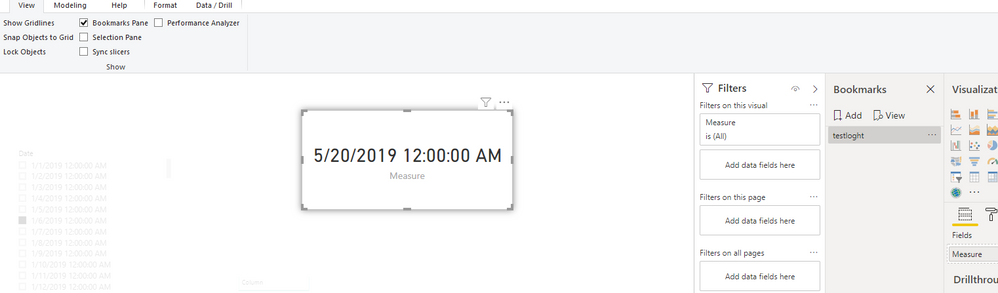
Yes, we could use bookmark and spotlight to achieve. You could click view-Bookmark oane, then enable spotlight for corresponding visuals and create bookmark. Then you will get below result
You also could refer to this video for more details (SpotLight Bookmark and Selection pane power BI) .
Best Regards,
Zoe Zhi
If this post helps, then please consider Accept it as the solution to help the other members find it more quickly.
Hi EmilyNomura,
Yes, we could use bookmark and spotlight to achieve. You could click view-Bookmark oane, then enable spotlight for corresponding visuals and create bookmark. Then you will get below result
You also could refer to this video for more details (SpotLight Bookmark and Selection pane power BI) .
Best Regards,
Zoe Zhi
If this post helps, then please consider Accept it as the solution to help the other members find it more quickly.
Hello @Anonymous
You can use bookmarks to achieve what you describe. Here is a link to the video that the Guy in a Cube team did on bookmarks and visuals.
https://www.youtube.com/watch?v=_Afcj8mT5_Q
Take a look at that first then let us know if you have additional questions.
Check out the May 2026 Power BI update to learn about new features.
Sign up to receive a private message when registration opens and key events begin.
If you have recently started exploring Fabric, we'd love to hear how it's going. Your feedback can help with product improvements.
| User | Count |
|---|---|
| 29 | |
| 27 | |
| 25 | |
| 20 | |
| 14 |
| User | Count |
|---|---|
| 53 | |
| 47 | |
| 22 | |
| 19 | |
| 19 |