cancel
Showing results for 
Search instead for 
Did you mean: 

The Power BI Data Visualization World Championships is back! Get ahead of the game and start preparing now! Learn more

Reply
Gchandrukris
Helper I
Helper I

Button style

Hi Mates,

In my PBIx file I have 50 pages and in each page i have 2 button. My client wanted to change the style of the button. i.e instead of rectangle they want to have oval /  rounded rectangle. Is there any easy way to do this instead of going through all the 50 pages and change it ?


Thanks in advance

1 ACCEPTED SOLUTION
Gordonlilj
Solution Sage
Solution Sage

Hi,


You could speed it up a bit by using the format painter

Format.PNG


Otherwise you could use custom themes to change the format on all buttons. The code below changes the outline edge among other things for example.


"actionButton": {
      "*": {
        "background": [ { "show": false } ],
        "border": [
          {
            "show": false,
            "color": { "solid": { "color": "#000000" } }
          }
        ],
        "outline": [
          {
            "show": true
          },
          {
            "$id": "default",
            "transparency": 20,
            "weight": 4,
            "roundEdge": 25
          },
          {
            "$id": "hover",
            "transparency": 20,
            "weight": 4,
            "roundEdge": 25
          },
          {
            "$id": "selected",
            "transparency": 20,
            "weight": 4,
            "roundEdge": 25
          }
        ]
      }
    },


View solution in original post

4 REPLIES 4
Gordonlilj
Solution Sage
Solution Sage

Hi,


You could speed it up a bit by using the format painter

Format.PNG


Otherwise you could use custom themes to change the format on all buttons. The code below changes the outline edge among other things for example.


"actionButton": {
      "*": {
        "background": [ { "show": false } ],
        "border": [
          {
            "show": false,
            "color": { "solid": { "color": "#000000" } }
          }
        ],
        "outline": [
          {
            "show": true
          },
          {
            "$id": "default",
            "transparency": 20,
            "weight": 4,
            "roundEdge": 25
          },
          {
            "$id": "hover",
            "transparency": 20,
            "weight": 4,
            "roundEdge": 25
          },
          {
            "$id": "selected",
            "transparency": 20,
            "weight": 4,
            "roundEdge": 25
          }
        ]
      }
    },


in above script "action button" is the name of the button or its button property or something ?


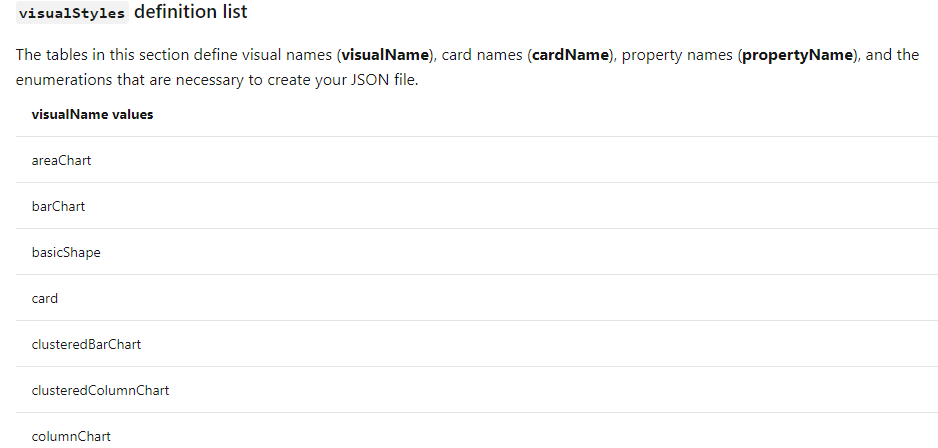
actionButton is the name value for the button visual.

Below are some other examples


Capture.PNG

PaulDBrown
Community Champion
Community Champion

OUCH!!!!


Sorry, that wasn't very helpful...

There isn't a simple way as far as I'm aware...

You might be able to save some time and work by changing the format of each button (in the Button format pane, turn the "Line" off, and add a "Border" with a radius) instead of creating new ones and having to establish the links for each. It's still going to be a real pain having to do that 100 times....


Did I answer your question? Mark my post as a solution!
In doing so, you are also helping me. Thank you!

Proud to be a Super User!
Paul on Linkedin.


Helpful resources

Announcements
Power BI DataViz World Championships

Power BI Dataviz World Championships

The Power BI Data Visualization World Championships is back! Get ahead of the game and start preparing now!

November Power BI Update Carousel

Power BI Monthly Update - November 2025

Check out the November 2025 Power BI update to learn about new features.

FabCon Atlanta 2026 carousel

FabCon Atlanta 2026

Join us at FabCon Atlanta, March 16-20, for the ultimate Fabric, Power BI, AI and SQL community-led event. Save $200 with code FABCOMM.