Don't miss your chance to take the Fabric Data Engineer (DP-700) exam on us!
Learn moreWe've captured the moments from FabCon & SQLCon that everyone is talking about, and we are bringing them to the community, live and on-demand. Starts on April 14th. Register now
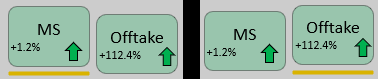
I want to achieve a hover effect something similar to this:
The thing is, this effect is pretty easy to achieve with the text of the button. The issue arises when I try to elevate the shape of the button itself, I can't seem to figure out how to do it since the position of the shape is fixed and there is no option to change what happens "On hover" and "Default State" unlike with the text.
How do I achieve this effect? Any help would be grealy appreciated!
Hi @Iveeerrr ,
Could you tell me if your problem has been solved? If it is, kindly Accept it as the solution. More people will benefit from it. Or you are still confused about it, please provide me with more details about your problem.
Best Regards,
Rico Zhou
Hi @Iveeerrr ,
Currently, Power BI doesn't support us to highlight the button when our mouse is hovering.
Your demand is a good idea, while it is not supported to implement in Power BI currently.
You can submit a new idea to improve the Power BI.
It is a place for customers provide feedback about Microsoft Office products . What’s more, if a feedback is high voted there by other customers, it will be promising that Microsoft Product Team will take it into consideration when designing the next version in the future.
Best Regards,
Rico Zhou
If this post helps, then please consider Accept it as the solution to help the other members find it more quickly.
Hi @Iveeerrr ,
Has you refer you cannot do it on the shape postion, you can try to simulate this using a combination of Outline, Text, and shadow but probably will not give the same but can be a similar effect.
Regards
Miguel Félix
Proud to be a Super User!
Check out my blog: Power BI em PortuguêsIf you have recently started exploring Fabric, we'd love to hear how it's going. Your feedback can help with product improvements.
A new Power BI DataViz World Championship is coming this June! Don't miss out on submitting your entry.
Share feedback directly with Fabric product managers, participate in targeted research studies and influence the Fabric roadmap.
| User | Count |
|---|---|
| 53 | |
| 37 | |
| 34 | |
| 19 | |
| 17 |
| User | Count |
|---|---|
| 72 | |
| 72 | |
| 38 | |
| 35 | |
| 26 |