
Join us at FabCon Atlanta from March 16 - 20, 2026, for the ultimate Fabric, Power BI, AI and SQL community-led event. Save $200 with code FABCOMM.
Register now!The Power BI Data Visualization World Championships is back! Get ahead of the game and start preparing now! Learn more
Hello everyone,
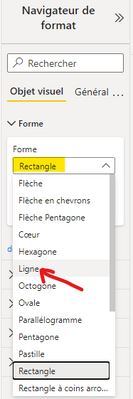
I try to create a line shape button with the new automatic navigation button feature (pages). In the shape properties, when I select "Line", the selection stays as it was previously...
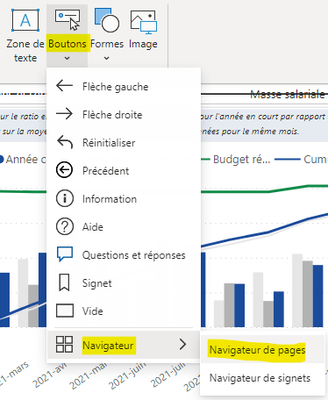
So, in the example below, I insert the navigation buttons.
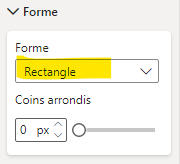
The default value is "Rectangle".
When I click on the dropdown menu, I select "Ligne" ("Line" in French).
The selection then stays to "Rectangle".
Is it a known bug?
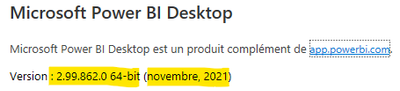
Here is my Power BI Desktop version (in French).
Thanks.
Steve
Solved! Go to Solution.
In my quick test, "Line" is not a valid shape for a button. If you think about how difficult it will be for a User to click a Line vs a valid shape button, this kinda makes sense.
You should be able to choose a rectangle or other valid shape and make it as small as you want by adjusting the width and height using the General Properties.
Hope this helps.
@rsbin
I expected this line shape to be sort of un underlined button. Something like this...
That's what I was already creating "manually" with empty buttons and bookmarks. So that would have same me a lot of time.
I reposted as an Issue.
The Power BI Data Visualization World Championships is back! Get ahead of the game and start preparing now!
| User | Count |
|---|---|
| 59 | |
| 46 | |
| 39 | |
| 38 | |
| 21 |
| User | Count |
|---|---|
| 176 | |
| 131 | |
| 118 | |
| 82 | |
| 54 |